
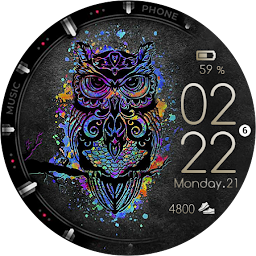


Color Owl Watch Face Wear OS is a Personalization application developed by Turcu Radu, but with the best Android emulator-LDPlayer, you can download and play Color Owl Watch Face Wear OS on your computer.
Running Color Owl Watch Face Wear OS on your computer allows you to browse clearly on a large screen, and controlling the application with a mouse and keyboard is much faster than using touchscreen, all while never having to worry about device battery issues.
With multi-instance and synchronization features, you can even run multiple applications and accounts on your PC.
And file sharing makes sharing images, videos, and files incredibly easy.
Download Color Owl Watch Face Wear OS and run it on your PC. Enjoy the large screen and high-definition quality on your PC!
Watch face installation notes on smart watch:Phone app serves only as a placeholder to make it easier to install & find the watch face on your Wear OS watch.
You have to select your watch device from the install dropdown menu from here.
If you download the helper directly with the phone , you need to open application and touch on the display. -> will start to install on the watch.
A wear os watch need to be connected.
Or you can follow the application hints to download to watch.
Features :
Battery friendly
Simple and cool design
Steps counter
Battery indicator
Date
Big Clock
AoD


