DJ Mixer Studio - DJ Music Mix is a Music&Audio application developed by KUCO Apps, but with the best Android emulator-LDPlayer, you can download and play DJ Mixer Studio - DJ Music Mix on your computer.
Running DJ Mixer Studio - DJ Music Mix on your computer allows you to browse clearly on a large screen, and controlling the application with a mouse and keyboard is much faster than using touchscreen, all while never having to worry about device battery issues.
With multi-instance and synchronization features, you can even run multiple applications and accounts on your PC.
And file sharing makes sharing images, videos, and files incredibly easy.
Download DJ Mixer Studio - DJ Music Mix and run it on your PC. Enjoy the large screen and high-definition quality on your PC!
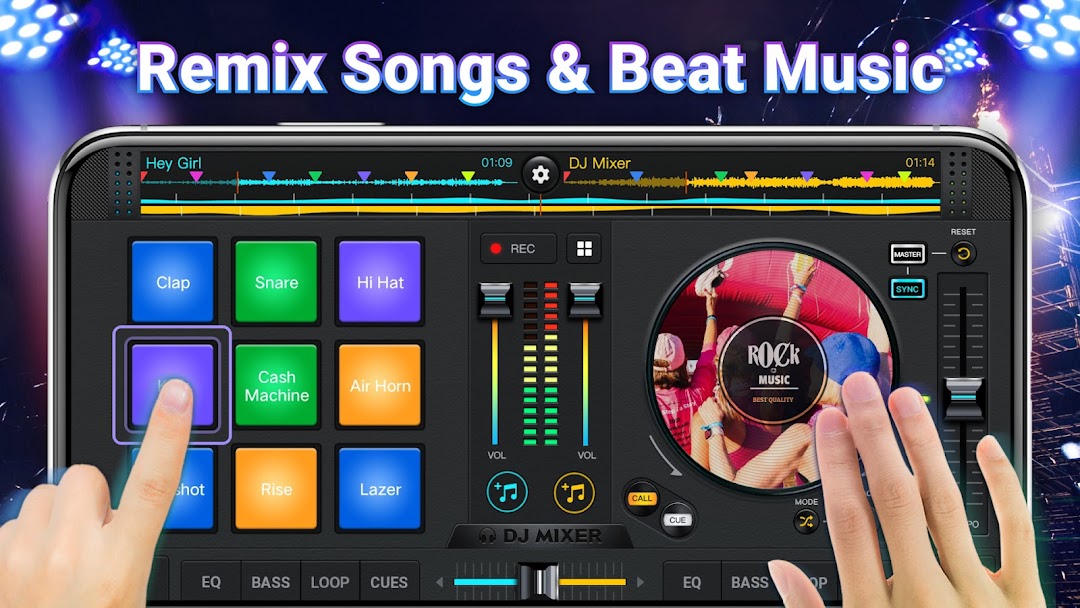
DJ Mixer Studio - DJ Music Mixer is a perfect virtual DJ mixer and music mixer with Equalizer, Bass Booster & Sound Effects to make music beat music remix songs & record mix music. With DJing Mixer - DJ Mixer Studio, effortlessly create and customize your music mixes using a variety of powerful mixing tools, effects, and loops. 🎧🎶DJ Remix - DJ Music Mix is a powerful, intuitive app designed for both professional and beginner DJs to create seamless mixes. Use it as a free DJ music tool to create and remix songs exactly the way you want. 🎺🎸
DJ Music Mixer - DJ Mixer Studio is optimized for the latest mobile devices, offering smooth, seamless mixing on any platform. Effortlessly mix your favorite tracks, add effects, and enjoy a real DJ player with dual crossfaders. Explore a variety of loops and an intuitive sound editor for custom creations. Whether you're a pro or just starting out, our app has everything you need to craft incredible DJ mixes.
Looking for a top-tier virtual DJ and music mixer? Want to create the perfect playlist for your next party? This powerful DJ mixer is designed for creative minds and music lovers like you!💯💯
📀 Powerful DJ Mixer Studio & DJ Music Beat Maker
• Use a professional-grade mixer for flexible, dynamic mixing
• Real crossfader with 2 virtual turntables for seamless transitions
• Set up to 6 Hot Cues per deck, with loops from 1/64 to 128 beats
• Intuitive interface for quick access to all essential features
• Designed by professional DJs for optimal performance
🎛️ DJ Music Mixer & FX Sound Effects
• Built-in sound effects on music remix pads: 28 free sample packs (DJing, Gunshot, Boom, Clap, Boing, Scratch, etc.)
• Five-band Equalizer & Bass Boost for enhanced sound control
• Adjustable mix volume and pitch for precise customization
🎙 High-Quality DJ Music Remix Recorder
• HD recording of your mixes and scratch routines in .mp3 format
• Record your mixes via Microphone or Internal Audio (Android 10+)
• High-quality, uninterrupted DJ song recordings
🥁 Advanced DJ Mixer Studio & DJ Remix Audio Features:
• Full DJ mixer with built-in sound effects and music remix tools
• Access all your device’s music: Tracks, Artists, Albums, Folders
• Effortlessly add music to your playlist library for easy imports
• Instant sound effects at your fingertips with customizable buttons
• Wide audio spectrum for precise beat detection and sync
• Rotate the turntable to remix tracks, play forward or in reverse
• Simple, user-friendly equalizer for controlling sound and effects
• High-quality, professional-level DJ player for seamless mixing
• Automatic beat and tempo detection
DJ Mixer Studio - DJ Music Mix is the ultimate virtual DJ tool for mixing tracks and creating music with ease. Download DJ Music Mixer - DJ Remix and start remixing like a pro! Select your favorite genres and use the pads to craft beats and songs. DJ Maker lets you experiment, mix styles, and create stunning melodies while mastering your beat-making skills step by step. Enhance your music with DJ sound effects, fine-tune with equalizers, and more—bring your live DJ remix to life!❤️❤️