home page
Games
Pre-RegisterRPGStrategyAdventureCasualArcadeRacingActionSimulation
Support
LDPlayer 9 IntroductionEnable VTStartup Stuck at 50%/94%Fix Invalid Virtual DiskUpdate Graphics DriverKeyboard MappingEnable LDMultiplayerFPS Setting
Blogs
Updates
LDGame
Affiliate
LDGame Community
download ldplayer
Download LDPlayer
English
繁體中文한국어Tiếng ViệtภาษาไทยPусскийPortuguêsEspañolFrançaisDeutsch日本語Indonesiaالعربية

LDPlayer Support

EmailFacebookDiscordLDGame Customer Service(For LDPlayer account & recharge problem)

Products

LDCloudOSLinkEasyFunLDShop

About

About UsBusiness InquiryDMCA Takedown

Follow Us

©2025 LDPLAYER.NET , ALL RIGHTS RESERVED.JUST OKAY LIMITED , OFFICE F, 12/F, YHC TOWER , 1 SHEUNG YUET RD, KOWLOON BAY KLN, HONG KONG
Games and applications on this site are collected from the internet. If there is any infringement, please contact the email: support@ldplayer.net
Privacy Policy|GDPR Privacy Notice|Help Translate
English
繁體中文한국어Tiếng ViệtภาษาไทยPусскийPortuguêsEspañolFrançaisDeutsch日本語Indonesiaالعربية

Blogs/

Game Guides/

News and Guides for Zenless Zone Zero

Play Zenless Zone Zero on PC: Ultimate Reroll Guide

2024-07-05

Zenless Zone Zero is HoYoverse's latest 3D action game set in a near-future world plagued by supernatural disasters called Hollows. In this chaotic world, a unique city, New Eridu, rises as the last oasis. As a Proxy, you'll be a key player in this intertwined tale of Hollows and the city. Here is a guide on how to enjoy Zenless Zone Zero on your PC using LDPlayer.


Contents

  • STEP 1: Download LDPlayer
  • STEP 2: Download Zenless Zone Zero
  • STEP 3: Clone the Emulator
  • STEP 4: Sync Operations
  • STEP 5: Enter the Game
  • TIPS: Graphics Settings

STEP 1: Download LDPlayer

Download the latest vulkan version of LDPlayer with Android 9.

Adjust settings for an optimal experience:

1. Device Settings: Select a device model supporting 120 FPS.

2. Game Settings: Enable 120 FPS and high frame rate options.

3. Performance Settings (Optional): Set custom resolution to 2560x1440 and DPI to 480.

Play Zenless Zone Zero on PC: Ultimate Reroll Guide

STEP 2: Download Zenless Zone Zero

Open the LD Store or Google Play and search for Zenless Zone Zero to download the game.

Play Zenless Zone Zero on PC: Ultimate Reroll Guide

STEP 3: Clone the Emulator

Open LDMultiPlayer to clone the first instance.

Play Zenless Zone Zero on PC: Ultimate Reroll Guide

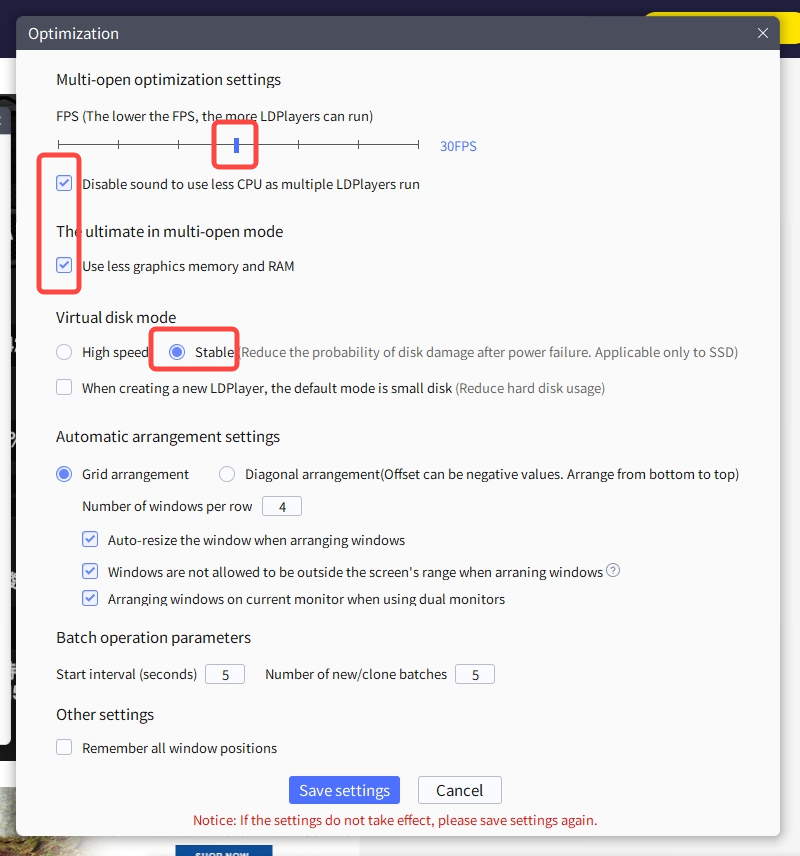
If you experience lag, adjust the settings in LDMultiPlayer as shown in the image below.
Play Zenless Zone Zero on PC: Ultimate Reroll Guide

STEP 4: Sync Operations

Start the cloned emulator, use the "Synchronizer" tool on the right toolbar, select all, and start synchronization. Then, launch the game.

Play Zenless Zone Zero on PC: Ultimate Reroll Guide

STEP 5: Enter the Game

Register with a Google account. For rerolling, you can add a dot in the email address before the "@" symbol (e.g., if your email is abcd@gmail.com, use a.bcd@gmail.com).

Play Zenless Zone Zero on PC: Ultimate Reroll Guide

Finish the beginner tasks and claim the free 20 rolls via your mailbox. For more free resources, don’t forget to use all the active redeem codes.

Play Zenless Zone Zero on PC: Ultimate Reroll Guide

TIPS: Graphics Settings

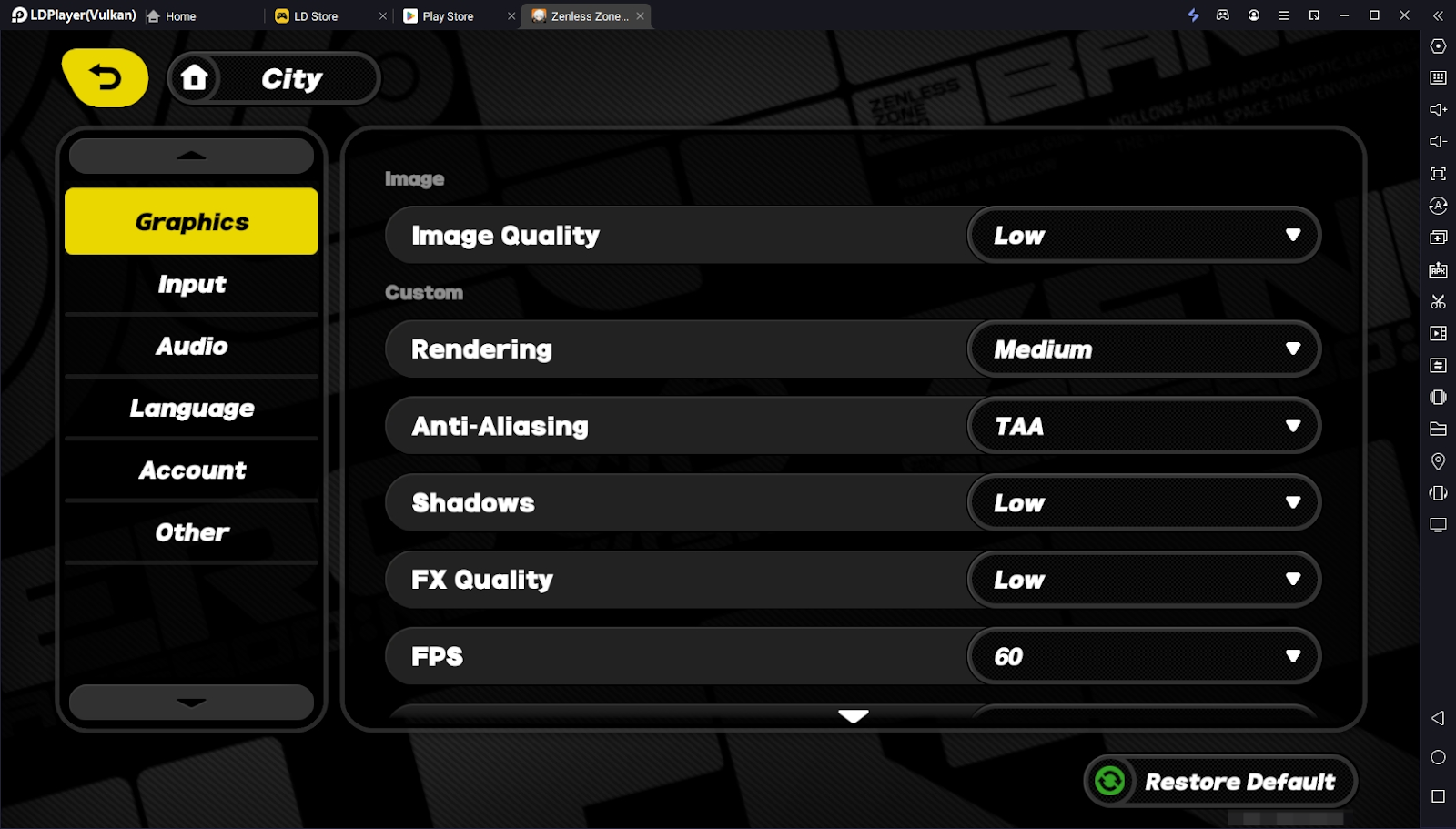
Adjust graphics settings as shown below to achieve high-definition and high-frame-rate gameplay.
Play Zenless Zone Zero on PC: Ultimate Reroll Guide

The Offenders 400 Tips and Tricks for Beginners – Beat the Criminals
|
Sword of Convallaria Tier List and Reroll Guide for Best in March 2025: With LDPlayer

Zenless Zone Zero

You May Also Like
Top Game Guides
Zenless Zone Zero Version 2.1 Banners and New Updates
Zenless Zone Zero Vivian Guide - How To Best Play Vivian
Zenless Zone Zero Version 1.7 Update Patch & Beyond - Everything You Need To Know
Zenless Zone Zero Codes - February 2026 (Latest)
How to Download and Play Zenless Zone Zero on PC - Beginners Guide
Zenless Zone Zero Beginner Guide and Gameplay Walkthrough