Black Beacon Reroll Guide with LDPlayer – Who to Reroll For
2025-04-09
There are different types of gacha and a pity system available in the Black Beacon game. And to make a better impact in the combat, you have to make sure that you are pulling a powerful hero with powerful stats but this has to be done through a Black Beacon reroll process. So, how to do this and how to effectively earn heroes? And who to reroll for? Let’s find out.
Table of Contents
Rerolling Banners and the Pity System
Before you dive into the exact steps of the Black Beacon reroll, it is a must to know how the pity system works in this game and what gacha types with rates are there. Currently, there are two banners for characters as well as for the weapons as follows:
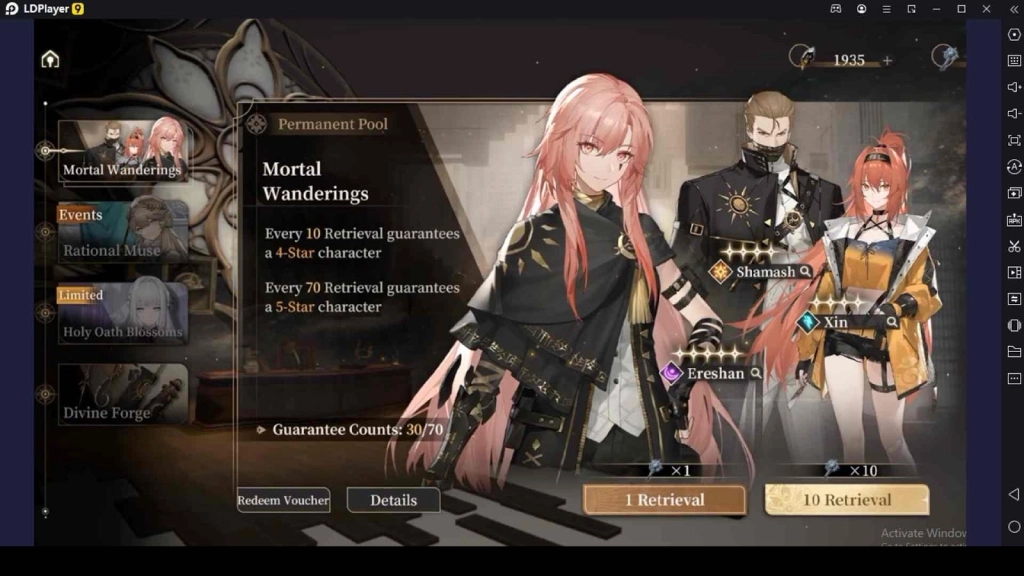
- Standard Banner – this is a banner that you can use to pull out a five-star strongest character in the Black Beacon tier list. It guarantees a 5 star with 70 pulls and the selector pity is here will be 300.
- Weapon Banner – this is for the weapons, and there is a 100% for with a 50 pity.
The rate-ups on banners are:
- For an Event – there is a 100% rate up character with a total of 70 pulls max. Here, the pity will be also 70
- Limited Weapons – a limited weapon can be collected for 100% with a 50-pity, and this rate is going to be increased when you are hitting the 2nd pull.
- Limited Characters – limited characters have a 70/30 rate for 70 pity, and this rate will be increased once you hit the 40th pull
Remember that once you manage to pull a 5-star, the pity is going to reset with whatever banner you are dealing with.
Black Beacon Reroll Steps
So, here is how you can do a Black Beacon reroll step by step.
- Start playing the game with a guest account.
- Progress yourself with the tutorial so you will be able to unlock the summoning system.
- If there are any pre-registration rewards you earned, collect them all now. And make sure to collect all the freebies from the Black Beacon codes as well in his stage so you will have currencies that you need to pull your heroes.
- Now go to the gacha system and pull a hero or a weapon as you need. Make sure to focus on the high-ranked characters here
- If you managed to collect a five-star or a most powerful hero, then continue the game.
- If you didn’t manage to collect a hero as you desired, go with the reroll steps again by resetting the game.
- You can delete the current account you use and restart going through the reroll process again.
When rerolling, just make sure that you are primarily focusing on Florence, who is a five-star powerful hero from the Limited banner. You can also focus on the Event banner to collect any of the 5-star heroes available in the standard pool. Florence, as well as the Qing, comes with a 70/30 rate when you are trying to get a 5-star. With the Logos banner, you will have a 100% chance to collect Logos. But it comes with a 70x limited pull, and once you are done, the banner will end and disappear.
Rerolling with LDPlayer for Efficient Results
A rerolling process will usually take up to 10 or 15 minutes, and this should be done multiple times to earn a top-tier character or a weapon. So the best thing you can follow to efficiently collect a powerful hero is to use LDPlayer, the best Android emulator, and play Black Beacon on PC through it. So, here is how you can do it.
- Install LDPlayer (use only the official website to download the emulator)
- Install the game through LDPlayer.
- Do not open the game instead, go to the menu of the emulator.
- Click LDMultiplayer and create several instances of the same game.
- You can create clones or instances as much as you want. But remember that each clone takes more space, so limiting this to four instances would be much better.
- Go back to the emulator menu and click Synchronizer.
- Sync all the instances you create so every action you perform in your primary emulator will be applied to other clones, too.
- Start playing the Black Beacon game and do your rerolling.
Who to Reroll for in Black Beacon?
And if you need some suggestions over the top tier heroes that you must focus on to reroll for, here are our suggestions.

- Li Chi – Li Chi is highly recommended to pull from the beginner banner as he does well for the complex stages, like the end game.
- Florence – this is undoubtedly the best DPS you can go for because she is rich in defense and has the best damage.
- Azi – Azi is great for those who are looking for the best supporter. And the best thing is she can reduce the resistance and the defense of her enemies.
Conclusion
So, that is how you can do rerolling, and for all the Black Beacon beginners, make sure to pull out the best heroes. And if it takes so much time, LDPlayer is also here to make the process more efficient, so what are you waiting for?