Eve Echoes: Everything to know about ships
2020-10-03
Eve Echoes is one of the few games that got fame before its release. NetEase Games develop Eve Echoes, the developer of games like LifeAfter, Rules of Survival, Tom and Jerry Chase, and more.
The game has over 1 million installs on Google Play Store. Eve Echoes is a mobile version of the famous Eve Online and has all the features of Eve Online.
The overall game is about ships and making your empire in the vast space. Engage in PvP warfare, make history, create your own unique adventure is just the tip of the iceberg in Eve Echoes. In this Eve Echoes ship guide, you will find the best ship guide, which will give you the best start possible in Eve Echoes. So, without further ado, let's get started.
Basics about Ships:
If you are looking to know about all the ships in eve echoes, go to "Ship Tree." Then click on the bottom left icon to access all factions of ships. In the ship tree, you will find four different columns.
The first column (in Ship Tree) on the left side contains tech levels. The tech levels will be according to your current level. For example, if your current level is four, then you can only access tech levels 1-4. If you manage to buy a tech level five, you won't be able to fly it until you reach tech level five.
The ship tree has information about frigates, destroyers, cruisers, battlecruisers, and battleships. The noticeable difference between all these are:
Frigates:
Frigates are small, fast, low damage, and fragile. They usually don't do much individually, but they are fast and hard to hit.
Battleships:
Battleships are the opposite of frigates. Battleships are very big and powerful but very easy to hit because they are so slow-moving.
Cruisers:
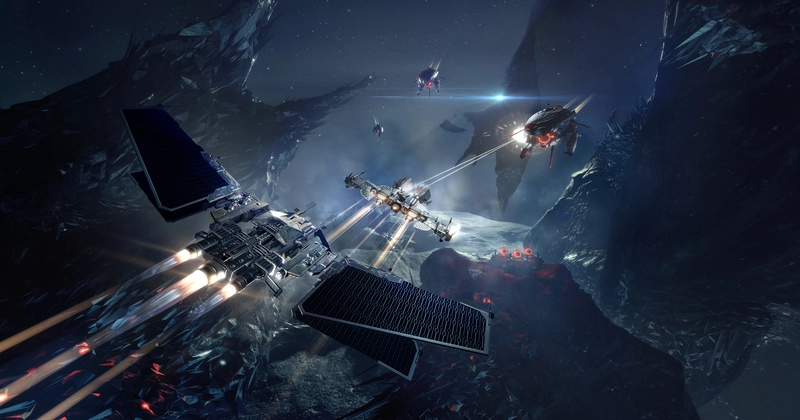
Cruisers operate in a middle ground. They are not faster than frigates but faster than battleships. Bigger than frigates but smaller than battleships and slower than frigates but faster than battleships, making them somewhat harder to hit.
Destroyers:
Destroyers and battle cruisers fall into the same category. They are bigger than cruisers but not bigger than battleships.
It all comes to which ship can beat which one. For example, a battleship can take out a cruiser very easily, a cruiser can easily take out a frigate, and if you look at frigates, it can take out battleship because it's a fast speed frigate and a harder target to hit.
How to select a ship for yourself?
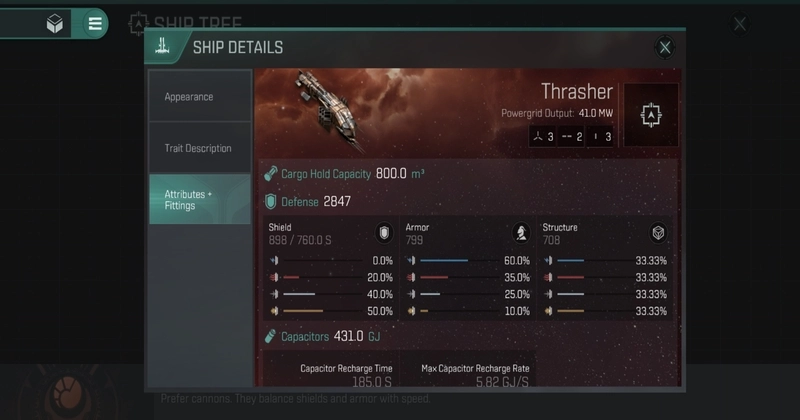
Let's assume you want to buy a ship in Eve Echoes, but you are confused about which one you should buy or what impact it can make on your account. You go to the ship tree and look at the ship. Let's say you want to buy a destroyer ship, "Thrasher." When you click on Thrasher, it will show you a page with all the details about the ship you are about to buy.
The page will contain the Tech level requirement you need to fly that ship. If you see a "ship can be repaired" line on the ship you are about to buy, then you will be able to repair that ship if you lose it during a fight.
Go to the kill mail in the game and repair that ship. The only downfall to repairing a ship is that you will lose all your attachment and gear fittings it had on it, but you will be able to rebuild your ship for a very low cost compared to buying to a new one.
Destroyer Thrasher:
Thrasher has three different fittings. If you look at Thrasher, you will see an icon with three written on it, which means you have three high slots; that's turrets weapon.
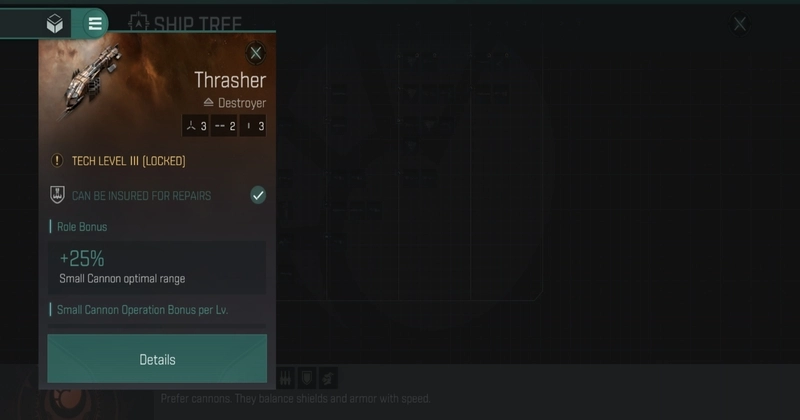
The next icon is "lines" with two written on it, which means you have two mid slots in Thrasher; mid slots are your sub-weapons, neutralizers, modules, war disruptors, and others. The next icon, you see dots with three written next to it. It means three low settings/fittings. Low fittings are things like tracking computers, afterburner, and others.
Role Bonus:
Role Bonus explains everything regarding your weapon selection. For example, the Thrasher has a 25% small cannon optimal range, which means you can put a cannon. The explanation is straightforward; what you will get is the range of the cannon you used and 25% extra range.
That's what Thrasher does; it increases the range of your small cannons and makes them better. Consider using strike cannons for kiting.
Dedicated Skills:
Dedicated skills are the bonuses that ship grants based on skills you have trained. For example, small cannon operation will give you 7.5% damage for each level you have in small cannon operation. If you have two levels in small cannons, it will give you 15% additional damage.
Destroyer Command:
Destroyer command gives you 5% flight velocity for each level you upgrade in destroyer command. The Thrasher comes with 273m/s flight velocity, and the maximum destroyer command level is five. So, you will get an extra 25% flight velocity, which will make your Thrasher go a little bit faster.
Basic Info:
The Thrasher has an overall defense of 2847: the combined total of your shield, armor, and hull. Warp speed is 4.5AU/s, power grid output is 41MW, capacitors at 431GJ, and cargo hold capacity is 800m3 on Thrasher.
Conclusion:
The ships themselves explain all the important stuff you will get after buying that ship. As I have mentioned the Thrasher, it's just an example of what those stats tell you and what it really means. Next time you want to buy a ship, make sure to read it out first and understand what it's offering, and it is what you need right now or not.
A bad investment in the early game can cause you to lose interest in Eve Echoes or spend money. Instead of losing interest or money, it's better to spend a little bit of time exploring ships before buying them. The above-given guide has all the necessary information about the Thrasher ship and what to look for in other ships.