home page
Games
Pre-RegisterRPGStrategyAdventureCasualArcadeRacingActionSimulation
Support
LDPlayer 9 IntroductionEnable VTStartup Stuck at 50%/94%Fix Invalid Virtual DiskUpdate Graphics DriverKeyboard MappingEnable LDMultiplayerFPS Setting
Blogs
Updates
LDGame
Affiliate
LDGame Community
download ldplayer
Download LDPlayer
English
繁體中文한국어Tiếng ViệtภาษาไทยPусскийPortuguêsEspañolFrançaisDeutsch日本語Indonesiaالعربية

LDPlayer Support

EmailFacebookDiscordLDGame Customer Service(For LDPlayer account & recharge problem)

Products

LDCloudOSLinkEasyFunLDShop

About

About UsBusiness InquiryDMCA Takedown

Follow Us

©2025 LDPLAYER.NET , ALL RIGHTS RESERVED.JUST OKAY LIMITED , OFFICE F, 12/F, YHC TOWER , 1 SHEUNG YUET RD, KOWLOON BAY KLN, HONG KONG
Games and applications on this site are collected from the internet. If there is any infringement, please contact the email: support@ldplayer.net
Privacy Policy|GDPR Privacy Notice|Help Translate
English
繁體中文한국어Tiếng ViệtภาษาไทยPусскийPortuguêsEspañolFrançaisDeutsch日本語Indonesiaالعربية

Blogs/

Game Guides/

News and Guides for Magic Chess: Go Go

Magic Chess: Go Go Keymapping Guide

2025-08-25

Playing Magic Chess: Go Go on PC unlocks a smoother and faster experience—especially if you take advantage of your keyboard. Instead of dragging and clicking everything with your mouse, you can use the keymap to sell heroes, reroll shop, buy EXP and so on much faster. This guide will walk you through the essential keymapping hotkeys.

How to Enable Default Keymap for MCGG

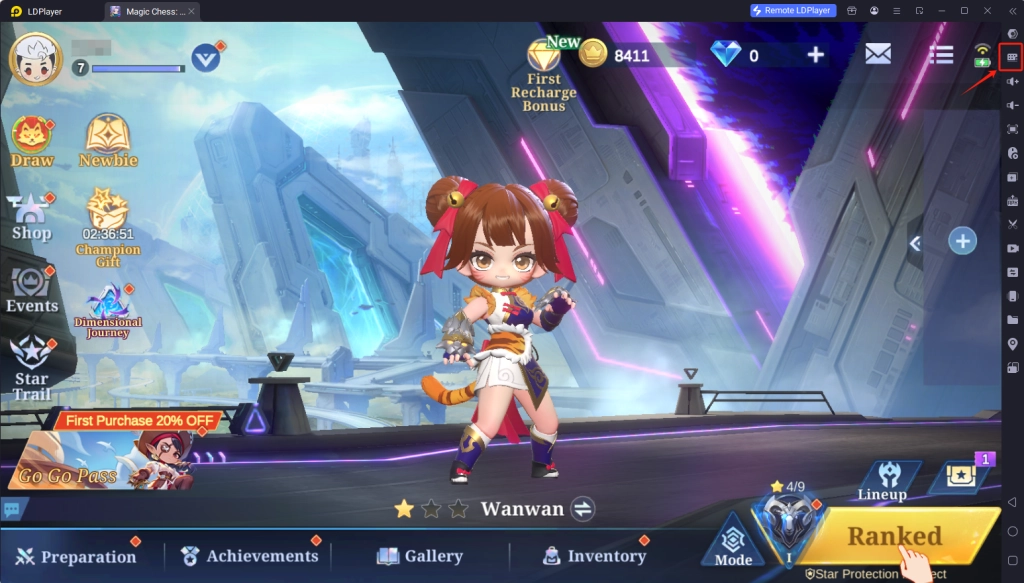
1. Launch LDPlayer and open Magic Chess: Go Go. Open the keymap function in the right side toolbar.
 Magic Chess: Go Go Keymapping Guide

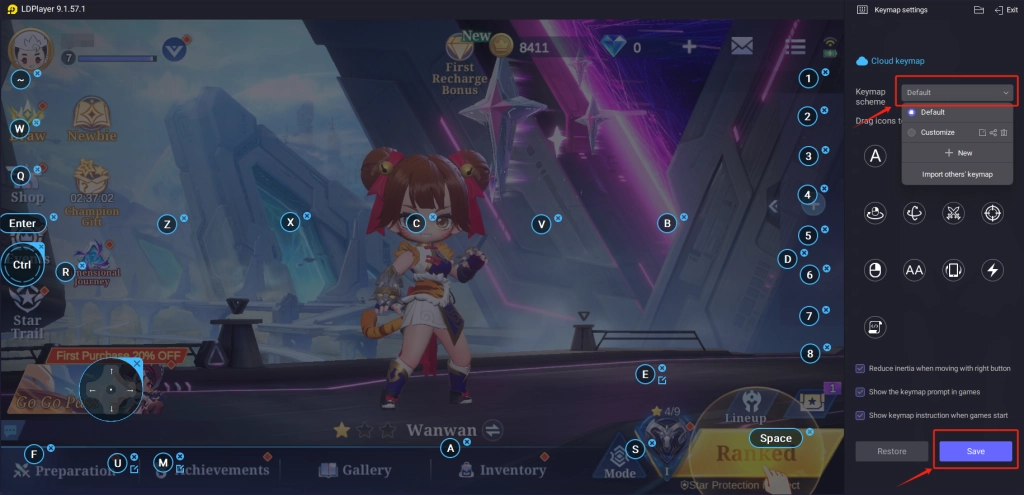
2. Select and enable the keymap scheme named “Default”.
 Magic Chess: Go Go Keymapping Guide

Keymap Hotkeys Guide

Magic Chess: Go Go Keymapping Guide

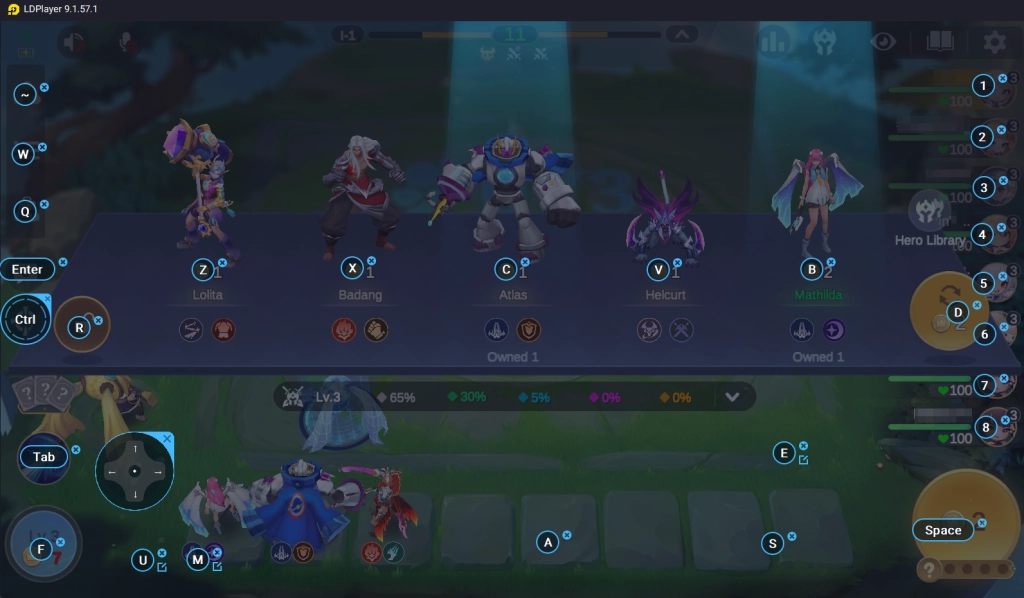
1-8: View other player’s board and lineup.

Space: Open shop

Z,X,C,V,B: Buy hero

D: Reroll/refresh shop

R: Lock/unlock shop

U: One-press to buy all heroes in the shop

E: Quick sell selected hero (Put your cursor on top on the hero you want to sell, and then press E)

F: Buy EXP

WASD: Control Commander movement

Ctrl: Select a target to mark with directional skill control

Enter: Open chat

Q: Open inventory to assign equipment

W: View ally DMG dealt

~: View Synergies

Special for Magic Chess: Go Go Season 3 “Cosmic Traders” Auction Arena:
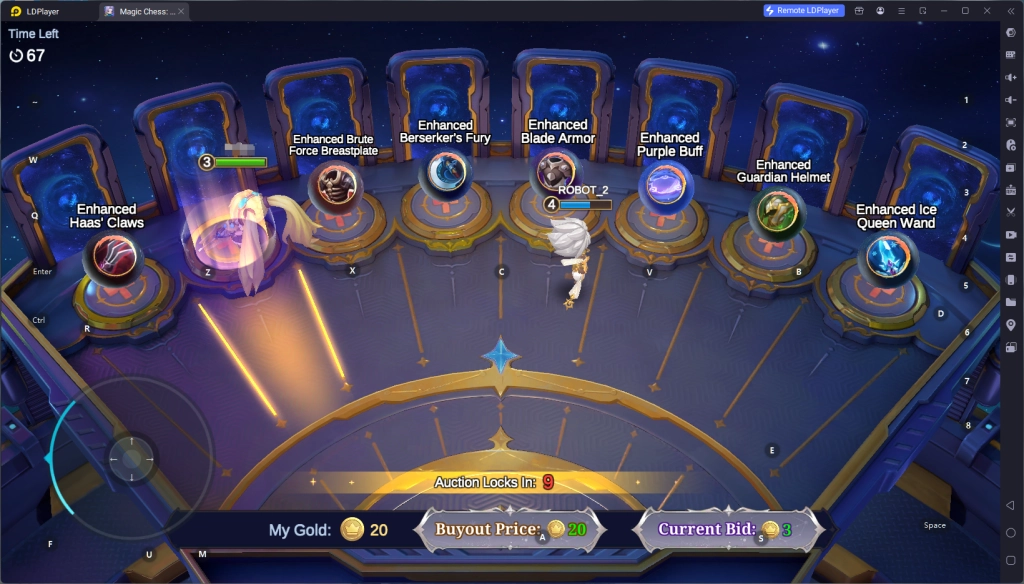
Magic Chess: Go Go Keymapping Guide
WASD: Commander movement. Run fast to select your desired reward!

S: Bid

A: Buy out the reward with 20 Gold

Looking to set up hotkeys that are more exclusive to your creative gameplay? No problem! Follow our keyboard mapping guide and keyboard macro guide to enhance your gameplay. For more useful guides, don't hesitate to check out MCGG Commanders Tier List and MCGG Best Synergies & Team Lineups.

Mecha Break Redeem Codes: September 2025
|
What Does Star Level Do in Clash Royale? A Comprehensive Guide

Magic Chess: Go Go

You May Also Like
Top Game Guides
Best Natalia Build Guide: Magic Chess Go Go
Magic Chess: Go Go Season 3 Update - New Synergies, New Heroes and More
How to Get More Coins and Resources in Magic Chess Go Go – Tips and Tricks
Magic Chess: Go Go Level Up Tips for Beginners – The Best Upgrade Strategies
Magic Chess: Go Go Commanders Guide - Best Commanders Tier List
Magic Chess: Go Go - Best Synergies & Team Lineups For Easy Games