home page
Games
Pre-RegisterRPGStrategyAdventureCasualArcadeRacingActionSimulation
Support
LDPlayer 9 IntroductionEnable VTStartup Stuck at 50%/94%Fix Invalid Virtual DiskUpdate Graphics DriverKeyboard MappingEnable LDMultiplayerFPS Setting
Blogs
Updates
LDGame
Affiliate
LDGame Community
download ldplayer
Download LDPlayer
English
繁體中文한국어Tiếng ViệtภาษาไทยPусскийPortuguêsEspañolFrançaisDeutsch日本語Indonesiaالعربية

LDPlayer Support

EmailFacebookDiscordLDGame Customer Service(For LDPlayer account & recharge problem)

Products

LDCloudOSLinkEasyFunLDShop

About

About UsBusiness InquiryDMCA Takedown

Follow Us

©2025 LDPLAYER.NET , ALL RIGHTS RESERVED.JUST OKAY LIMITED , OFFICE F, 12/F, YHC TOWER , 1 SHEUNG YUET RD, KOWLOON BAY KLN, HONG KONG
Games and applications on this site are collected from the internet. If there is any infringement, please contact the email: support@ldplayer.net
Privacy Policy|GDPR Privacy Notice|Help Translate
English
繁體中文한국어Tiếng ViệtภาษาไทยPусскийPortuguêsEspañolFrançaisDeutsch日本語Indonesiaالعربية

Blogs/

Game Guides/

News and Guides for Free Fire: Lost Treasure

Play Free Fire at High FPS on Android Emulator

2019-08-16

If you want to play Free Fire smoothly on our Android emulator LDPlayer, read the following tips. Here we go.


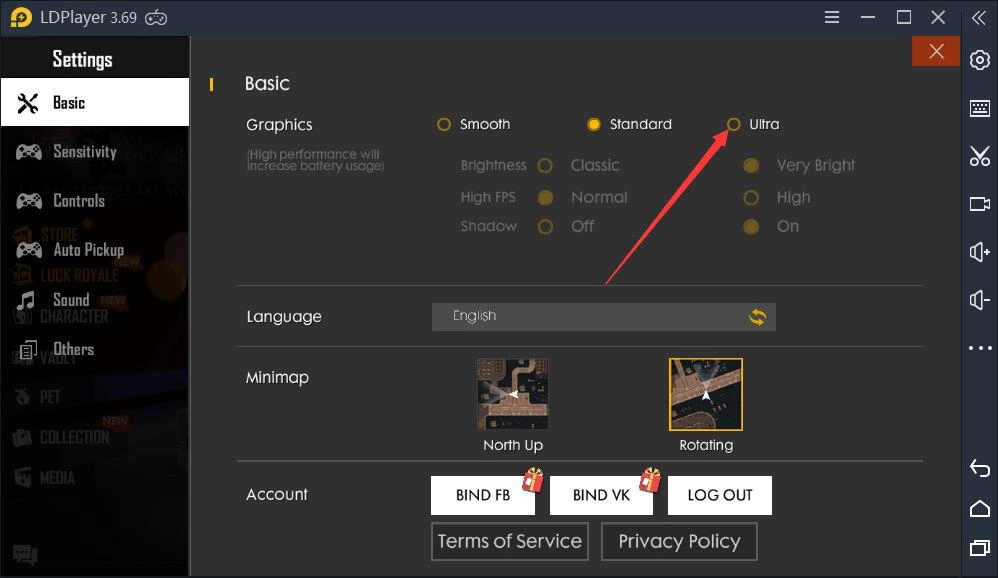
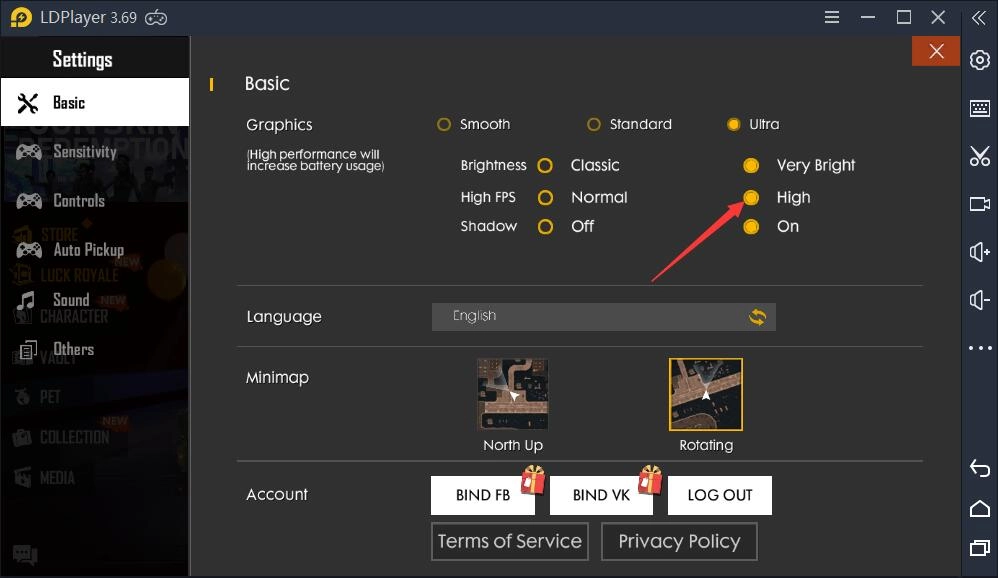
Click settings in game and then select Ultra and then select High from High FPS.
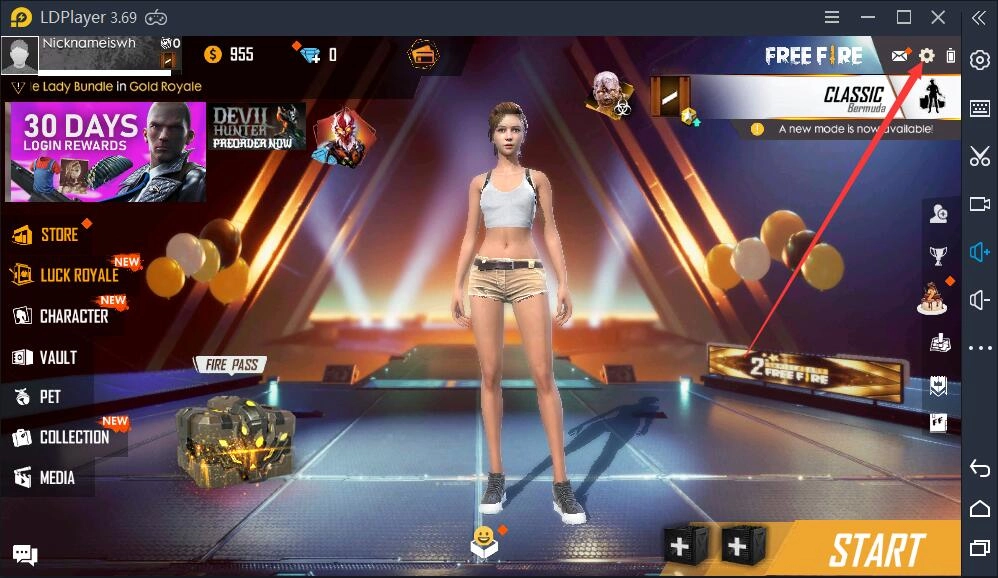
Play Free Fire at High FPS on Android EmulatorPlay Free Fire at High FPS on Android EmulatorPlay Free Fire at High FPS on Android Emulator


Additionally, click Controls, here you need to select Precise on Scope in Aim Precision and select One-handed in Vehicle Controls.
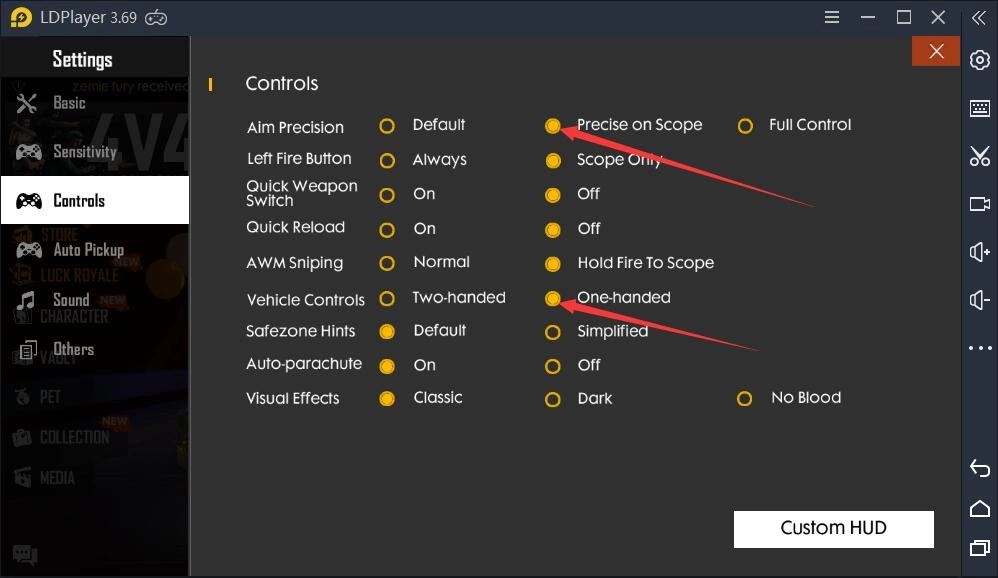
Play Free Fire at High FPS on Android Emulator


Some players playing Free Fire said that they encountered an issue with the keyboard mapping after updating LDPlayer to the latest version 3.55. Actually, it can be completely avoided. Now we tell you why it occurred.
We have changed the location of the crosshair key used to change view. If the location of this key is changed by you, you will find it hard to change your view. So don’t change it at will. Even if you really would like to change it, please don't move it to the left side of your screen. 
In point of fact, it is highly recommended that you use the keyboard mapping which is provided by us.
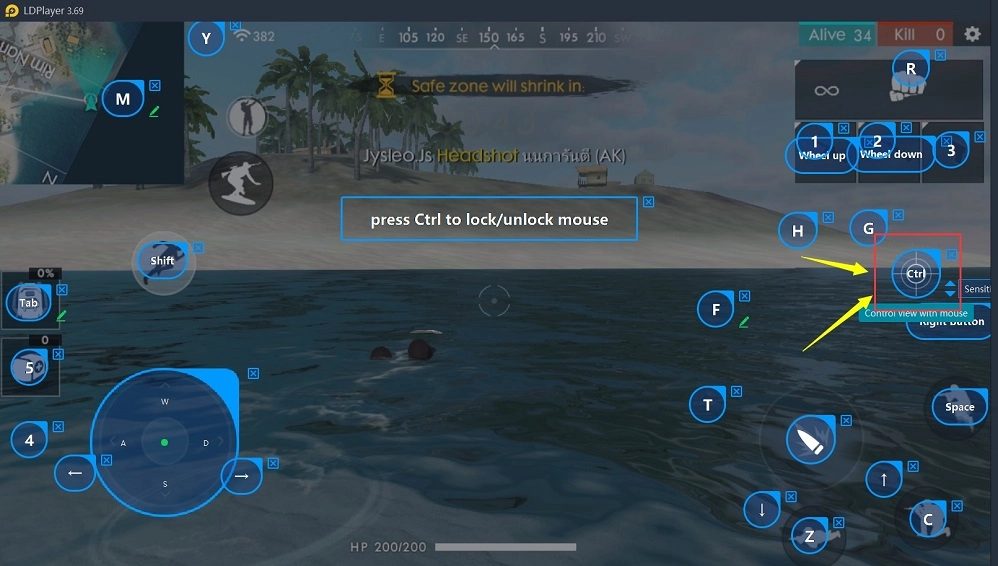
Play Free Fire at High FPS on Android Emulator


Enjoy playing Free Fire!

Best Emulator to Play Free Fire on PC with High Performance

Best Way to Play Elune (Gamevil) on PC Guide
|
King's Raid for PC | Best Way to Run Kings Raid on Desktop

Free Fire: Lost Treasure

You May Also Like
Top Game Guides
How to Fix The Unexpected Crouching And Mouse Stuck Issues in Free Fire
Free Fire Redeem Codes: January 2026, Newest and Working
How to Earn the Coveted V-Badge in Garena Free Fire - 2025
Free Fire Oscar Guide- Everything You Need to Know
Free Fire Kelly Guide For OB49: Abilities, Tips, and Best Strategies for 2025
Best Free Fire Character Combinations 2025