Games
Support
Blogs
Updates
LDGame
Affiliate
LDGame Community

Follow Us

LDPlayer Support

EmailEmailFacebookFacebookDiscordDiscordLDGame Customer ServiceLDGame Customer Service(For LDPlayer account & recharge problem)

Products

LDCloudLDCloudOSLinkOSLinkEasyFunEasyFun

About

About UsAbout UsBusiness InquiryBusiness Inquiry

©2026 LDPLAYER.NET, ALL RIGHTS RESERVED. JUST OKAY LIMITED, OFFICE F, 12/F, YHC TOWER, 1 SHEUNG YUET RD, KOWLOON BAY KLN, HONG KONG

Games and applications on this site are collected from the internet. If there is any infringement, please contact the email: support@ldplayer.net
Software Licensing ProtocolSoftware Licensing ProtocolTerms of UseTerms of UsePrivacy PolicyPrivacy PolicyGDPR Privacy NoticeGDPR Privacy NoticeHelp TranslateHelp Translate

Blogs/

Game Guides/

News and Guides for Snowbreak: Containment Zone

How to Unlock Uncensored Content in Snowbreak: Containment Zone

2025-09-25

Even though the global Android release of Snowbreak: Containment Zone is censored by default, you can easily switch to the uncensored version, which restores the game to how the developers originally intended. The uncensored build showcases the characters in their true, less-restricted outfits, letting you experience their full design without limitations. 

Here’s how you can do it (Android Global version only):

1. Install Snowbreak: Containment Zone in LDPlayer.

2. Launch the game and download the required resource.

3. When the required resource is downloaded, close the game for now, open the "System Apps" folder and open "File Manager".
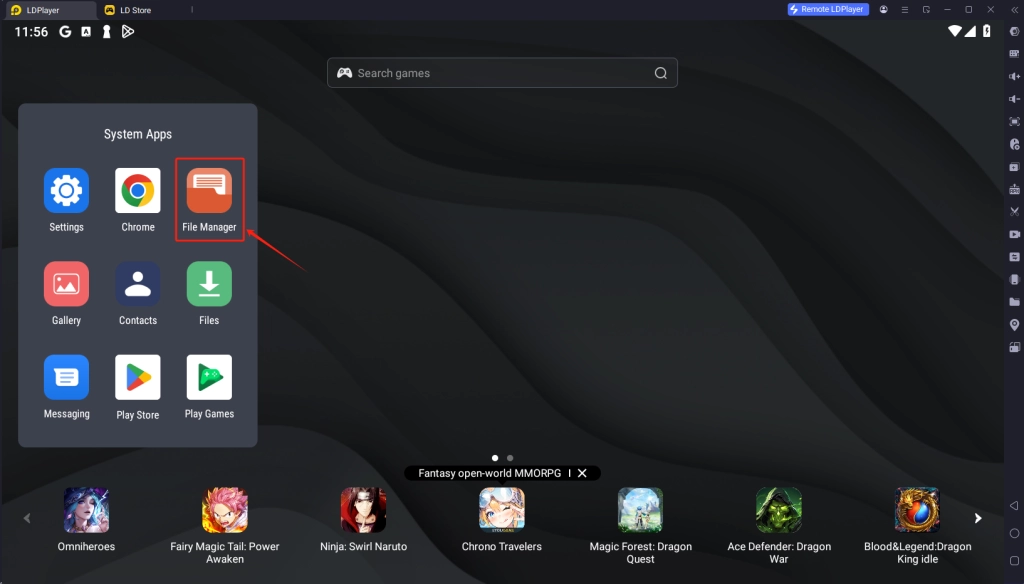
How to Unlock Uncensored Content in Snowbreak: Containment Zone

4. Go to Android > data > com. seasun.snowbreak.google >files and find the file named "localization.txt".
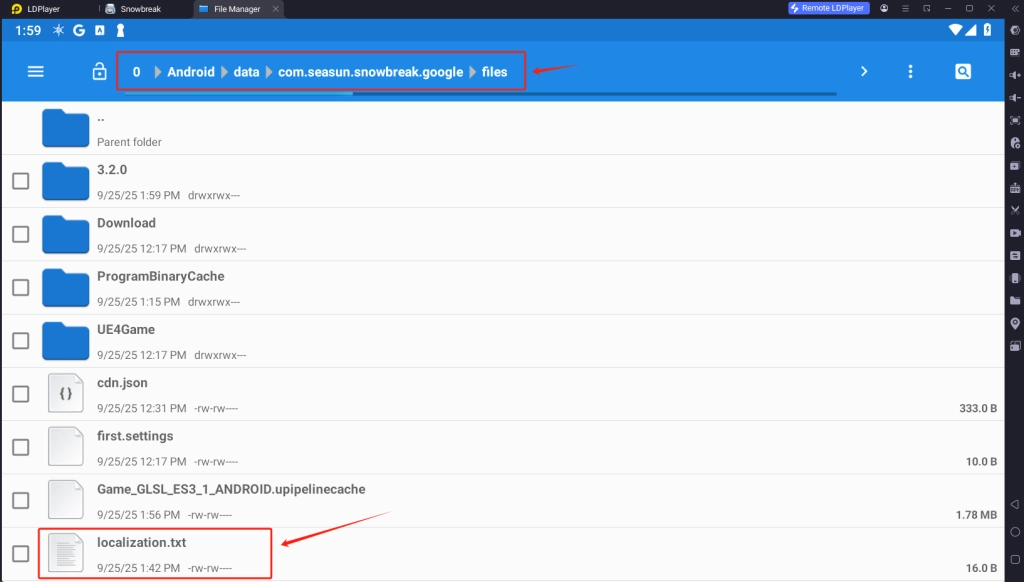
How to Unlock Uncensored Content in Snowbreak: Containment Zone

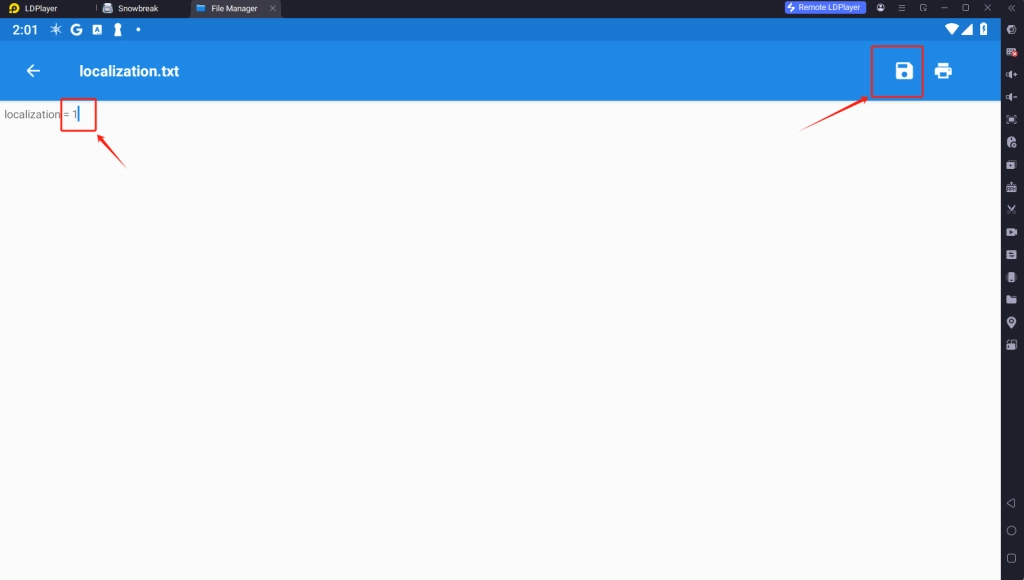
5. Open the file localization.txt with Editor and Change the value from 0 to 1, then save the file.
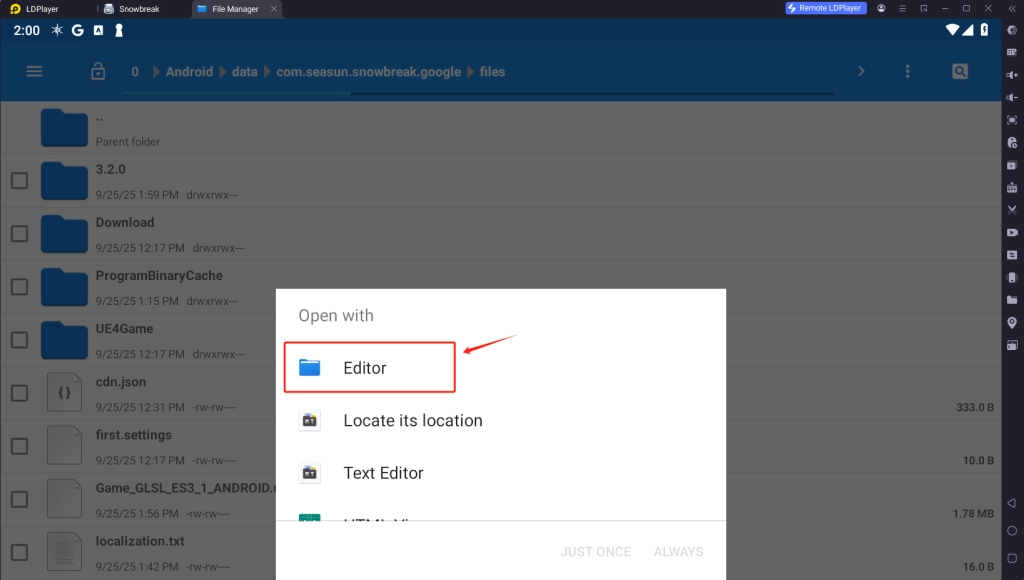
How to Unlock Uncensored Content in Snowbreak: Containment Zone

How to Unlock Uncensored Content in Snowbreak: Containment Zone

That’s it—now you can restart the game and enjoy the uncensored version of Snowbreak: Containment Zone!

LDPlayer - The best android emulator to play Snowbreak: Containment Zone on PC
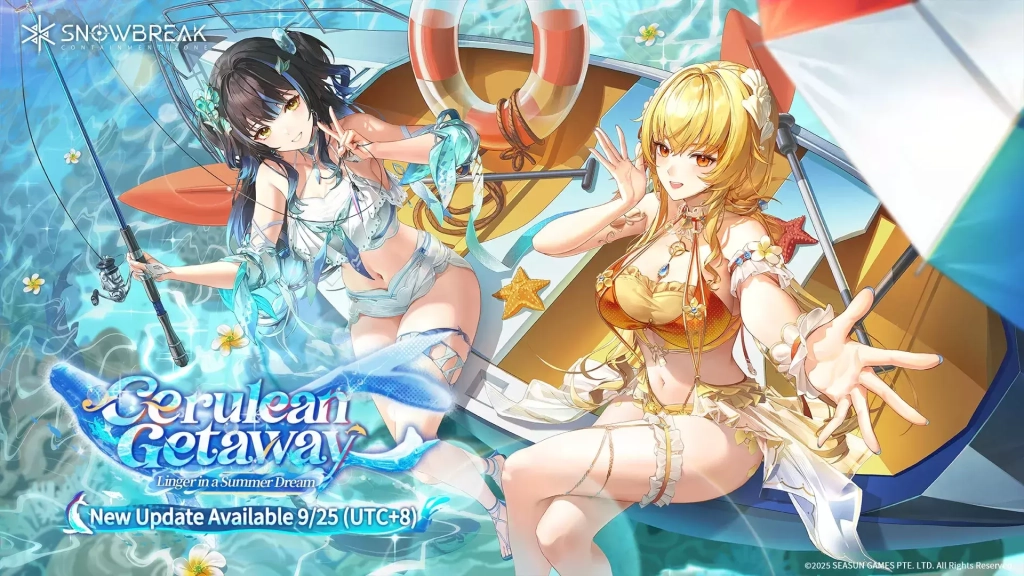
How to Unlock Uncensored Content in Snowbreak: Containment Zone

Multi-instance & Sync: Operate multiple accounts simultaneously to improve rerolling efficiency

One-key Macro:Record and auto-execute your actions, making resource farming and dungeon clearing a breeze

High FPS & Keyboard Mapping:Smoother combat, precise skill activation, and no lag or frame drops

Video Recorder:Record highlights and turn them into shareable videos

Download LDPlayer now and enjoy the epic adventure with your waifus on PC!
Download and Play Snowbreak: Containment Zone on PC
HERO'S LAND Codes for More Freebies (April 2026)
|
'Play Together' Opens Farms! “My Farm” Update Live!

Snowbreak: Containment Zone

You May Also Like
Top Game Guides
Snowbreak: Containment Zone Codes: November 2025
Snowbreak: Containment Zone Guide, Tips and Everything You Need to Know
SnowBreak: Containment Zone - Game review & Gacha Rates
Snowbreak: Containment Zone Tier List & Reroll Guide with LDPlayer 9 – Step by Step Guide to the Best Characters
Snowbreak: Containment Zone What is the Best Class to Choose - The Top S Class Heroes
Roblox Dino Hunters Codes July 2026: All New Working Codes