Whiteout Survival State Transfer Guide: Requirements, Transfer Passes, Power Cap & Tips

Ashi Prasadi
|2026-05-11If you’ve been thinking about leaving your current state in Whiteout Survival but have no idea how the whole transfer system works, don’t worry. You’re not the only one. Between transfer passes, power caps, leading states, special invites and all the confusing rules, the system can feel way more complicated than it should. That’s why this Whiteout Survival transfer guide is here to help you whether you’re a longtime player or a complete Whiteout Survival beginner trying to figure things out for the first time. So before you waste resources, overpay for transfer passes, or move to the wrong state, let’s go through everything you actually need to know.
Contents
- What Is State Transfer in Whiteout Survival?
- How Do You Transfer States in Whiteout Survival?
- How Long Does State Transfer Last?
- Whiteout Survival State Transfer Requirements
- Transfer Passes Explained
- Why Some Players Need More Passes
- What Happens After You Transfer?
- Best State Transfer Tips
- People Also Ask
- Conclusion

Hot Recommend
Download LDPLAYER, play Whiteout Survival on PC, enhance your gaming experience!


What Is State Transfer in Whiteout Survival?
State Transfer in Whiteout Survival is basically a feature that lets you move your account from one state to another.You can do this when your current server becomes inactive, too competitive, too toxic, or when you simply want a better alliance and stronger teammates for events like SVS.

How Do You Transfer States in Whiteout Survival?
Finding the right state can completely change the game. A good active server makes events more fun, helps you grow faster, and gives you better teamwork. But for transferring, there are rules, power caps, transfer passes, and limited slots you need to understand first. Here’s how the whole process works step by step:
How Long Does State Transfer Last?
The State Transfer event in Whiteout Survival usually lasts around 7 days total and is divided into 3 different phases. The first phase is the preparation stage where players check available states, power caps, and transfer requirements. The second phase is the invitation phase where presidents and transfer managers start inviting players into their state. Then comes the final phase, where transfers fully open and players can move freely if they meet the requirements.
- Open the Events Menu
- Tap State Transfer
- Check Available States
- Meet the Requirements
- Use Transfer Passes
- Apply or Receive Approval
- Move to the New State

Whiteout Survival State Transfer Requirements
Before you can transfer states in Whiteout Survival, your account needs to meet a few important requirements. If even one condition is missing, the game will block your transfer. So before you get excited about moving to a new state, make sure you check everything carefully first.
- Reach the maximum Furnace Level 30 required by the target state
- Your account must be old enough for the transfer group
- Leave your current alliance before transferring
- Your city cannot be in combat or active matchmaking
- No troops should remain in the infirmary or enlistment office
- You cannot be the current president, tyrant, or transfer manager
- You must wait the required number of days since your last transfer
- You can only have a limited number of characters in the target state
- Make sure important rewards are claimed from your mail and events
- Extra unprotected resources may be lost after transfer
Transfer Passes Explained
If you want to move servers during the Whiteout Survival State Transfer event, you’ll need something called Transfer Passes. These are special items required to transfer your account to another state. The stronger your account is, the more passes you usually need. Smaller accounts may only need a few passes, while stronger players and whales can need dozens. That’s why many players start saving passes weeks before the Whiteout Survival State Transfer 2026 schedule begins.
You can get Transfer Passes from the alliance shop or by buying transfer packs from the store. A lot of experienced players slowly collect them every week instead of panic buying later when the transfer season suddenly opens. Since transfer costs are based on your overall strength, players often lower their power first to reduce the number of passes needed before moving to a new state.
Why Some Players Need More Passes
A lot of players get shocked during Whiteout Survival State Transfer because their transfer cost is WAY higher than expected. That happens because the game uses Transfer Score. The stronger your account is compared to the destination state, the more Transfer Passes you’ll need. So if you’re a whale with strong heroes, high Furnace Level, powerful pets, and stacked gear, your transfer cost can become extremely expensive.
Here’s what usually affects your transfer pass cost the most:
|
Account Factor |
How It Affects Transfer Cost |
|
Furnace Level |
Higher Furnace Levels increase transfer score |
|
Hero Power |
Strong heroes raise your overall strength |
|
Hero Gear |
Advanced gear increases required passes |
|
Chief Gear & Charms |
Higher upgrades make transfers more expensive |
|
Pet Power |
Powerful pets also count toward transfer score |
|
Troop Power |
Large troop counts can affect transfer limits |
|
Destination State Strength |
Stronger states may require more passes |
|
Overall Battle Strength |
Higher total power = higher transfer cost |
What Happens After You Transfer?
Once you move to a new state in Whiteout Survival, certain progress, rankings, and resources may reset or disappear, so it’s important to prepare your account properly before transfer day.
After You Transfer States:
- Your city teleports randomly into the new state
- You receive a 24-hour shield after arriving
- Arena points reset back to the default amount
- Some event progress may reset
- Group chats from your old state disappear
- Certain ongoing activities get canceled
- Some temporary rankings and leaderboard progress reset
- Extra unprotected resources may be deleted
Best State Transfer Tips
State Transfer in Whiteout Survival can either become the best decision you make in the game. Focus on joining a stronger state, but preparation matters just as much. These simple tips can save you resources, money, and a LOT of regret during transfer season.
1. Buy Transfer Passes Early
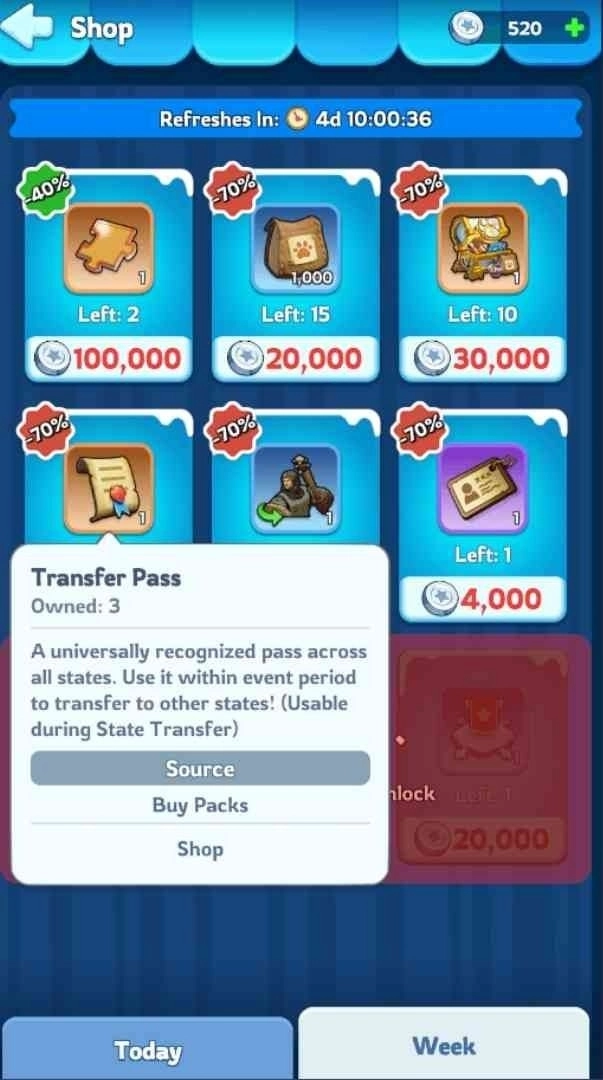
One of the biggest mistakes players make is waiting until the last minute to buy Transfer Passes. During transfer season, many players suddenly realize they need 20, 30, or even 40 passes, and panic-buying gets really expensive. Try to buy Transfer Passes weekly from the alliance shop whenever possible. Even if you’re not planning to move right now, future you will definitely be thankful later
2. Lower Power Carefully
If your power is above the transfer cap, don’t randomly destroy your account trying to lower it. A lot of players remove hero gear, reset heroes, or reduce troops, but you should only lower what you actually need. Losing too much power can hurt your account progress badly, especially if you transfer into a competitive state afterward.
3. Contact the State Before Moving
This is SUPER important, especially if you’re a solo player. Don’t just randomly join a server because it looks strong. Talk to alliance leaders first, check how active the state is, and make sure there’s actually a place for you. Having an alliance ready before you transfer makes the entire move way smoother and helps you settle into the new state much faster.
4. Be Ready When Phase 3 Opens
Popular states can fill up incredibly fast during Phase 3. Sometimes transfer slots disappear within minutes after the phase opens. If you already know where you want to go, stay online and prepare everything early so you can transfer immediately when the phase starts.
5. Protect Your Resources
Before transferring, spend extra resources whenever possible. Only the resources protected by your storehouse are safe, and everything above that limit can disappear after transfer. A lot of players lose huge amounts of iron, coal, and food because they forgot to prepare beforehand. Upgrade buildings, start research, or use resources before transfer day instead of risking a massive loss.
People Also Ask
What Is a Whiteout Survival State Transfer Special Invite and How Does It Work?
A Whiteout Survival State Transfer Special Invite allows players above the state’s power cap to transfer into that state. These invites are limited and are usually reserved for strong players or whales during the transfer event.
What Is the Difference Between Leading States and Ordinary States?
Leading States have fewer transfer slots and stricter transfer rules, while Ordinary States allow more players and can use special invites.
Do you lose your account progress after State Transfer?
No. Your heroes, Furnace Level, gear, pets, and overall account progress stay with your account when moving to a new state.
Conclusion
Understanding the Whiteout Survival state transfer rules can make the entire process way less stressful and help you avoid expensive mistakes. From power caps and Transfer Passes to special invites and resource protection, planning ahead is the key to a smooth transfer. Take your time, talk to the destination state first, and your account properly before the event starts. And while you’re preparing for your next move, don’t forget to check out the latest Whiteout Survival code guide too. Free rewards, gems, speedups, and resources always make rebuilding in a new state much easier
More Guides for Whiteout Survival: