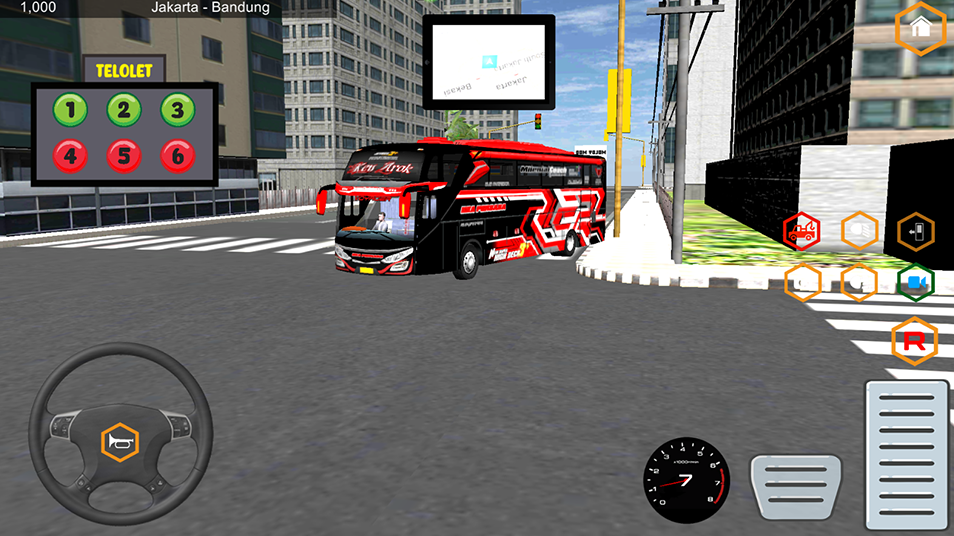
bus ken arok basuri v5 is a Simulation application developed by MOLDY MOD, but with the best Android emulator-LDPlayer, you can download and play bus ken arok basuri v5 on your computer.
Running bus ken arok basuri v5 on your computer allows you to browse clearly on a large screen, and controlling the application with a mouse and keyboard is much faster than using touchscreen, all while never having to worry about device battery issues.
With multi-instance and synchronization features, you can even run multiple applications and accounts on your PC.
And file sharing makes sharing images, videos, and files incredibly easy.
Download bus ken arok basuri v5 and run it on your PC. Enjoy the large screen and high-definition quality on your PC!
Bus Ken Arok Basuri V5 is a bus simulator game that offers a very realistic bus driving experience. In this game, players can experience the sensation of driving a bus with various interesting and exciting features designed to provide an unforgettable gaming experience.Main feature:
1. Realistic Graphics: Enjoy stunning visuals with graphic details that are close to reality.
2. Responsive Vehicle Controls: Feel complete control of your bus with an easy to understand yet challenging control system.
3. Real Routes and Sights: Explore travel routes designed based on real locations with stunning views.
4. Snaking Mode: Try the challenging 'snaking bus' mode where you have to control the bus in narrow and winding road conditions.
5. Air Horn Feature: The bus is equipped with an air horn feature which provides a strong and distinctive horn sound effect.
6. Telolet Viral: Play your bus with the telolet horn sound which is viral and popular among bus simulator fans.
7. Top Funnel Basuri Ken Arok Bus: Drive a Basuri Ken Arok bus with a top funnel feature that adds an authentic feel to your driving experience.
With all these features, Bus Ken Arok Basuri V5 is the main choice for fans of bus simulator games who are looking for an exciting and challenging gaming experience. Download it immediately and feel the sensation of driving a real bus!