Home/

Games/

Adventure/

Co-op horror Mobile game 2025

Co-op horror Mobile game 2025
4.05+

Co-op horror Mobile game 2025

Co-op horror: scavenge relics, dodge terrors in eerie, physics-based junkyards.

Play on PC with LDPlayer
recommend
Faisal Hayat
How to Download&Play Co-op horror Mobile game 2025 on PC?
Last Updated: 2025-05-16
com.fh.repo.mobile.horror.game
Share:
  • Overview

  • FAQ

Use LDPlayer to Play Co-op horror Mobile game 2025 on PC

Co-op horror Mobile game 2025 is a Adventure application developed by Faisal Hayat, but with the best Android emulator-LDPlayer, you can download and play Co-op horror Mobile game 2025 on your computer.

Running Co-op horror Mobile game 2025 on your computer allows you to browse clearly on a large screen, and controlling the application with a mouse and keyboard is much faster than using touchscreen, all while never having to worry about device battery issues.

With multi-instance and synchronization features, you can even run multiple applications and accounts on your PC.

And file sharing makes sharing images, videos, and files incredibly easy.

Download Co-op horror Mobile game 2025 and run it on your PC. Enjoy the large screen and high-definition quality on your PC!

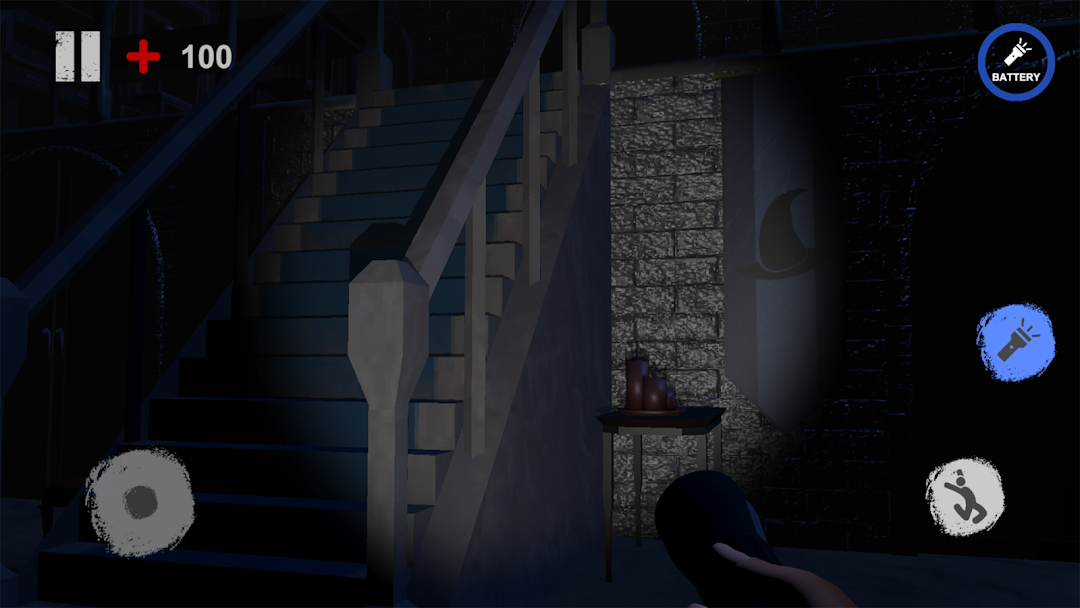
Dive into Scrapyard Shadows, a chilling online co-op horror game for up to four players, where teamwork, cunning, and precision are your only hopes of survival. As elite scavengers hired by a mysterious overseer, your task is to infiltrate desolate, haunted junkyards and retrieve priceless, physics-based relics scattered across perilous landscapes. Handle these objects with care—some are volatile, others are possessed, and a few might fight back.

The shadows are alive, and something malevolent tracks your every step. Each relic you seek is tied to a cryptic purpose, guarded by entities that punish the careless. One wrong move—drop a relic, make too much noise, or disturb the wrong artifact—and you’ll awaken horrors that thrive in the dark.

Key Features:

Physics-Based Chaos: Relics react unpredictably to your actions, making every retrieval a heart-pounding challenge.
Relentless Terrors: Outsmart or evade nightmarish entities using stealth, strategy, and split-second decisions.
Ever-Changing Nightmares: Randomized relic placements and dynamic threats ensure no two runs are the same Repo Mobile Horror Game.
Immersive Dread: Haunting visuals and bone-chilling audio keep you on edge, with every creak and whisper hiding a clue—or a threat.
Team up, manage your scarce resources, and survive the Scrapyard Shadows. Your overseer’s motives are unclear, but one thing is certain: failure means more than losing the mission.
Open up

Screenshots and Videos of Co-op horror Mobile game 2025 PC

Experience a wider field of view, exquisite game graphics, and cooler combat skills and effects by downloading and playing Co-op horror Mobile game 2025 on PC with LDPlayer. Enjoy the ultimate gaming experience with LDPlayer.

Why Play Co-op horror Mobile game 2025 on PC with LDPlayer?

LDPlayer offers unique emulator features including multi-instance support, macros, operation recorder, and other functions not available on mobile devices.

Multi-Instance & Sync

Remote Control

Custom Controls

Multi-Instance & SyncRemote ControlCustom Controls

Effortlessly clone multiple instances and initiate synchronization until you draw the desired hero before binding your account, enhancing efficiency in rerolls in Co-op horror Mobile game 2025.

  • High FPS

    With support for high FPS, Co-op horror Mobile game 2025's game graphics are smoother, and actions are more seamless, enhancing the visual experience and immersion of playing Co-op horror Mobile game 2025.
  • Video Recorder

    Easily capture your performance and gameplay process in Co-op horror Mobile game 2025, aiding in learning and improving driving techniques, or sharing gaming experiences and achievements with other players.

How to Download&Play Co-op horror Mobile game 2025 on PC?

  • 1

    Download and install LDPlayer on your computer

  • 2

    Locate the Play Store in LDPlayer's system apps, launch it, and sign in to your Google account

  • 3

    Enter "Co-op horror Mobile game 2025" into the search bar and search for it

  • 4

    Choose and install Co-op horror Mobile game 2025 from the search results

  • 5

    Once the download and installation are complete, return to the LDPlayer home screen

  • 6

    Click on the game icon on the LDPlayer home screen to start enjoying the exciting game