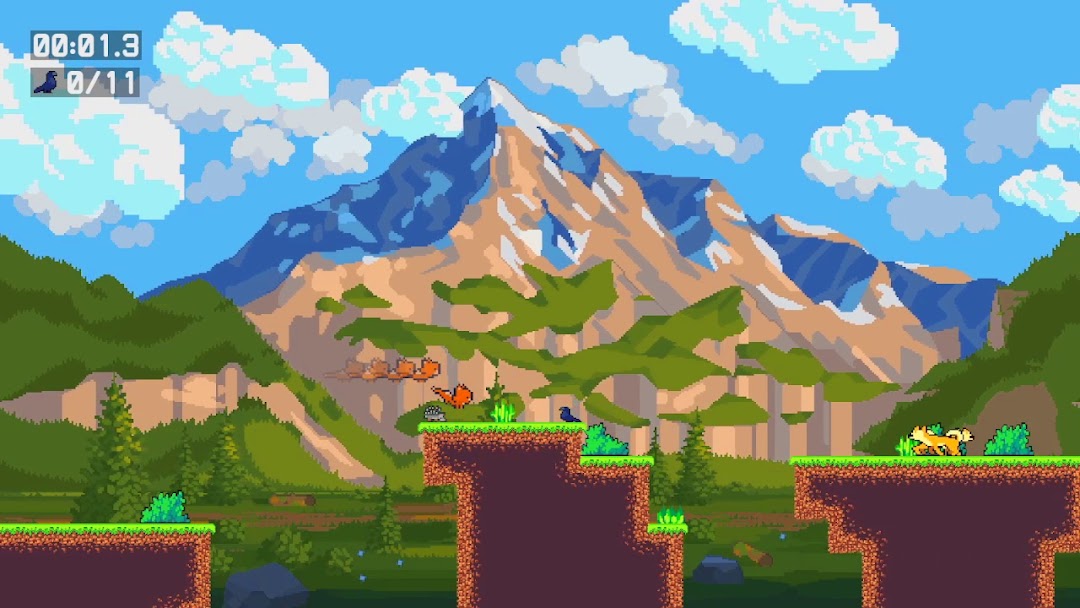
Fast Cato is a Arcade application developed by Super Casual Gamess, but with the best Android emulator-LDPlayer, you can download and play Fast Cato on your computer.
Running Fast Cato on your computer allows you to browse clearly on a large screen, and controlling the application with a mouse and keyboard is much faster than using touchscreen, all while never having to worry about device battery issues.
With multi-instance and synchronization features, you can even run multiple applications and accounts on your PC.
And file sharing makes sharing images, videos, and files incredibly easy.
Download Fast Cato and run it on your PC. Enjoy the large screen and high-definition quality on your PC!
Embark on a thrilling feline adventure in "Fast Cato" the ultimate platform mobile game that puts you in the paws of a mischievous cat with a mission. Dash through vibrant landscapes as you bound and leap, your fur flowing in the wind, in pursuit of an exhilarating goal: to scare away every last bird on the map!With each level more challenging than the last, "Fast Cato" demands your agility and speed. As the nimble cat, you'll need to employ quick reflexes and cunning strategies to startle flocks of colorful birds perched on various obstacles and platforms. The touch-responsive controls make it intuitive to navigate, while the immersive graphics breathe life into the bustling world around you.
Across six meticulously designed levels, you'll traverse diverse environments. Each level presents a unique layout, demanding that you master the art of timing your jumps, dashes, and scares to perfection. And it's not just about speed – precision is key. Only the quickest and smartest cats will earn the coveted title of "Fast Cato".
"Fast Cato" isn't just a game – it's a heart-pounding test of your reflexes and strategic prowess. Whether you're a casual gamer seeking a quick adrenaline rush or a dedicated speedrunner aiming to shatter records, this mobile platformer promises endless hours of entertainment and challenge. So, lace up your virtual whiskers and get ready to sprint, leap, and spook your way to victory in this fast-paced, bird-banishing adventure!