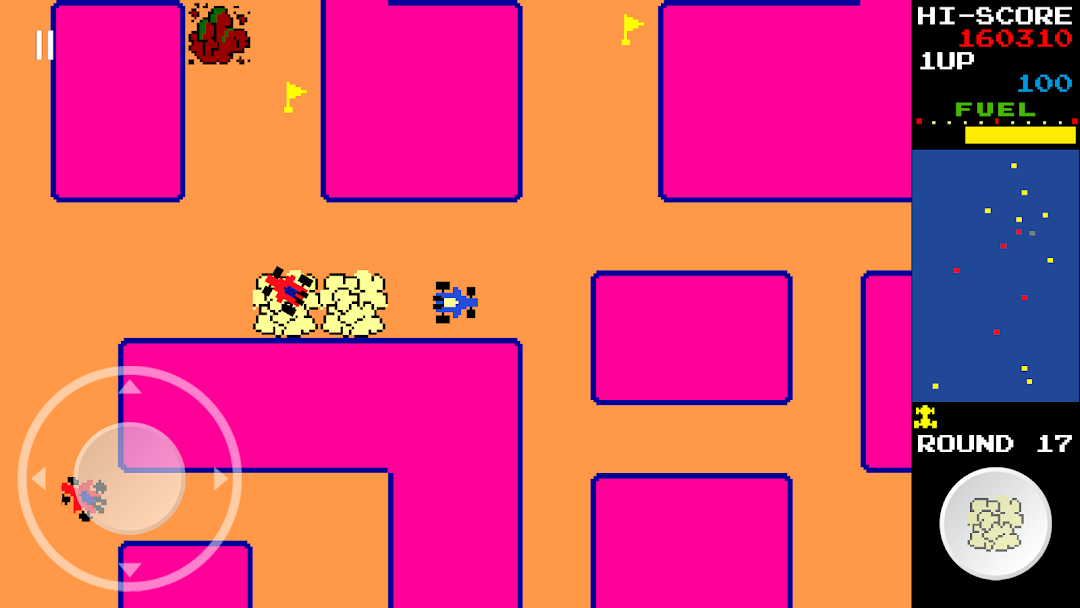
Rally Car X is a Arcade application developed by Hutonsoft Corp., but with the best Android emulator-LDPlayer, you can download and play Rally Car X on your computer.
Running Rally Car X on your computer allows you to browse clearly on a large screen, and controlling the application with a mouse and keyboard is much faster than using touchscreen, all while never having to worry about device battery issues.
With multi-instance and synchronization features, you can even run multiple applications and accounts on your PC.
And file sharing makes sharing images, videos, and files incredibly easy.
Download Rally Car X and run it on your PC. Enjoy the large screen and high-definition quality on your PC!
The player drives a blue car around a multi-directional, scrolling maze. The car automatically moves in whichever direction the joystick/d-pad is pressed, but if it runs into a wall, it will turn and continue. The player must collect all of the flags to clear the round and move on to the next round. The flags increase in value as they are collected: the first is 100 points, the second is 200, the third is 300, and so on. There are also special flags (indicated by red S) — if the player collects it, the value earned from flags doubles for the rest of the round. If the player dies, however, the double bonus is lost. The player will also obtain a fuel bonus after get the lucky flag(indicated by red L) and after the round is complete, and it varies depending on how much fuel is remaining according to the fuel gauge.Several red cars chase the blue one around the maze, and contact with any of them results in losing a life when hit. The number of these cars begins at one and increases in number throughout to five. However, the player has a smokescreen, to use against the red cars. If a red car runs into a cloud of smokescreen, it will be momentarily stunned and won't kill the player on contact. Using the smokescreen uses a small amount of fuel.
The blue car has a limited amount of fuel which is consumed with time, though it is normally sufficient to last until all flags have been collected. When fuel runs out, the smoke screen no longer works, so it very quickly falls victim to the red cars.
There are also stationary rocks that the player must avoid. The rocks are randomly distributed throughout the maze, increasing in number as the game progresses. Unlike the cars and flags, their positions are not shown on the radar, so the player has to be careful for them. The rocks will also kill the player on contact, so the player has to be careful not to get trapped between rocks and the red cars. If this happens there is no escape.
Once the player has run out of lives, the game will be over. The player get one more life every 20000 points.
[Control]
Joystick/D-Pad: Control blue car
Button: Drop a smokescreen
You can switch between Joystick and D-Pad, and also modify the size of controller.
Download now and enjoy !