Home/

Games/

Action/

Rift Rapture

Rift Rapture
4.6100+

Rift Rapture

Intense FPS Survival: Combat hordes, upgrade firepower, and conquer the darkness

Play on PC with LDPlayer
recommend
EmitterCritter Games RS
How to Download&Play Rift Rapture on PC?
Last Updated: 2024-10-23
com.emittercrittergames.riftrapture
Share:
  • Overview

  • FAQ

  • Game Guides

Use LDPlayer to Play Rift Rapture on PC

Play Rift Rapture on PC

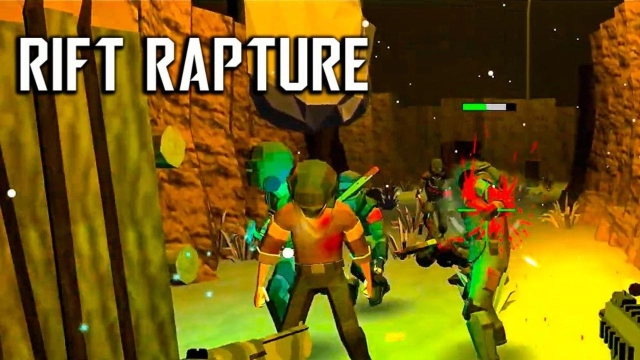
Rift Rapture is a first-person shooter action game by Quiz & Trivia Games by Mno Go Apps, and it gives you roguelike gameplay with the best thrill that keeps you on the edge of an amaze. You have to dive into the darkness, and there are many eerie environments that you must explore. Get ready to face so many monsters as well as zombies, and you need to fight for your life on a night in this world full of thrill. LDPlayer 9 is the best emulator to play Rift Rapture on PC.

Tactical Gameplay to Survive through Many Dangers

Since you have multiple enemies to face in this game, it is a must-to-be tactic for every situation you face, and you can use stealth tactics or your guns to play in every situation. It is a must to buy some best weapons and upgrade them, as it can give you the best skills to battle the horror in this world.

There will be roguelike challenges to get ourselves within, and the gameplay is constantly changing here. And you even can recruit characters to fight against the foes; it is just about surviving through all the odds.

Best Aims for the Targets

If you want to target your enemies smoothly without any hassle, use the Y Sensitivity Adjustments with LDPlayer 9. This can provide you with the smoothest aiming without making any issues, and you can target your enemies with the best timing ever. So your survivability is going to be secured in this game to the best.

Open up

Screenshots and Videos of Rift Rapture PC

Experience a wider field of view, exquisite game graphics, and cooler combat skills and effects by downloading and playing Rift Rapture on PC with LDPlayer. Enjoy the ultimate gaming experience with LDPlayer.

Why Play Rift Rapture on PC with LDPlayer?

LDPlayer offers unique emulator features including multi-instance support, macros, operation recorder, and other functions not available on mobile devices.

Ultra-Wide Screen

Keyboard Mapping

One-Click Macro

Ultra-Wide ScreenKeyboard MappingOne-Click Macro

Utilizing the expansive screen, it offers a panoramic, all-encompassing view of the game in Rift Rapture, leaving no blind spots. Players can observe game details with crystal clarity and react instantaneously.

  • High FPS

    With support for high FPS, Rift Rapture's game graphics are smoother, and actions are more seamless, enhancing the visual experience and immersion of playing Rift Rapture.
  • Extended Battery Life

    When running Rift Rapture on your computer, you need not worry about low battery or device overheating issues. Enjoy playing for as long as you desire.

How to Download&Play Rift Rapture on PC?

  • 1

    Download and install LDPlayer on your computer

  • 2

    Locate the Play Store in LDPlayer's system apps, launch it, and sign in to your Google account

  • 3

    Enter "Rift Rapture" into the search bar and search for it

  • 4

    Choose and install Rift Rapture from the search results

  • 5

    Once the download and installation are complete, return to the LDPlayer home screen

  • 6

    Click on the game icon on the LDPlayer home screen to start enjoying the exciting game

Hot Topics

More From EmitterCritter Games RS