
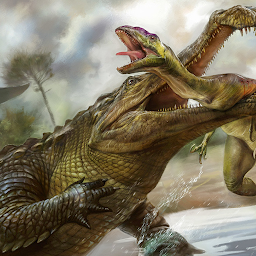


Sarcosuchus Dinosaur Simulator is a Simulation application developed by Jurassic Dinos, but with the best Android emulator-LDPlayer, you can download and play Sarcosuchus Dinosaur Simulator on your computer.
Running Sarcosuchus Dinosaur Simulator on your computer allows you to browse clearly on a large screen, and controlling the application with a mouse and keyboard is much faster than using touchscreen, all while never having to worry about device battery issues.
With multi-instance and synchronization features, you can even run multiple applications and accounts on your PC.
And file sharing makes sharing images, videos, and files incredibly easy.
Download Sarcosuchus Dinosaur Simulator and run it on your PC. Enjoy the large screen and high-definition quality on your PC!
🦖 T-Rex wasn’t the only apex predator millions of years ago—Sarcosuchus ruled too! 🦕Dive into the ultimate Dinosaur Simulator where you play as the ancient Sarcosuchus, a prehistoric beast even deadlier than a T-Rex! Explore a massive open-world Jurassic island, face off against fearsome dino predators, and become the king of the wild.
🔥 KEY FEATURES:
🐊 Realistic Sarcosuchus Simulation
Hunt, eat, drink, and fight to survive in a dangerous prehistoric ecosystem. Battle against legendary dinosaurs like T-Rex, Spinosaurus, Velociraptor, and Triceratops to claim your place at the top of the food chain.
🌧 Dynamic Weather & Day-Night Cycle
Experience immersive weather conditions including clear skies, storms, snow, and fog, along with a realistic day-night cycle and seasonal changes that affect gameplay.
🌍 Massive Open World Exploration
Explore vast jungle environments, hunt across rivers and plains, and uncover hidden areas filled with dangers and rewards. This is not just a Dino Game, it’s a true Prehistoric Survival Adventure!
🎮 RPG-Style Progression
Level up your Sarcosuchus, unlock new abilities and powerful dino skills, and evolve your character for even more thrilling battles.
🦕 Face Off Against Iconic Dinosaurs:
Velociraptor, Spinosaurus, Iguanodon, Triceratops, Stegosaurus, T-Rex, Compsognathus, Dilophosaurus, Pteranodon, Ankylosaurus, Brachiosaurus, and more!
📈 Additional Highlights:
Realistic Dinosaur Sound Effects
Customization Options
Fast-paced, Action-Packed Combat
Quest and Mission System
Beautiful 3D Graphics & Animation
Open World Dino Simulator Experience
Whether you're a fan of T-Rex Games, Dino Hunting Games, or Jurassic Survival Adventures, this is your chance to step into the world of ancient beasts. Download now and unleash the power of the Sarcosuchus!







