
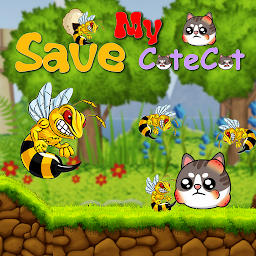


Save My CuteCut : Drawing is a Puzzle application developed by Applicationapp, but with the best Android emulator-LDPlayer, you can download and play Save My CuteCut : Drawing on your computer.
Running Save My CuteCut : Drawing on your computer allows you to browse clearly on a large screen, and controlling the application with a mouse and keyboard is much faster than using touchscreen, all while never having to worry about device battery issues.
With multi-instance and synchronization features, you can even run multiple applications and accounts on your PC.
And file sharing makes sharing images, videos, and files incredibly easy.
Download Save My CuteCut : Drawing and run it on your PC. Enjoy the large screen and high-definition quality on your PC!
Save My CuteCut : Drawing is a captivating game available now on Google Play. The game is centered around protecting an Cute cat from pesky insects by drawing a protective line around it. As you progress through each level, the game becomes more challenging, requiring you to use your problem-solving skills and creativity to come up with the best way to shield the cat from harm. The game's intuitive controls and immersive graphics provide a seamless and engaging experience for players of all ages.One of the best things about Save My CuteCut : Drawing is that it stimulates the mind in a fun and entertaining way. The game requires you to think strategically and creatively, helping to develop critical thinking and problem-solving skills. It is an excellent game for people of all ages who want to sharpen their minds while having fun.
The game's design and layout are visually appealing, with bright colors and cute character designs. The game's sound effects and background music add to the overall experience, making it an immersive and enjoyable game to play. Additionally, the game's difficulty is well-balanced, providing a challenge without being overly frustrating.
In conclusion, "Draw Save My CuteCut : Drawing is a must-have game for anyone looking for an engaging, challenging, and fun experience that will keep them coming back for more. With its visually appealing design, intuitive controls, and challenging gameplay, it is a game that will provide hours of entertainment while stimulating your mind. So, what are you waiting for? Download Save My CuteCut : Drawing , now and see how far you can go in protecting the adorable cat!
* how to play:
- You have to tap the screen once in each stage until the side buttons disappear if you don't need them to be ready to draw.
- Draw a line around the cute cat to protect it from the attacks of the rebel bees,
- Try not to over draw the line around the cute cat in order to get three stars,
When you get three stars, you will earn 100 diamonds.
Two stars = 75 diamonds
Star = 50 diamonds
0 star = 0 sparkler.
*the Game features:
You can disable ads by clicking on a button, when your stock of diamonds reaches 50,000.
After you pass some stages, you will get a free rewards.
You can get diamonds through click on the diamond increase button, and you can also get them through the wheel of fortune that you can get for free as a reward after passing the stages or purchasing them from the in-game store.
*What benefit from diamonds?
buy wallpapers,
buy a wheel of fortune,
buy colored fonts,
Disable ads...







