
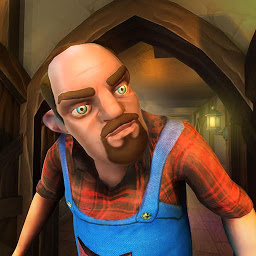


Scary Stranger 3D is a Simulation application developed by Z & K Games, but with the best Android emulator-LDPlayer, you can download and play Scary Stranger 3D on your computer.
Running Scary Stranger 3D on your computer allows you to browse clearly on a large screen, and controlling the application with a mouse and keyboard is much faster than using touchscreen, all while never having to worry about device battery issues.
With multi-instance and synchronization features, you can even run multiple applications and accounts on your PC.
And file sharing makes sharing images, videos, and files incredibly easy.
Download Scary Stranger 3D and run it on your PC. Enjoy the large screen and high-definition quality on your PC!
Unleash the Fun in this Non-Stop Action Adventure Game similar to Scary Teacher 3D!Prepare yourself for prank games with Scary Stranger 3D and Nick & Tani. If you're a fan of Scary Teacher and Scary Neighbor games, get ready to face the ultimate challenge with the Scary neighbor in this hair-raising 3D offline scary game experience. Embark on a thrilling journey through a twisted narrative filled with puzzle, pranks, and dark secrets. Play as Nick & Tani and make sure to stop the plans of your scary neighbor with your prank games.
Meet the Scary neighbor: Get ready to confront your desire for funny games as you encounter the enigmatic and sinister Scary uncle. Will you survive his relentless pursuit with your prank games, or will you become just another victim in his scary game?
Solve Puzzles with Pranks games: Navigate your way through puzzles by finding clues and performing prank games that will keep you on your toes against Scary Uncle. Can you outsmart the Scary neighbor and unveil the truth hidden in this offline games?
Funny and Stylish Gameplay: Scary Stranger 3D isn't just about fear – it's also about funny games! Experience hilarious moments and a unique stylized games art style that adds a twist to the classic scary game genre.
Action-Packed Adventure: Immerse yourself in a thrilling action adventure as you face off against the Scary Stranger. Your strategy will determine your fate against his scary games – will you escape with your prank games, or succumb to the scary neighbor that is Francis or as some call it, Scary Uncle?
Uncover Francis' Secrets: Dive deep into the story and discover the dark secrets of Francis, your mysterious neighbor. What's he hiding, and why is this Scary neighbor involved in this funny games?
Offline Gameplay: Enjoy Scary Stranger 3D even without an internet connection. Play his scary games anytime, anywhere, and dive into the heart-pounding prank games whenever you want.
If you're a fan of prank games, Scary Stranger 3D is the perfect choice for you. With its combination of funny games, thrilling puzzles, chilling mysteries, and heart-pounding action, it offers a complete scary games experience that you won't want to miss. Can you survive the Scary Stranger's reign of terror with his scary games and unlock the secrets within? Download now and brace yourself for the ultimate fun and prank games experience.







