Velvet 89 is a Puzzle application developed by Charles Games, but with the best Android emulator-LDPlayer, you can download and play Velvet 89 on your computer.
Running Velvet 89 on your computer allows you to browse clearly on a large screen, and controlling the application with a mouse and keyboard is much faster than using touchscreen, all while never having to worry about device battery issues.
With multi-instance and synchronization features, you can even run multiple applications and accounts on your PC.
And file sharing makes sharing images, videos, and files incredibly easy.
Download Velvet 89 and run it on your PC. Enjoy the large screen and high-definition quality on your PC!
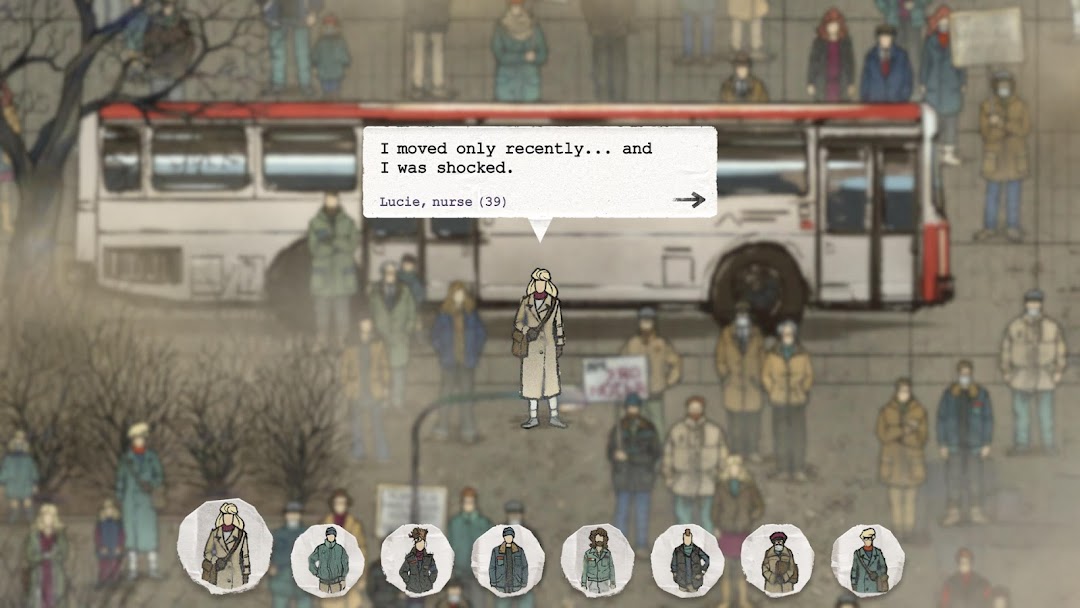
How did the communist regime in Czechoslovakia fall? This hidden-object game tells the story of ordinary people taking part in the peaceful demonstrations that changed the course of history. Big crowds hide those, who want to tell you why they took to the streets.What do people making a stand against the unjust regime dream of? What do they fear?
Hidden-object history in five cities
Velvet 89 takes you on a trip across the revolting country – from cautious ecology-themed protests to huge crowds. Investigate the moments before police brutally attacked a peaceful demonstration and unveil the stories of those who decided to speak up.
Made with real memories
Velvet 89 was developed with experts from the renowned Czech project Stories of Injustice. Every piece of the story in the game is based on actual testimonies. It shows how the revolution gained momentum, from the border regions onto the squares of Prague and further.
Paper meets video
History comes alive in a visual style reminiscent of paper cut-outs, used videotapes or faded photo albums. The game combines handcrafted atmosphere with real historical footage.
Features:
• Five cities, six protests that made the Velvet Revolution happen
• Hidden-object gameplay with more than 40 stories
• Stylized visuals that combine handcrafted graphics and actual historical footage
• Made with experts and based on real testimonies
The game was developed in cooperation with educational programme One World in Schools to commemorate the 35th anniversary of the Velvet Revolution. It was created as a part of the Stories of Injustice project, which aims to introduce our country’s modern history to young people.