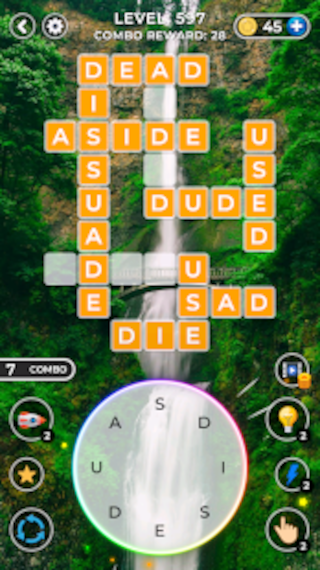
Word Match - Crossword Puzzle is a Word application developed by BuddyBio.com, but with the best Android emulator-LDPlayer, you can download and play Word Match - Crossword Puzzle on your computer.
Running Word Match - Crossword Puzzle on your computer allows you to browse clearly on a large screen, and controlling the application with a mouse and keyboard is much faster than using touchscreen, all while never having to worry about device battery issues.
With multi-instance and synchronization features, you can even run multiple applications and accounts on your PC.
And file sharing makes sharing images, videos, and files incredibly easy.
Download Word Match - Crossword Puzzle and run it on your PC. Enjoy the large screen and high-definition quality on your PC!
Word Match - Crossword Puzzle Game 🎮Our Current Top Country With The Highest Levels Achieved Are:🇨🇦🇺🇸🇬🇧🇹🇷🇷🇺🇮🇳
"Word Connect" Also known as "Crossword" Or "Word Match" letters in levels to find a word, and fill all search words in the crossword board complete the levels. It is easy to get started and becomes more challenging as you play! Features more than 10,000 levels!💭🧠
This is a great game 🎮 for those who want to learn English spelling or improve their English language skills or enjoy playing crosswords, wird connect, word match or word puzzle games 🎮
❓HOW TO PLAY:
- Swipe letters to find the correct word.✔
- Find words in a row to earn coins.✔
- Collect extra words to get bonus coins.✔
- Find all words and fill in the crossword grid.✔
- user can earn word booster by watching video rewards✔
- Challenge yourself to Connect letters and find as many hidden words as you can! ✔
- Unlock stunning landscape backgrounds.✔
😁This crossword game is tremendous brain 🧠challenging fun. Enjoy modern word puzzles with the best of word searching, anagrams, and crosswords! Immerse yourself into the beautiful scenery backgrounds to relax.
You’ll never experience a dull moment after you try this addicting word puzzle game! Play this crossword puzzle once and just you won’t be able to put it down. Enjoy word connect and word find games?
Play this word search and "crossword game" while inspiring your word level.
💭 WHY PLAY CROSSWORD PUZZLES❓
✴ Benefits of crossword puzzles for students ✔
Solving crossword puzzles contributes to your vocabulary enhancement.🧠
Imagine you are solving a crossword puzzle. What do you do? Read the clues and put the words together.🤲
This mental exercise is indirectly enhancing your verbal skills. It certainly would reflect in your communication skills too, right?
Wondering why to expand your knowledge?
Well, there are plenty of reasons. You’ll be able to communicate in a better way. People will understand you more easily. Moreover, learning new words is not a tedious task. It will groom your personality and you will be one step ahead of all.
✴ Crossword Releases Stress✔
There is a lot of perceptions that rich people don’t have stress or people beyond the age group of 60 leads a stress-free time and so on, which is not true.
Each one of us has different lifestyles, different choices, and different demands.
Many of us face financial issues and get stressed. Some might be dealing with medical challenges. Others might have everything but a sense of dissatisfaction which leads to a stressful life.
With everything happening in our surroundings, there is a need to turn off the noise for a bit and relax.
Playing Crossword puzzles is an apt way of doing so. It’s just like you are meditating. You have only one goal – to complete the puzzle!
You avoid the world, quiet the noises, and concentrate to solve the quest.
This ultimately releases your stress. Whatever, you have in your mind is washed away, and once you solve the word search puzzle right that feeling of accomplishment is beyond words.
✴Crosswords Maintain Social Bonds✔
Each one of us plays crosswords when we have nothing to do. In short, it’s the best pass time activity. But have you ever played this game with a bunch of your friends?
Studies have shown that solving crossword puzzles in groups is highly beneficial to your brain functionality.
While you solve a word puzzle in a group, your speed of thinking and talking enhances. This also strengthens the social bonds and manages disputes if any.
We all have heard the famous saying – “Two and two makes four.”
So, next time when you stuck somewhere call a bunch of your favorite ones and start word puzzling.
Word Match - Crossword Puzzle Game
Word Puzzle Game 🎮
Developed by Buddybio.com 🇨🇦😉 ✔