
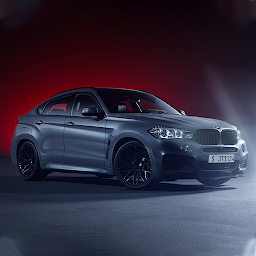


X6 Drift Racing City Simulator is a Simulation application developed by Zaaky Games, but with the best Android emulator-LDPlayer, you can download and play X6 Drift Racing City Simulator on your computer.
Running X6 Drift Racing City Simulator on your computer allows you to browse clearly on a large screen, and controlling the application with a mouse and keyboard is much faster than using touchscreen, all while never having to worry about device battery issues.
With multi-instance and synchronization features, you can even run multiple applications and accounts on your PC.
And file sharing makes sharing images, videos, and files incredibly easy.
Download X6 Drift Racing City Simulator and run it on your PC. Enjoy the large screen and high-definition quality on your PC!
X6 DRİFT RACİNG CİTY SİMULATORWe are here with our brand new city drift simulator game with real physical vehicle features. You can download it for free now!
There are 1 full model cars in the game; x6 . You can paint it the colors you want and customize the vehicle.
You can reach the bumper, horn, stylish and flashy wheels, spoiler, front and rear headlights, vehicle interior design, mirrors, front hood and more.
There are various lighting fixtures and horn systems up to the peaks of the vehicle.
If you are going to talk about playing our game in general;
In our game, you can observe the game environment with 3 different camera modes and directional driving angles. 4 different melodies, musical alarm and remote control, active planning systems.
What's In Our Game?
You can control the character with FPS control. You can drive in any car you want.
All cars have a fuel system. While driving in the city, you should pay attention to the fuel. Before you run out of fuel, you should buy diesel from the closest oil.
-You must use the cars meticulously. When you force it, you can break the engine and stay on the road.
- You can pick up passengers from the stops on the route. You will usually follow a cars to accompany you.
-You can access all controls with interior driving and camera angles.
-To use the 360 degree driving angle, simply touch the middle of your phone and tablet.
Download our minibus game now to start the fun moments with air horns and engine sound effects. We wish you good games.
You will transport passengers in a modern and wide city with excellent quality cars physics, realistic sound effects.
You will safely transport passengers at different points of the city, on stop routes in heavy traffic.
Bus Driving Features :
> Stunning graphics.
> Smooth and realistic bus driving.
> Amazing x6 driving sounds and drift controls.
> Multiple camera angles for cars driving.
> Multiple to control the bus driving like buttons or steering wheel
> Free to download and play X6 Drift Racing City Simulator
X6 Drift Racing in a city bus on highways and uphill roads to the destination. Show your van driving skills on challenging terrains.
X6 Drift Racing City Simulator is for everyone to play and enjoy. Improve your driving skills on highways, city traffic and extraordinarily populated areas. Offroad driving car simulator game drive passengers in vehicles to remote places. Uphill cars driving on various terrains. Improve your driving skills by driving this megabus simulator on city roads and highways.
X6 Drift Racing City Simulator helps you improve your bus driving skills and improve your driving skills. You will encounter extraordinary terrain, uphill, mountain roads while transporting passengers in X6 Drift Racing City Simulator.
Get ready to be a X6 Drift Racing City Simulator driver X6 Drift Racing City Simulator has challenging missions so hone your driving skills to make sure you can drift any time.







