Gps Area Measurement is a Maps&Navigation application developed by Stardevelopers: Android Tool, Translate, Keyboard, but with the best Android emulator-LDPlayer, you can download and play Gps Area Measurement on your computer.
Running Gps Area Measurement on your computer allows you to browse clearly on a large screen, and controlling the application with a mouse and keyboard is much faster than using touchscreen, all while never having to worry about device battery issues.
With multi-instance and synchronization features, you can even run multiple applications and accounts on your PC.
And file sharing makes sharing images, videos, and files incredibly easy.
Download Gps Area Measurement and run it on your PC. Enjoy the large screen and high-definition quality on your PC!
GPS Area Measurement app or GPS land measurement is a smart tool app to calculate the field’s measurements directly from maps. Users have lots of options to calculate in units, feets, meter and miles. GPS Perimeter App is helping thousands of people in terms of measurement of lands & areas. Gps acreage calculator is a free area and land calculator superficial app. Gps Area Calculation app for land calculation directly from a map. Don't waste time & get this user friendly Gps Area Measurement App for Free.Key Features
Area Measurement
Accurately calculate the size of any land or plot with user-friendly area measurement. Perfect for measuring fields, farms, construction sites, or landscaping projects, it provides precise acreage or square footage results for effective planning and management. GPS Land Area Calculator simplifies determining acreage, square footage, or any plot size with accuracy. Perfect for large fields, farms, construction sites, or land development projects, this calculator ensures quick and reliable results.
Acreage Calculator
Easily calculate acreage for large fields, farms, or land development projects and obtain accurate results for any plot of land.
Converter
Easily convert between different units of land areas, distance, weight, volume, energy, temperature, velocity and power, such as acres, square feet, square meters, hectares, and more. Converter simplifies land measurements by allowing you to switch seamlessly between units based on your project needs.
Distance Calculator
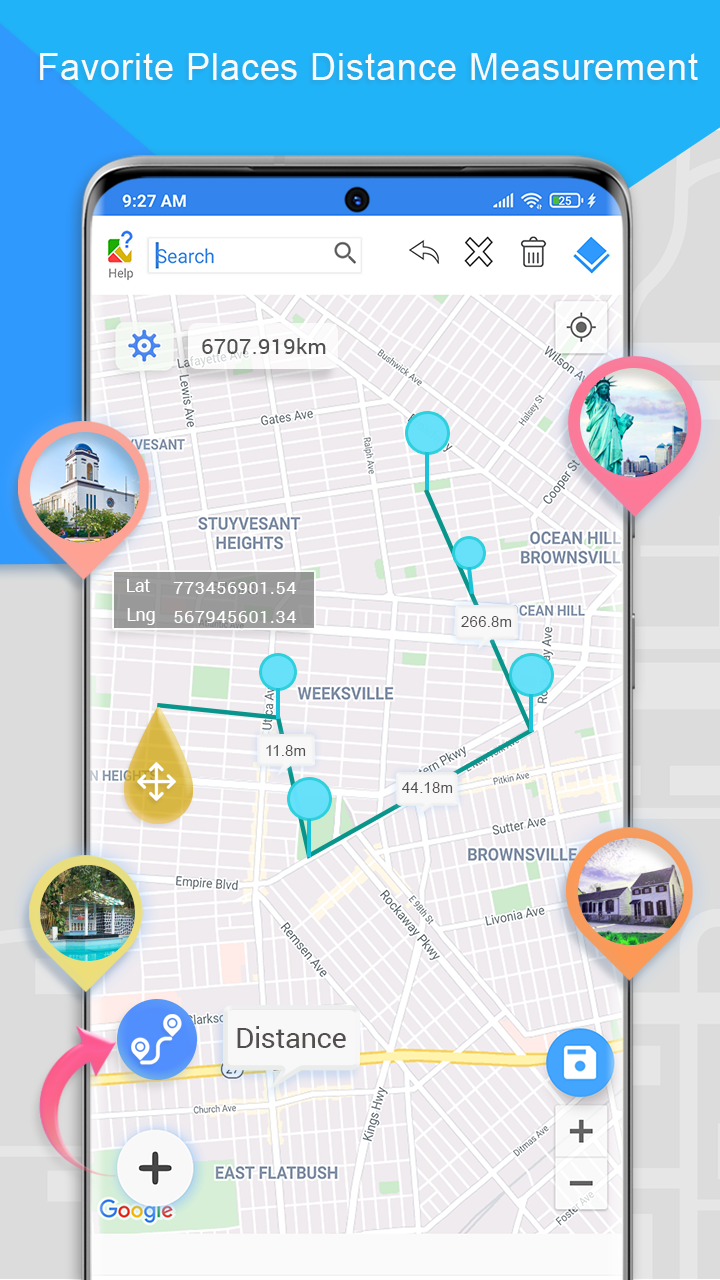
Easily measure the distance between two points on the map using the distance measure feature. Ideal for measuring fencing, roads, or pathways across your land.
Location
Location uses latitude and longitude to pinpoint exact locations on the Earth's surface. Latitude lines run horizontally and measure the distance north or south of the equator, while longitude lines run vertically and measure the distance east or west of the Prime Meridian. In GPS Area Measurement, these coordinates help accurately define and measure the boundaries of land or plots.
Compass
The compass feature helps you navigate and orient yourself accurately while measuring land areas. Using real-time GPS data, the compass detects your direction (North, South, East, or West) and guides you to mark points or boundaries with precision.
Bubble Level
The bubble level detects your level from the surface and ensures accurate, level measurements by indicating when your device is perfectly horizontal. Bubble level is essential for marking precise boundaries, plotting points, or measuring land areas without any tilt.
Saved Measurements
The saved measurements allow you to store and access previously measured land areas or boundaries. Saved Measurements enables you to revisit, compare, or share your measurements with ease, making it perfect for ongoing projects or long-term land management. Whether you're working on multiple plots, tracking progress, or revising calculations, saved measurements help keep all your data organized and readily available for future reference.
Features of GPS Area Measurement-Acreage Calculator
Fast area/distance Mapping.
Accurate area calculation
Calculate acreage by perimeter
Calculate areas of irregular lots using triangle method
latitude/ longitude data for bigger areas
Smart marker Mode for super accurate pin placement.
Measurement unit changing facility.
Map, Satellite, Terrain and Hybrid modes
Any feedback and suggestions are highly appreciated, feel free to contact us on Developers contact. Our team will coordinate with you in the best possible solution.