TMK Keyboard (ထုင့်မၢဝ်းၶမ်း) is a Productivity application developed by TMK Group, but with the best Android emulator-LDPlayer, you can download and play TMK Keyboard (ထုင့်မၢဝ်းၶမ်း) on your computer.
Running TMK Keyboard (ထုင့်မၢဝ်းၶမ်း) on your computer allows you to browse clearly on a large screen, and controlling the application with a mouse and keyboard is much faster than using touchscreen, all while never having to worry about device battery issues.
With multi-instance and synchronization features, you can even run multiple applications and accounts on your PC.
And file sharing makes sharing images, videos, and files incredibly easy.
Download TMK Keyboard (ထုင့်မၢဝ်းၶမ်း) and run it on your PC. Enjoy the large screen and high-definition quality on your PC!
(English below)TMK Keyboard (ထုင့်မၢဝ်းၶမ်း) ၼႆ့ ပဵၼ်ၶီးပွတ်ႇတႆး ဢၼ်ၵိုၵ်းပႃးဝႆ့ ဢၼ်ပိၼ်ႇ လိၵ်ႈၸေႃႇၵျီႇလႄႈ လိၵ်ႈတႆးမၢဝ်းယဝ့်။ ၶီးပွတ်ႇၼႆ့ လႆႈၶူင်သၢင်ႈဝႆ့ တႃႇႁႂ်ႈမီးဝႆႉ လိၵ်ႈတႆးလၢႆလၢႆလွင်ႈ တီႈၼႂ်းၶီးပွတ်ႇဢၼ်ၼိုင်ႈလႄႈ Version ဢၼ်ၼႆ့ တေမီးဝႆ့ ၶီးပွတ်တႆး (8) လွင်ႈ ႁူမ်ႈပႃး မၢၼ်ႊ လႄႈ ဢၢင်းၵိတ်ႈ တၢင်းမူတ်း (10) ဢၼ်ယဝ့်။
ၸႂ်ႉၶီးပွတ်ႇၼႆႉသေ ႁဵတ်းသင်လႆႈလၢႆလၢႆ
- ၵိုၵ်းပႃးဝႆႉဢၼ်ပိၼ်ႇ လိၵ်ႈၸေႃႇၵျီႇတႆး လႄႈ လိၵ်ႈတႆးမၢဝ်း
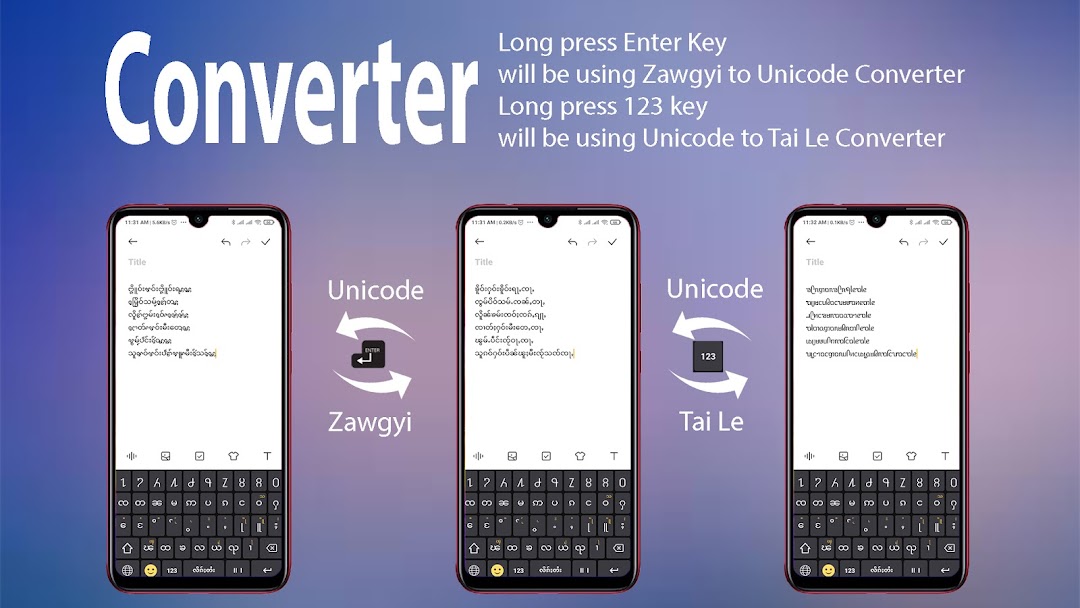
(ပေႃးၼဵၵ်းပၼ် 123 တီႈၶီးပွတ်ႇပၼ်ႁိုင်ႁိုင် တေဢဝ်လိၵ်ႈတႆး(တူဝ်မူၼ်း) ၼၼ့် ပိၼ်ႇပၼ်ႁႂ်ႈပဵၼ် လိၵ်ႈတႆးမၢဝ်း(တူဝ်ယၢဝ်း)
ယဝ့်ၵေႃႈ ပေႃးၼဵၵ်း Copy ပၼ်တီႈၼိူဝ် လိၵ်ႈတႆးမၢဝ်း ဢမ်ႇၼၼ် လိၵ်ႈတႆးၸေႃႇၵျီႇၼႆ တေပိၼ်ႇပၼ်ႁႂ်ႈပဵၼ် လိၵ်ႈတႆးယဝ်ႉ)
- ႁၢင်ႊ Emoji ၵေႃႈလႆႈသႂ်ႇဝႆႉတၢင်းၼမ်
- ႁၢင်ႊပိုၼ့်လင်ၶီးပွတ်ႇ (10) ဢၼ်
- တႅမ်ႈလႆႈ (10) ၽႃႇသႃႇ
- သႂ်ႇပႃးဢၼ်တူင့်သၼ်ႇ မိူဝ်ႈတႅမ်ႈလိၵ်ႈ
- သႂ်ႇပႃးသဵင် မိူဝ်ႈတႅမ်ႈလိၵ်ႈ
- လၢႆးတႅမ်ႈလိၵ်ႈၸွမ်းပိူင်သွၼ်ႁဵၼ်း တီႈၶီးပွတ် တႆး၊ မၢၼ်ႊ လႄႈ တႆးဢႃႇႁူမ်ႇ
- တေႃႈလဵဝ်တေ့ (10) ၽႃႇသႃႇဢၼ်ၸႂ်ႉၶီးပွတ်ႇၼႆ့သေတႅမ်ႈလႆႈၼႆ့
(1) တႆး
(2) တႆးမၢဝ်း (တႆးတူဝ်ယၢဝ်း)
(3) တႆးဢႃႇႁူမ်ႇ
(4) တႆးၶမ်းတီႈ
(5) တႆးလမ်
(6) တႆးထမ်း
(7) တႆးလိုဝ့်
(8) ထႆး
(9) မၢၼ်ႊ
(10) ဢၢင်းၵလိတ်ႈ ယဝ့်။
- တေႃႈလဵဝ် ၶီးပွတ်ႇၼႆ့ တေၸႂ်ႉလႆႈလူၺ်ႈ (4) ၽႃႇသႃႇ
(1) တႆး
(2) တႆးမၢဝ်း
(3) တႆးဢႃႇႁူမ်ႇ
(4) ဢၢင်းၵလိတ်ႈ ယဝ့်။
TMK Keyboard (ထုင့်မၢဝ်းၶမ်း) is specially designed for Tai Unicode users. TMK Keyboard itself is a free application. No ads, no fees, no unnecessary permissions and will always be like this. TMK Keyboard is focusing on creating a Tai Keyboard which includes most of the Tai languages. If you feel like your Tai language should be included in this keyboard, you can contact us via Email or Facebook, we will gladly help you.
Features included
- Zawgyi-Tai and Tai Le Converter
- Emoji Keyboard
- 10 Keyboard Themes
- 10 Languages
- Key vibration
- Key sound
- Handwriting typing style for Burma, Tai and Tai Ahom Keyboard
Currently, TMK Keyboard supports
(1) Tai (Shan)
(2) Tai Le (Tai Mao)
(3) Tai Ahom
(4) Tai Khamti
(5) Tai Tham
(6) Tai Lue
(7) Tai Dam
(8) Thai
(9) Burma
(10) English
The Keyboard application can be used with 4 languages.
(1) Tai
(2) Tai Le
(3) Tai Ahom
(4) English
More Tai Languages will be added in Future Release.