
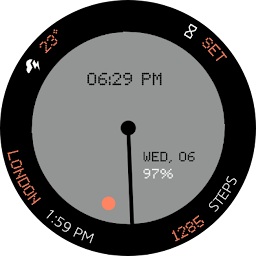


Nothing cmf Watch Face is a Personalization application developed by SOC Creations, but with the best Android emulator-LDPlayer, you can download and play Nothing cmf Watch Face on your computer.
Running Nothing cmf Watch Face on your computer allows you to browse clearly on a large screen, and controlling the application with a mouse and keyboard is much faster than using touchscreen, all while never having to worry about device battery issues.
With multi-instance and synchronization features, you can even run multiple applications and accounts on your PC.
And file sharing makes sharing images, videos, and files incredibly easy.
Download Nothing cmf Watch Face and run it on your PC. Enjoy the large screen and high-definition quality on your PC!
Installation:1. Make sure you watch is connected to your phone via Bluetooth.
2. Install, download and open the companion app.
3. Go to the watch Play Store, and type the exact watch name(with correct spelling and spacing) and open listing. If price still appears, wait for 2-5 minutes or restart your watch face.
4. Please also try installing the watch face via Galaxy Wearable app(install it if not installed)> Watch Faces> Downloaded and apply it to watch.
5. You can also install this watch face by accessing the Google Play Store in the web browser in a PC or Laptop. Make sure you use the same account you made the purchase from to avoid double charge.
6. If PC/laptop not available, you can use the phone web browser. Head over to the Play Store app, then to the watch face. Click the 3 dots in the upper right hand corner then Share. Use the available browser, login to the account you made the purchase from and install it there.
About the watch face:
A Nothing cmf inspired watch face for your Wear OS Device.. Some features include:
1. 4 Customizable Complications
2. A Hybrid clock consisting of a digital clock and a set of analog hands
3. Battery and Day/Date
4. 12 Color Options
More to come in future updates..


