SG Weather is a Weather application developed by Sim Ruenn Kang, but with the best Android emulator-LDPlayer, you can download and play SG Weather on your computer.
Running SG Weather on your computer allows you to browse clearly on a large screen, and controlling the application with a mouse and keyboard is much faster than using touchscreen, all while never having to worry about device battery issues.
With multi-instance and synchronization features, you can even run multiple applications and accounts on your PC.
And file sharing makes sharing images, videos, and files incredibly easy.
Download SG Weather and run it on your PC. Enjoy the large screen and high-definition quality on your PC!
Singapore weather with radar map display, PSI alert and 24hrs Raining alert/Rain Stop Alert by any location in Singapore.Features:
- Rain start & stop + PSI (hazy day only, psi > 90) + Sumatra hotspot(>120) alert
- Weather info like temperature, UV, PSI.
- Weather info on map: 1hr PSI , 1hr PM2.5, Visibility, wind direction, humidity, rain falls, temperature
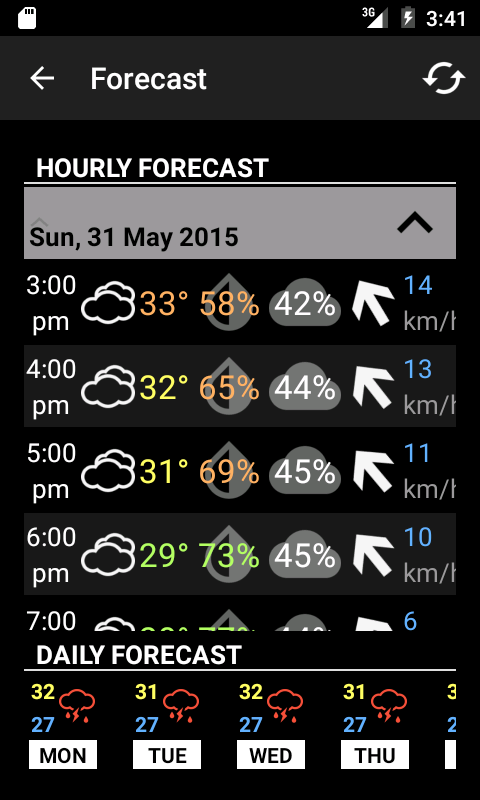
- 7 days forecast
- 1 Radar Map
- Raining cloud radar map in animation
- raining cloud movement prediction
- Full screen map display
- 3 hours nowcast
- 1hr PSI , 1hr PM2.5, Visibility, wind direction, humidity, rain falls, temperature
- forecast data every 3 hours
- bookmark landmarks/locations
- Weather Today, additional weather info like humidity, wind, sunrise and sunset, moon phase and tide.
- text to speech for weather highlight
- Marquee text (Running text)
Widget:
- weather now
VIP services:
- Remove Advertisement service (yearly ~US$2)
Map Button features:
Lets start from buttons on the left. First button can toggle fullscreen mode and
fullscreen ads will show, banner ads will hide. 2nd button can set your bookmark locations. You may
enable rain alert here. 3rd button is the 7days and every 3 hrs forecast. Last
button showing astronomy info.
1st button on the right will toggle the radar image on the map to be 10mins forecast
mode. You will see the raining cloud with shadow, the shadow is the NEXT 10mins
movement base on wind speed. 2nd button on the left will show NEA 2hrs nowcast as weather icon on the map.
For buttons at the bottom, 1st one from left is the Setting button, you can do some
setting and purchase our services here. 2nd button is radar animation, total six
images start from ~30mins ago. 3rd button will fit your map view focus on whole Singapore
land. 4th button will enable your GPS, your map will keep focus on your current
location, you may disable it by click the button again. The last button Refresh
button, it will refresh all data.