
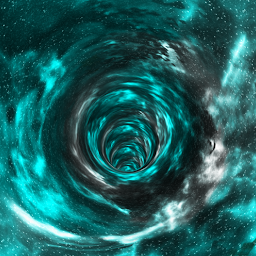


Wormhole 3D Live Wallpaper PRO is a Personalization application developed by MirageZone, but with the best Android emulator-LDPlayer, you can download and play Wormhole 3D Live Wallpaper PRO on your computer.
Running Wormhole 3D Live Wallpaper PRO on your computer allows you to browse clearly on a large screen, and controlling the application with a mouse and keyboard is much faster than using touchscreen, all while never having to worry about device battery issues.
With multi-instance and synchronization features, you can even run multiple applications and accounts on your PC.
And file sharing makes sharing images, videos, and files incredibly easy.
Download Wormhole 3D Live Wallpaper PRO and run it on your PC. Enjoy the large screen and high-definition quality on your PC!
Use your phone screen to travel through the warped intergalactic space-time in 3D using 9 different wormholes comprising of different colours, clouds and dust. By harnessing the energy of your Gyroscope and Accelerometer, you not only gain the ability to look around the wormhole at different viewing angles but also unleash the power to rotate along the wormhole simultaneously based on the earth's gravitational force. You can set it as a live wallpaper, a lock screen or both depending upon your launcher.Key Features:
- Immersive VR like experience with the ability to adjust the viewing angles based on your phone's orientation in space.
- Stabilization algorithms automatically align the wormhole to the centre of the screen when it's off-centred.
- Seamlessly rotate the wormhole 360 degrees based on the earth's gravity using your accelerometer. Alternatively choose between different modes of rotation like clockwise, anti-clockwise, zig-zag etc when the accelerometer is turned off. (For a seamless experience turn off home screen rotation)
- Choose between 9 high-quality 4K textures comprising wormholes of different colours, clouds and dust.
- Light speed enables you to temporarily fast travel through the wormhole for a specific duration and can be triggered via gestures.
- Works great on any screen orientation and supports both phones and tablets.
- Saves battery by pausing the wallpaper and turning off sensors when it's hidden behind other applications or when the screen is turned off.


