home page
Games
Pre-RegisterRPGStrategyAdventureCasualArcadeRacingActionSimulation
Support
LDPlayer 9 IntroductionEnable VTStartup Stuck at 50%/94%Fix Invalid Virtual DiskUpdate Graphics DriverKeyboard MappingEnable LDMultiplayerFPS Setting
Blogs
Updates
LDGame
Affiliate
LDGame Community
download ldplayer
Download LDPlayer
English
繁體中文한국어Tiếng ViệtภาษาไทยPусскийPortuguêsEspañolFrançaisDeutsch日本語Indonesiaالعربية

LDPlayer Support

EmailFacebookDiscordLDGame Customer Service(For LDPlayer account & recharge problem)

Products

LDCloudOSLinkEasyFunLDShop

About

About UsBusiness InquiryDMCA Takedown

Follow Us

©2025 LDPLAYER.NET , ALL RIGHTS RESERVED.JUST OKAY LIMITED , OFFICE F, 12/F, YHC TOWER , 1 SHEUNG YUET RD, KOWLOON BAY KLN, HONG KONG
Games and applications on this site are collected from the internet. If there is any infringement, please contact the email: support@ldplayer.net
Privacy Policy|GDPR Privacy Notice|Help Translate
English
繁體中文한국어Tiếng ViệtภาษาไทยPусскийPortuguêsEspañolFrançaisDeutsch日本語Indonesiaالعربية

Blogs/

Game Guides/

News and Guides for Tower of Fantasy

Fix the problem with insufficient storage space in Tower of Fantasy

2022-08-11

Since Tower of Fantasy has been released on 11. August, there are so many gamer flock to the game. Also part of them try to play it on PC with Android-Emulator. Then we LDPlayer is a perfect choice. We have optimized LDPlayer 9 and release the new version 9.0.14 for a better game experience in Tower of Fantasy.

Also we got some feedbacks from our users - they could not update the game because of the insufficient storage space.
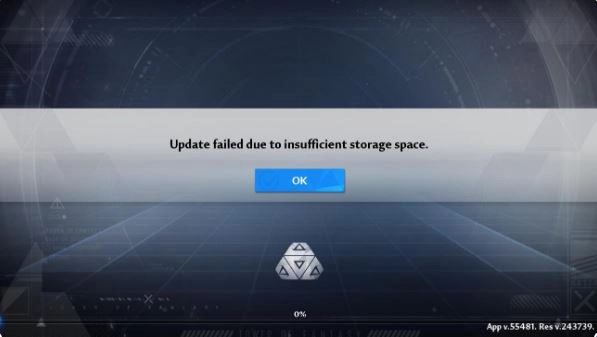
Fix the problem with insufficient storage space in Tower of Fantasy

If you also met the same problem when you want to play Tower of Fantasy on LDPlayer, don't worry, here we would help you solve it.


Here are two ways you can fix the problem, just choose the one you prefer to:

  1. Expand the disk space
  2. Create a new LDPlayer


1. Expand the disk space

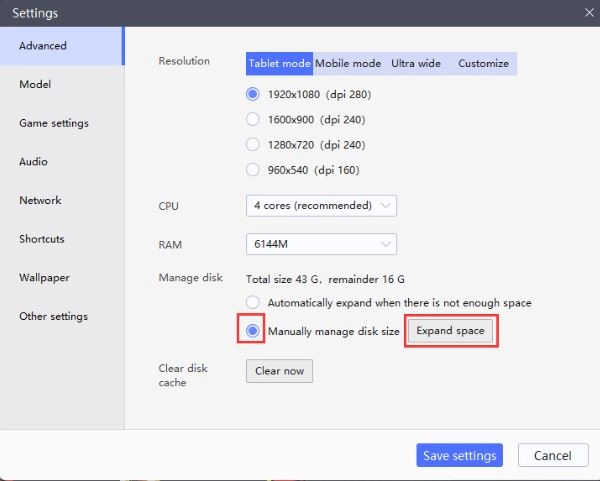
Step 1: Open the settings of LDPlayer and turn to the advanced setting.
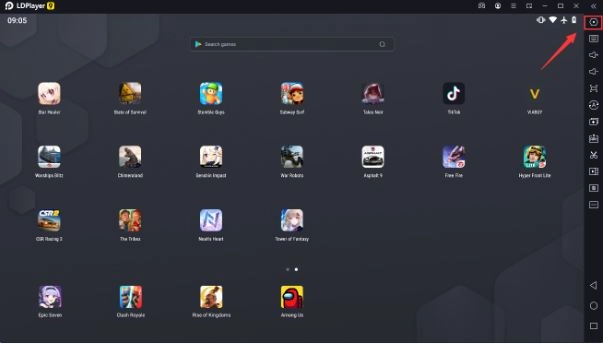
Fix the problem with insufficient storage space in Tower of Fantasy

Step 2: Look into the manage disk section, switch to manually manage disk size then click the button (Expand space).
Fix the problem with insufficient storage space in Tower of Fantasy

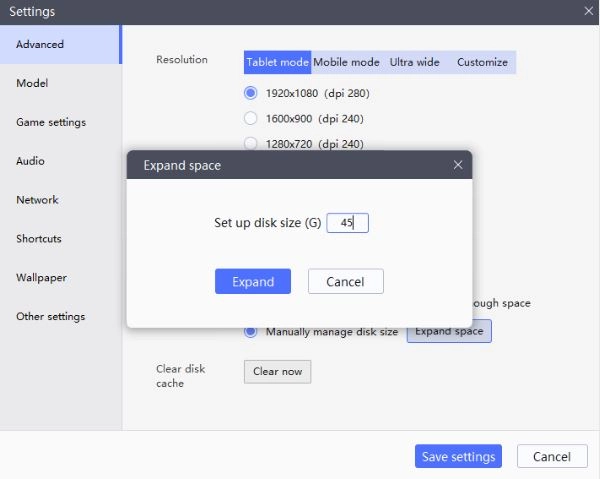
Step 3: Then set the disk size more then 20 (G)m, click expand and click the save settings button.
Fix the problem with insufficient storage space in Tower of Fantasy


2. Create a new LDPlayer

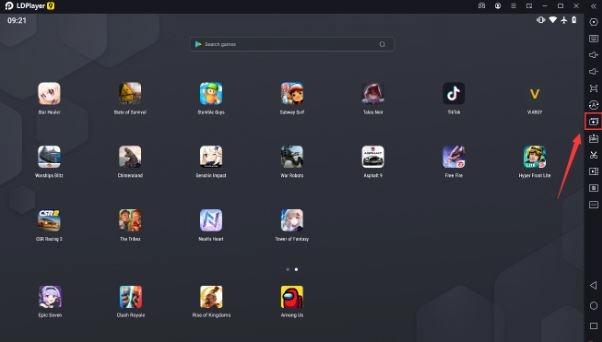
Step 1: Click the Multi-Player icon at the left side of LDPlayer to get into the multi-instanz manager.
Fix the problem with insufficient storage space in Tower of Fantasy

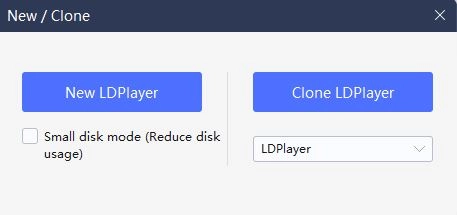
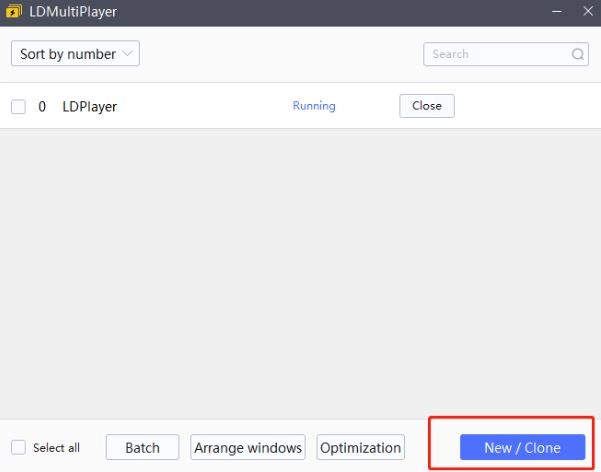
Step 2: Click the marked out button and choose new LDPlayer (don't check the small disk mode)
Fix the problem with insufficient storage space in Tower of Fantasy

Fix the problem with insufficient storage space in Tower of Fantasy

Step 3: Click the Start button, then you have a new LDPlayer-instanz.
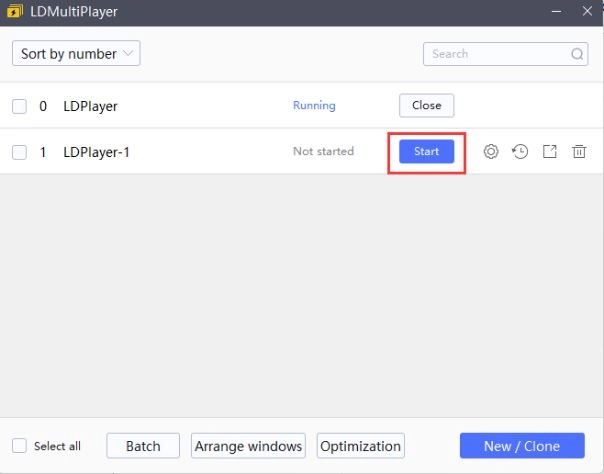
Fix the problem with insufficient storage space in Tower of Fantasy

Step 4: Just download the game again and start it on the new LDPlayer as before. If you want to know more about the multi-instanz function, please click here


We LDPlayer always try our best to optimize the game experience of players. We gonna post lots of game guide about Tower of Fantasy, if you are interested in them, just focus our blogs page.


[Without Using Stamina] How to Climb in Tower of Fantasy Infinitely
|
Fate/Grand Order Ooku Rerun and 18Mil Downloads Campaign Guide

Tower of Fantasy

You May Also Like
Top Game Guides
Tower of Fantasy Kailo Sector Exploration Guide - Everything You Need to Know
Tower Of Fantasy Lyncis Guide - How To Build The Best Lyncis
Tower of Fantasy Launches New Space Open-World! Up to 139 Pulls and 4 SSR Weapons Free!
Tower of Fantasy Version 4.8 "Interstellar Visitor" Launches! Embark on a Stellar Journey with New Simulacrum "Carrot"
Tower of Fantasy Codes (April  2026)
Tower of Fantasy Codes (April 2026)
Tower of Fantasy Tier List 2025 August: Best Heroes to Select