Arknights: Endfield Blueprint Codes Guide 2026

Ashi Prasadi
|2026-04-24Are you tired of building the same AIC layouts again and again in Arknights: Endfield? That’s where Blueprint Codes come to the rescue. These useful codes allow you to copy perfectly optimized base layouts from top players and use them instantly. In this guide, we’ve gathered the most needed Blueprint Codes and explained how they work, making base building faster, easier, and stress-free. Use these codes and build your base the smart way!
Contents

V1.2 Endgame BluePrint
The V1.2 Endgame Blueprint is a fully optimized late-game setup designed for players who have already unlocked most of the game and want maximum efficiency. This blueprint is about perfecting your base. The V1.2 Endgame Blueprint simply is:
- A pre-designed base layout (or set of layouts)
- Built specifically for late-game (endgame) players
Getting Your World Ready (Don’t Skip This)
Before you even think about placing a single blueprint, you need to unlock and max the right systems. This is what separates a clean endgame base from a broken one.
- Push the main story until WULING AIC III is unlocked
- Finish researching everything (except turret/combat facility line)
- Max out The Hub and Jingyu Valley to Version 1.1 cap
- Unlock the Depot Bus at Cardiac Remediation Station
- Open ALL mining nodes across Wuling City, Jingyu Valley, Qingbo Stockade, and Marker Stone
- Reach Regional Development Level 10
- Stock your depot with:
- 50 SC Wuling Battery
- 200 Cuprium Parts
- 100 Sandleaf
- 100 Yazhen
If you skip any of this, your blueprint won’t flow properly. Simple as that.
Marker Stone Setup (Clean and Tight Build)
This one is all about positioning. If you mess up the placement, the whole thing loses efficiency.
- Make sure the Precipitation Acid pool is on the LEFT side
- Place the Sub-PAC in the upper-right corner
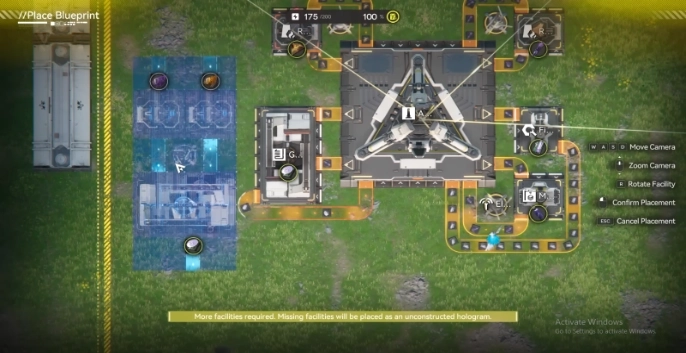
- Then drop the blueprint flush against the base + left edge
Code (EU):
EFO01O3E2100aiIAO9oe4
Keep it tight. No gaps. That’s what keeps production smooth here.
Sky King Flats Setup (Two-Part Placement Trick)
This one’s a bit more technical, but once you get it, it feels super clean.
- Pool must be on the RIGHT side
- Place Sub-Protocol Automation-Core in the lower-right corner
Now placement order matters:
- First, place the upper half flush against the top edge
- Then fill the remaining space with the lower half
Upper Code (EU):
EFO01893ui77e51u4UI73
Lower Code (EU):
EFO01Iao8UiiA290o5o08
If you place it in the wrong order, it won’t align properly so don’t rush this part.
Wuling City Main Base (Your Core Engine)
This is the heart of everything. If this is clean, your whole system feels effortless.
- Make sure the pool is at the BOTTOM
- Place the PAC in the upper-left corner
Now follow this exact order:
- Place Blueprint #1 in the lower-left corner (flush)
- Then place Blueprint #2 next to it
- Finish with Blueprint #3 on the right
Blueprint #1 Code (EU):
EFO014o5O9116U3a9E71A
Blueprint #2 Code (EU):
EFO01o083Aeei469UIieO
Blueprint #3 Code (EU):
EFO01a7094OO5IAIaoe5e
This order matters. It keeps everything connected without breaking your flow.
What Are Arknights: Endfield Blueprint Codes
In Arknights: Endfield, a Blueprint is a saved base layout that includes factories, buildings, and transport belt connections. These saved layouts can be exchanged with other players in the form of a code. These codes are called Arknights: Endfield Blueprint Codes.
These codes can be shared with other players, or you can use another player’s Blueprint Code to build your own base. Arknights: Endfield Blueprint Codes help players in many ways, such as:
- Helping to save time on base building.
- Helping to avoid rebuilding the same production chain layouts repeatedly.
- Helping to optimize production and resource collection.
- Giving players the chance to try AIC base layouts from top players.
Because of these key reasons, Arknights: Endfield Blueprint Codes give players a big advantage, making progression easier without worrying about building the base from scratch.
Best Arknights: Endfield Blueprint Codes by Progression Stage
We have brought you the most recommended Blueprint Codes from top players to make your base building much easier. Below are the Blueprint Codes available for you:
|
Blueprint Set Up |
Output Materials |
Blueprint Code |
|---|---|---|
|
Infinite Seed-Planter Loop |
Seeds/Plants (Infinite) |
EFO012O9A7uuU48aeIOo (Asia) |
|
Manifold Powerplant |
LC Valley Battery |
EFO01ouiO4aa5860IieO (Asia) |
|
Load Balanced Powerplant |
LC Valley Battery |
EFO01Ue3608e87OEA7Oa8 (Asia) |
|
Amethyst Part Simple Farm |
Amethyst Parts |
EFO0101O3o7789i7E979 (Asia) |
|
Amethyst Component Factory |
Amethyst Components |
EFO01ouiO4aa58639IieO (Asia) |
|
Efficient Amethyst Bottle |
Amethyst Bottles |
EFO013o72O99Eua30i79 (Asia) |
|
Buck Capsule C Line |
Buck Capsule C |
EFO01iUIa6551e2e272U4 (Asia) |
|
LC Valley Battery Line |
LC Valley Battery |
EFO01O4a7i88eEI3i9oe4 (Asia) EFO0189304IUUO1eUI73 (USA) |
|
Industrial Explosive Farm |
Industrial Explosives |
EFO01O4a7i88eEI3o9oe4 (Asia) EFO01U4A2aeII9OO7Oa8 (USA) |
Blueprint Codes for Mid Game
|
Blueprint Set Up |
Output Materials |
Blueprint Code |
|---|---|---|
|
Buck Capsule B Line |
Buck Capsule B |
EFO017i89aEE0U55EO0Ai (Asia) EFO01O3E8A499eIi9oe4 (USA) |
|
Ferrium Component Line |
Ferrium Components |
EFO019aEu8UU36eu5UI2 (Asia) EFO01eE7O6A33a4ioAi8 (USA) |
|
Modular Infinite Farm Loop |
Seeds/Plants (Infinite) |
EFO0101O3o7789i0E179 (Asia) EFO01eE7O6A33a4AoAi8 (USA) |
Blueprint Codes for Late Game
|
Blueprint Set Up |
Output Materials |
Asia |
|---|---|---|
|
Sandleaf Powder Line |
Sandleaf Powder |
EFO01194ouiiIaU930O7 (Asia) |
|
Cryston Component Line |
Cryston Components |
EFO01O4a7i1415I3U9oe4 (Asia) |
|
Ground Buckflower Powder Line |
Ground Buckflower Powder |
EFO0101O3o6AI7iaE179 (Asia) EFO01eE7O6A33a48oAi8 (USA) |
|
Steel Bottle Line |
Steel Bottles |
EFO01I3A5280E1995o08 (Asia) EFO01U4A2aeII9O67Oa8 (USA) |
|
Buck Capsule A Line |
Buck Capsule A |
EFO01eAo01IAIi4aUoAi8 (Asia) |
|
SC Valley Battery Line |
SC Valley Battery |
EFO01602I3AAu171EO83e (Asia) EFO011eai39OOIU734O7 (USA) |
Tip: Blueprint Codes are region-specific, so always use the code that matches your server. Using the wrong region code may not work, so double-check before importing to ensure your base layout builds perfectly!
How to Create Arknights: Endfield Blueprints
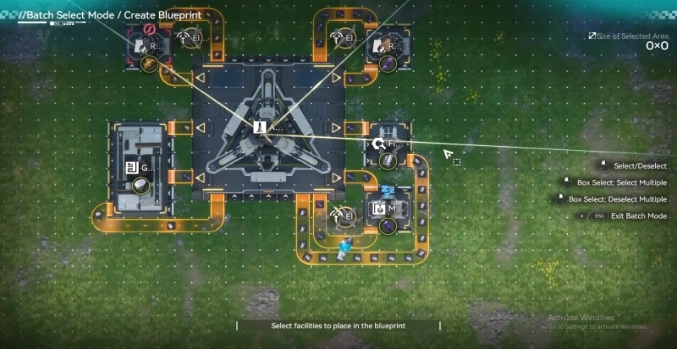
You have the chance to create your own base layouts and save building setups as blueprints for use again. So, here are the steps for creating the Arknights: Endfield blueprints:
- You have to go to the AIC System and enter the Top View Mode.
- Then click the Blueprints button to open the Blueprints Menu. This blueprint button is located at the bottom right corner of the gameplay screen.
- Go to the My Blueprints sub-menu and head to the New Blueprint button.
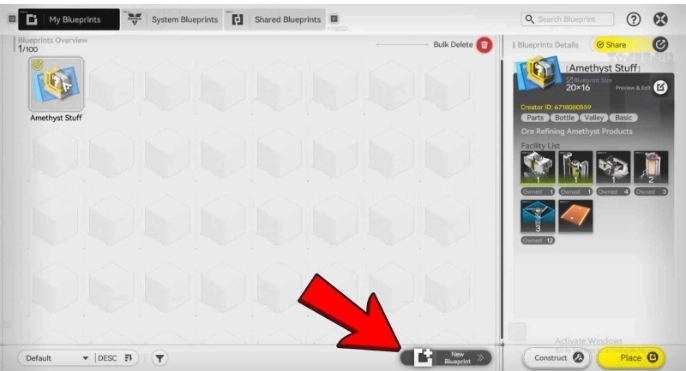
- Then select the buildings that you want to include in your blueprint.
(You can also select the layout with the buildings you want simply by selecting Bulk Action within the bottom right corner of the gameplay screen.)
- After that, click on the Save Blueprint button to save the blueprint you created. You can apply a custom name and a description for this saved blueprint as you like.
- You can view your saved blueprint in the My Blueprints tab.
How to Share Your Arknights: Endfield Blueprints
After saving your own Arknights: Endfield Blueprint, you have the chance to share this unique base layout with others to make their gameplay easier. So, here is the process:
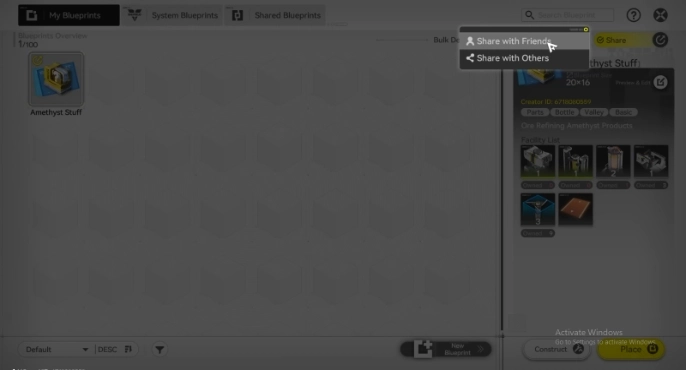
- Select the blueprint that you want to share from the My Blueprints menu.
- Find the yellow Share Button on the upper right corner to share the blueprint. This sharing option comes with two choices:
- Share with Friends: This is to share with your in-game friends.
- Share with Others: With this sharing method, you will get a sharing ID code, which is the Arknights: Endfield Blueprint Code. You can copy this sharing code and share it with others.
How to Import Arknights: Endfield Blueprint Codes
You don’t need to build your base all by yourself. You can use blueprints created by other players to make base building much easier. This can be done by importing Blueprint Codes. Here’s how to do it:
- First, copy the Blueprint Code you found.
- Open the Blueprints Menu.
- Go to the Shared Blueprints tab.
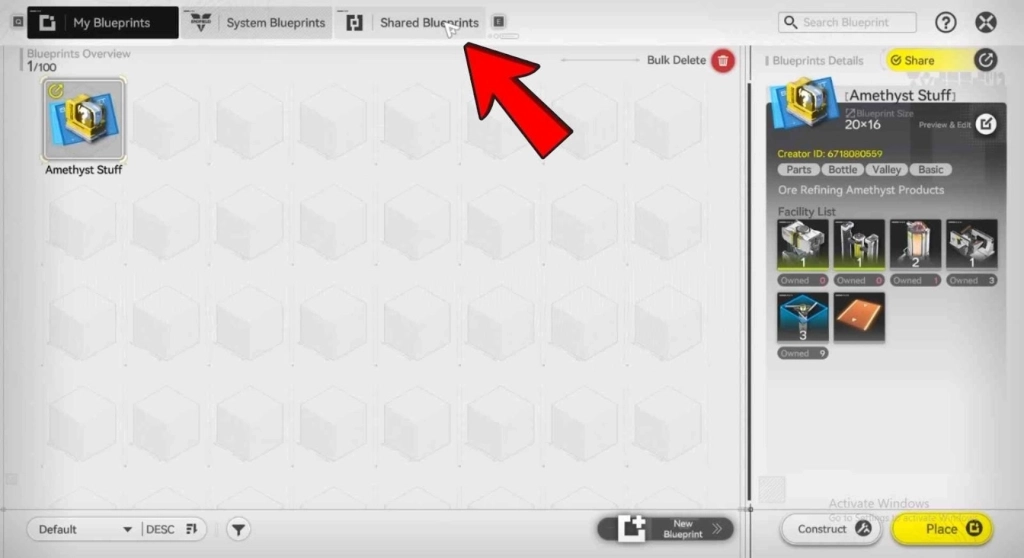
- Click on the Import Blueprint button.
- Finally, paste the shared Blueprint Code.
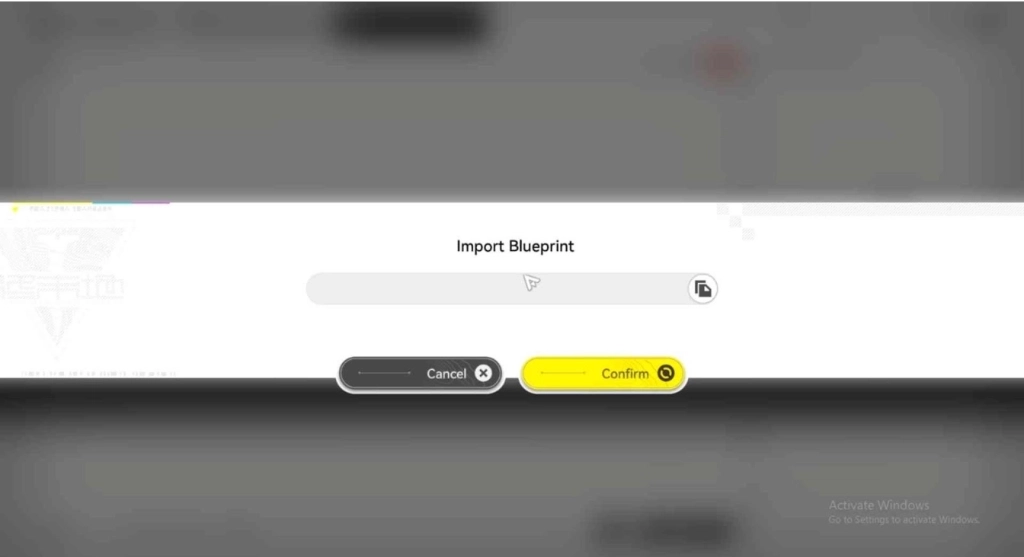
Once imported, you can use the shared base layout for your own base. Simply drag it and place it in the perfect spot to get the best possible efficiency from your setup.
Tips for Using Arknights: Endfield Blueprint Codes
Some issues may occur when you are using Blueprint Codes as an Arknights: Endfield beginner. So, here are some simple tips to help you use these blueprint codes without any problems:
- Not the Same Region: Some blueprint codes are made for different regions. Make sure to use blueprints that match your region.
- Ensure All AIC Buildings Are Unlocked: Some blueprints may not work because they include buildings you have not unlocked yet. Save these blueprints and use them later.
- Adjust Your Base Space: Some blueprints may not deploy because your base does not have enough space. Rearrange or clear space in your base to use them.
- Name Your Blueprints for Easy Recognition: Give a clear and specific name when saving your blueprints. This will help you recognize the base layout easily later.
- These tips will help you use Arknights: Endfield Blueprint Codes more smoothly and build your base faster.
Hot Recommend
Download LDPLAYER, play Arknights: Endfield on PC, enhance your gaming experience!


People Also Ask
Can I use any Blueprint Code from other regions?
No, Blueprint Codes are region-specific. Make sure the code matches your server for it to work.
Can I share my Blueprint with others?
Yes! Click the Share button in My Blueprints. You can share with friends or get a code to share with everyone.
What if my base doesn’t fit the imported Blueprint?
Make sure you have enough space in your base. Rearrange or clear space to fit the layout properly.
Conclusion
Using Blueprint Codes is the easiest and fastest way to build your base in Arknights: Endfield. With this guide, you get the best codes for perfect layouts, smart tips to use them effectively, and even the V1.2 Endgame Blueprint setup to take your base to the next level. Build smarter, save time, and don’t forget the Arknights: Endfield Redeem Codes too. They'll help you grab extra freebies while you keep progressing faster.
More from Arknights: Endfield