How to Play Astral:New Fantasy on PC?

Thisara Dilshan
|2026-05-23Hello Players! It’s time to bring your Astral: New Fantasy adventure to life on a bigger screen with LDPlayer. This powerful emulator enhances your gameplay with smoother performance, improved graphics, and easy keyboard-and-mouse controls for a more immersive experience. In this guide, you’ll learn how to install, set up, and explore the best LDPlayer features to enjoy a seamless adventure. So, let’s get started!
Contents

How to Play Astral: New Fantasy on PC with LDPlayer in 4 Easy Steps
Step 1: Download and Install LDPlayer Emulator
Before entering the magical world of Astral: New Fantasy, you first need a good Android emulator for your PC. The most recommended option for this is LDPlayer 9, because it gives smoother gameplay, better FPS, and easy keyboard controls for a more comfortable gaming experience.
1.1 – Visit the official LDPlayer website and download the latest version of LDPlayer 9.

1.2 – After the download is finished, open the installer file by double-clicking it.
1.3 – Press the Install button and wait a few minutes until the setup process is completed.
1.4 – Once the installation is done, launch LDPlayer from your desktop or Start menu. Now your emulator is fully ready to play games.
Step 2: Search and Install Astral: New Fantasy on LDPlayer
Now that LDPlayer is fully set up and ready to run your favorite mobile games, it is time to download Astral: New Fantasy and begin your magical adventure on PC.
2.1 – Open LDPlayer and find the search bar on the home screen.
2.2 – Type “Astral: New Fantasy” and choose the official game from the search results. Make sure to select the official version developed by LUCKYYX GAME.
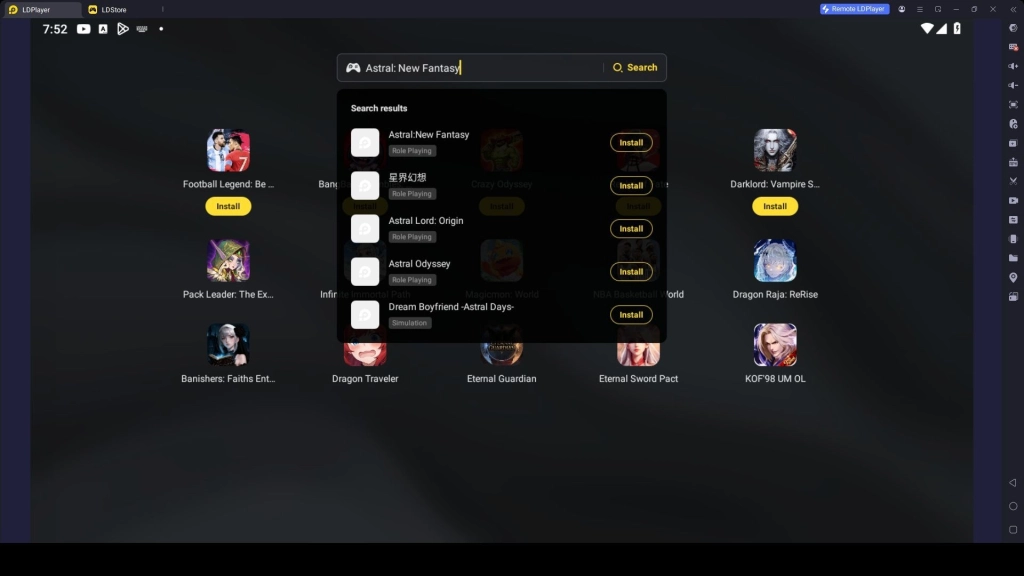
2.3 – Click the Install button to start downloading the game inside the emulator.
2.4 – If the game redirects you to the Google Play Store when you open the game, you have to follow the next step to continue the installation process for Astral: New Fantasy.
Step 3: Sign into Google Play Store
Even though you were automatically directed to the Google Play Store after opening the game, now you will have to sign in using the Google account. These are the following steps which you must follow:
3.1 – Tap on the ‘Sign In’ button present on the Google Play Store page.
3.2 – Put in your Gmail address or create a Google account if you do not have any.
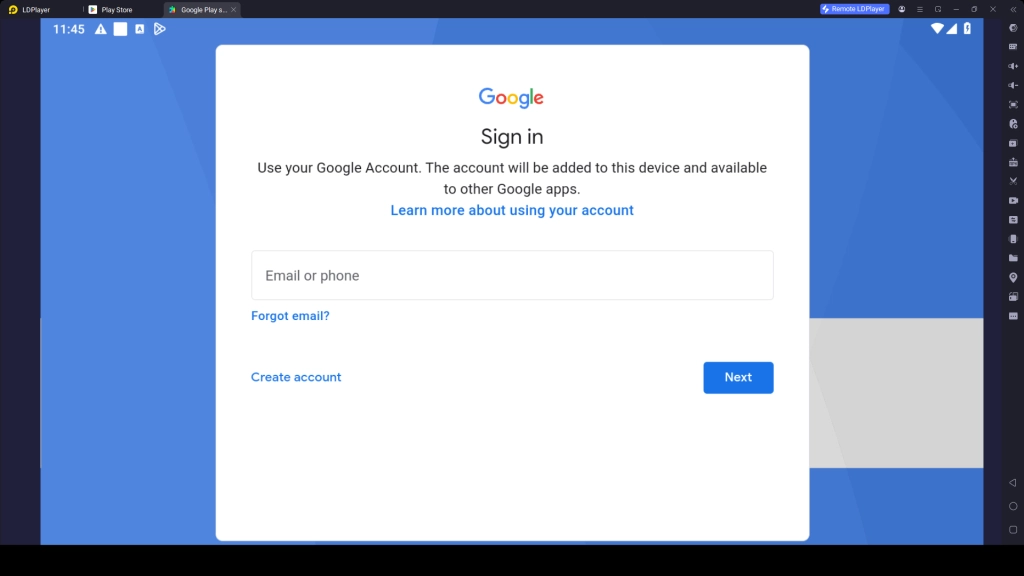
3.3 – Type your password and finish any security verification steps
3.4 – Confirm the terms and conditions for proceeding further.
3.5 – Select either the option of Google Backup or ignore that step.
3.6 – Search for Astral: New Fantasy again in the Play Store and press Install.
3.7 – Now, wait until the game has been successfully downloaded and installed.
3.8 – Once the installation is completed, the game icon will appear on the LDPlayer home screen. Then you can launch Astral: New Fantasy and enjoy the gameplay on your PC.
Step 4: Download More Game Files and Begin Your Gameplay Journey
Upon launching Astral: New Fantasy via LDPlayer, you may be required to download more additional game files before you can start playing. Downloading these files will allow you to have the best experience when playing the game.
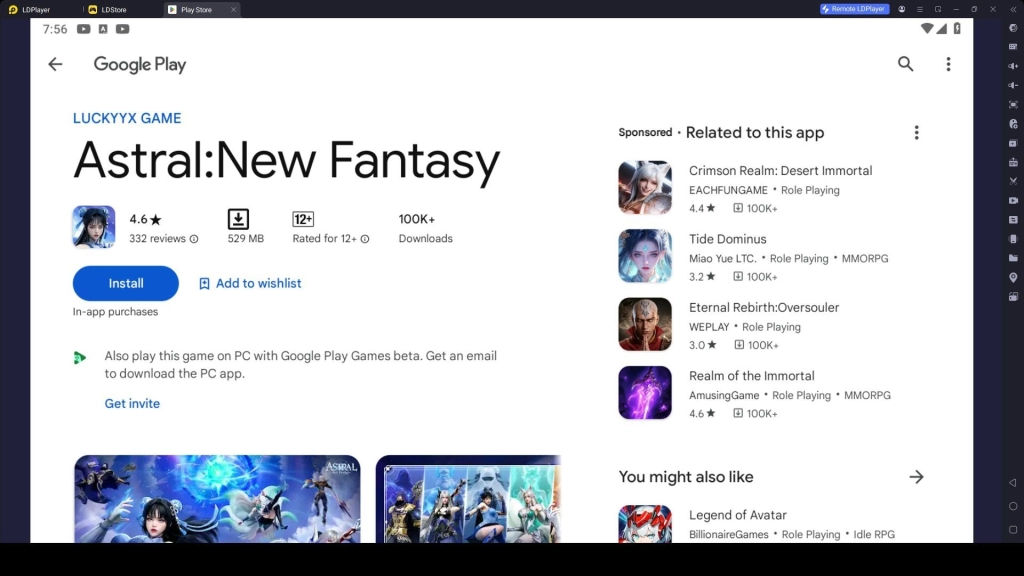
4.1 – Click on the Astral: New Fantasy icon to launch the game.
4.2 – Press Confirm or OK to proceed with downloading the necessary data files for the game. It should be noted that this may take several minutes based on your internet speed.
4.3 – Upon successful download of more game data files, then you are required to create a new account or login into your existing one.
4.4 – You are then supposed to choose your preferred mode of logging into the game from among those that are provided, such as Google, Facebook, or any other preferred option.
4.5 – And finally, you are now ready to start playing Astral: New Fantasy on PC with smoother controls, a bigger screen, and a much easier and better gameplay experience through LDPlayer.
Common Problems You May Face on LDPlayer and Easy Fixes
When using LDPlayer to play Android games on your PC, you may sometimes face problems. But most of these issues are usually easy to fix, and you can start enjoying your games on your PC again. Below are some common problems you may face and how to fix them.
Fix LDPlayer Emulator Repair Error
When you launch the LDPlayer emulator, sometimes it can display an error message indicating that there is some problem with the emulator and that you should repair it. This issue usually happens because of damaged emulator files, conflicting Windows settings, or not having proper permissions for LDPlayer. Luckily, the problem can be fixed easily without losing any information. All you have to do is follow the below instructions:
How to Fix it:
- Launch the repair function inside LDPlayer first and wait until the process completes.
- Make sure that Virtualization Technology (Intel VT, AMD-V) is activated in BIOS.
- Disable Hyper-V, Windows Hypervisor Platform, and Virtual Machine Platform from Windows Features.
- Right-click LDPlayer and select Run as Administrator.
- If the repair issue still continues, uninstall LDPlayer completely and reinstall the newest version from the official website.
Fix LDPlayer Lag and Low FPS Issue
While playing Android games on LDPlayer, you might feel lag during your gameplay. That's because your PC is not fully set up to run the emulator smoothly. It may happen due to low system memory, old graphics drivers, or incorrect LDPlayer settings. These issues can be fixed easily to run the games smoother by following these instructions:
How to Fix Lag Issues:
- Enable Virtualization (VT) in your BIOS to improve emulator speed
- Configure CPU cores and RAM in LDPlayer settings based on your PC specs
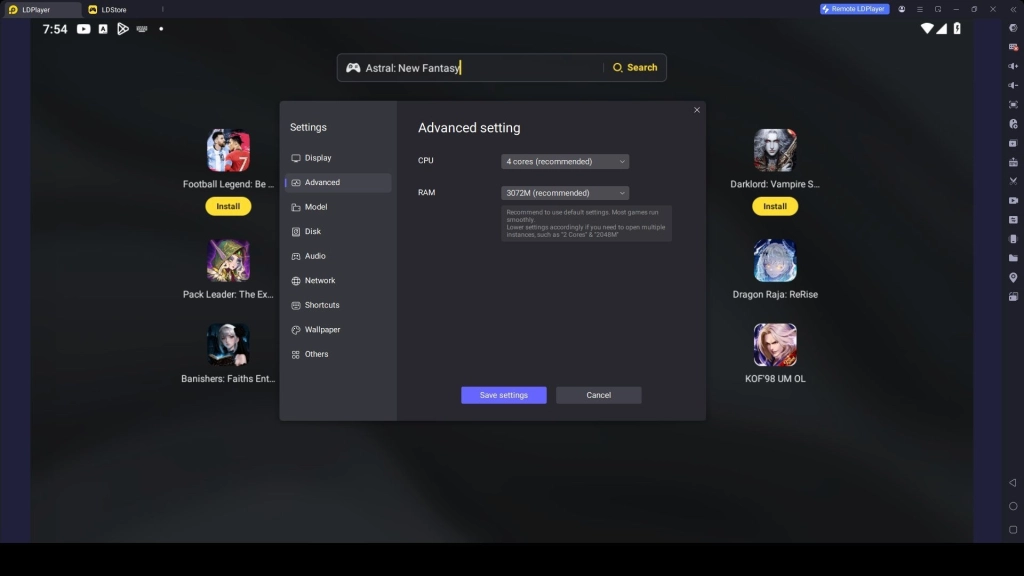
- Update Graphics Drivers to the latest version
- Close Background Apps to free up system memory and CPU usage
- Lower Game Resolution and DPI in LDPlayer settings for smoother performance
- Enable High Performance Mode in Windows power settings
- Restart LDPlayer and PC after making changes for best results
Play Astral: New Fantasy with Special LDPlayer Features
The gameplay experience of Astral: New Fantasy can be further enhanced by playing it on PC using LDPlayer. Because LDPlayer offers various special features that make gameplay smoother and controls more responsive, helping you enjoy a more comfortable and optimized gaming experience.
Play with Keyboard and Mouse
Playing Astral: New Fantasy with a keyboard and mouse in LDPlayer gives you much more precise and responsive control compared to touch controls. You can move faster, select skills more accurately, and react quickly during battles, making your gameplay smoother.
This setup is especially useful during boss battles and PvP battles, where fast reactions, timing, and precision matter. Using the keys reduces delay and helps execute skills instantly for successful wins.
How to Use Keyboard and Mouse Controls:
- Launch Astral: New Fantasy and open the Keyboard Mapping Tool from the LDPlayer side toolbar
- Assign keys for movement, skills, and menus (or use default presets)
- Save your control settings after any change
- Start the game and play using keyboard + mouse setup for better control
- You can adjust key bindings anytime based on your comfort
Hot Recommend
Download LDPLAYER, play Astral:New Fantasy on PC, enhance your gaming experience!


Execute Skill Combos Easily with One Tap
LDPlayer has a special feature called Keyboard Macro, which helps you perform skill combos using a single key. This is a very useful feature for Astral: New Fantasy because it can be used for chaining skills with perfect timing and managing cooldowns, especially when dealing high burst damage.
With this feature, you can record multiple skills along with time delays, then bind them to one key. This helps you activate a full combo instantly without manually pressing each key one by one. This leads to a more efficient combat experience.
How to Set Up Macro Combos:
- Open the Keyboard Mapping Tool in LDPlayer
- Select the Macro Recorder option
- Record your skill sequence with proper timing (including cooldown gaps)
- Assign the macro to a single key
- Save the setup and test it in battle
- Adjust timing for smoother combo execution if needed
Try Different Classes with Multiple Instances
In Astral: New Fantasy you have multiple classes like Fighter, Lancer, Warlock, and more to choose from when starting your adventure. These classes all have different gameplay mechanics for your playstyle. So, choosing the best class to play can be easily done in LDPlayer using the special Multi-Instance and Sync feature.
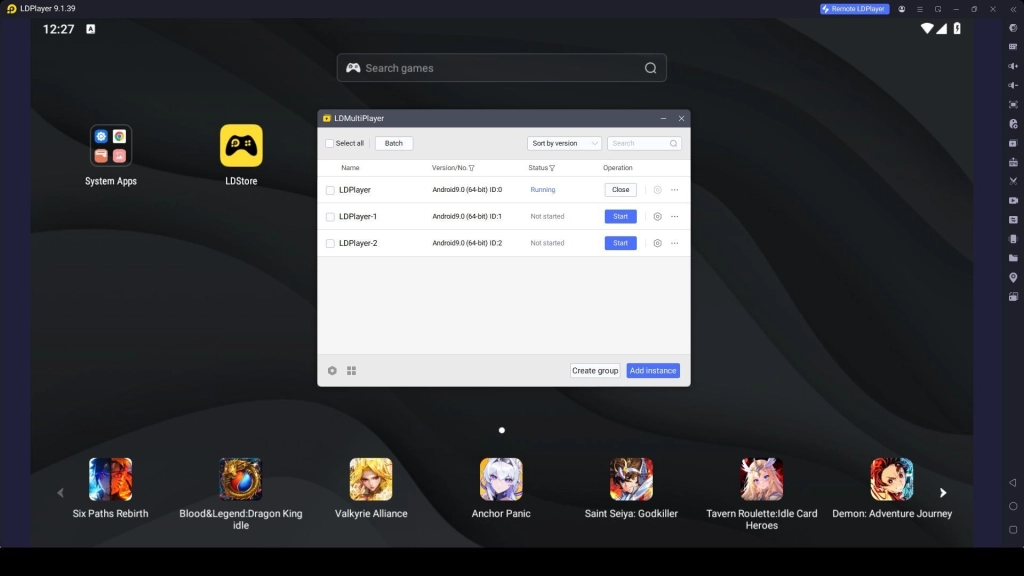
This feature helps you create multiple instances of Astral: New Fantasy at the same time, letting you test different classes, builds, and playstyles without losing progress on your main account. This makes it easier to understand which class fits your preferred playstyle before committing fully.
How to Use Multiple Instances:
- Open LDMultiplayer (Multi-Instance Manager)
- Click Create New Instance to launch additional emulator windows
- Clone your main setup if needed for faster setup
- Open Astral: New Fantasy on each instance
- Log in with different accounts with choosing different characters
- Test different classes and compare gameplay performance
- Keep your preferred setup and continue your main progress
Conclusion
Now you are ready to play Astral: New Fantasy on your PC using LDPlayer. With this setup, you can enjoy smoother performance, better controls, and a bigger screen for a more fun experience. Also use LDPlayer features like key mapping, macros, and multi-instance to improve your gameplay. So, follow this guide, set up Ldplayer and enjoy a fully optimized gaming adventure.
More from Astral:New Fantasy: