How to Play The Division Resurgence on PC - 2026

Thisara Dilshan
|2026-04-05Are you ready to have the best experience ever by playing The Division Resurgence on PC with LDPlayer? If yes, this guide can help you with everything you need, including how to install the game, optimize your settings, and use powerful LDPlayer features for smoother gameplay, faster controls, and precise aiming. So, let's enjoy epic battles with a keyboard and mouse setup and take your skills to pro-level gameplay!
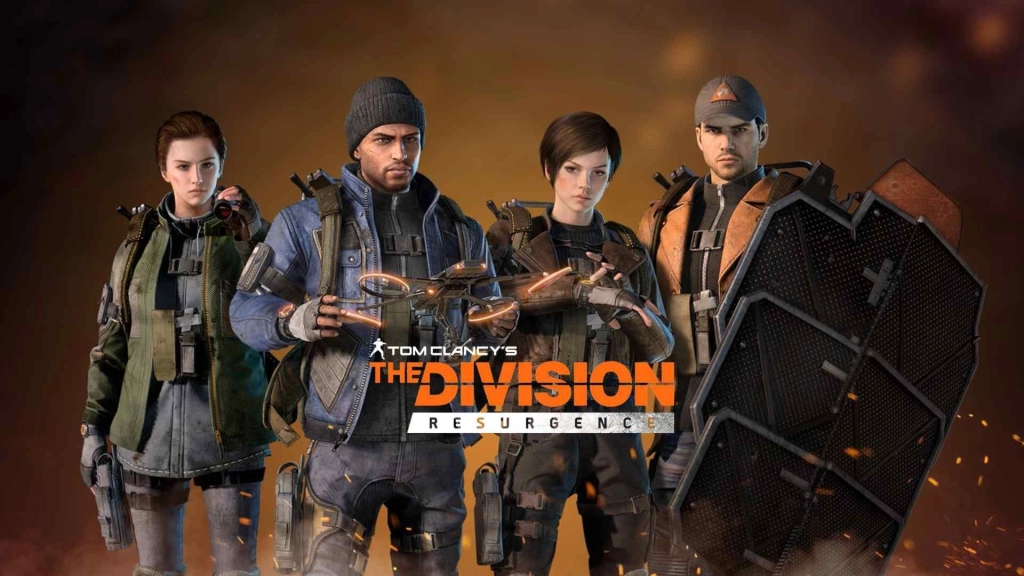
Play The Division Resurgence On PC With LDPlayer In 4 Easy Steps
Step 1: Download and Install LDPlayer Emulator
Before anything else, download the official LDPlayer 9.0 emulator to enjoy smooth mobile gaming on your PC.
1.1 – Visit to the LDPlayer official website and click the Download button to get the latest version.

1.2 – After the download is complete, open the installer from your browser to begin setup.
1.3 – When the installation window appears, press Install and let the process run. It usually takes just a few minutes.
1.4 – Once installed, launch LDPlayer 9.0 using the desktop shortcut or from the Start menu. You’re now ready to play mobile games on your PC!
Step 2: Find and Install The Division Resurgence
Now that LDPlayer is up and running, it’s time to search and install The Division Resurgence from the LDPlayer's LD Store.
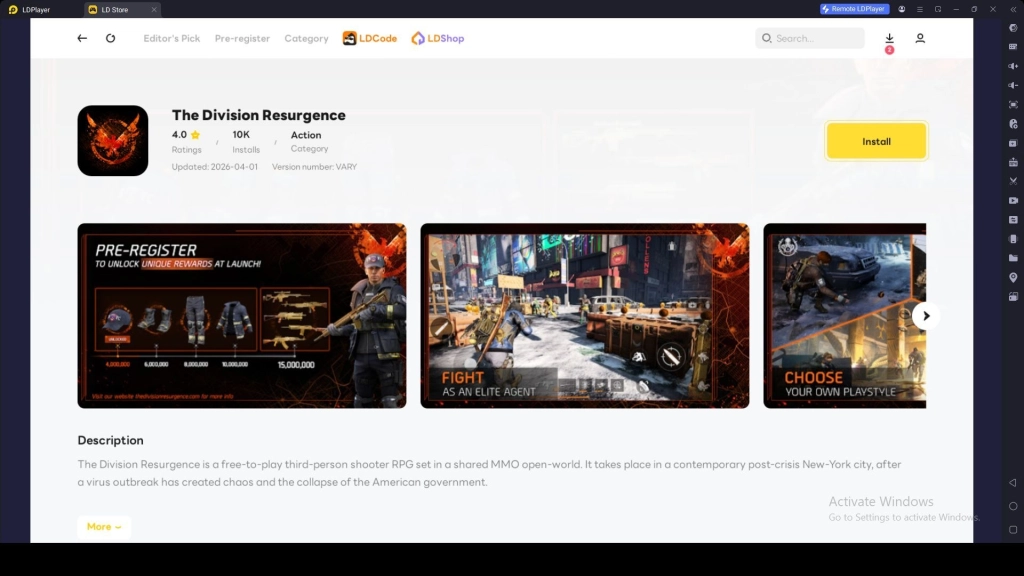
2.1 – Click on the search bar and type "The Division Resurgence" to find the game.
2.2 – When the game appears in the results, click Install next to its icon (make sure it's the official version that was developed by Ubisoft Entertainment).
2.3 – If the install button redirects you to the Google Play Store, continue to Step 3. If not, wait for the installation to complete and move to Step 4.
Step 3: Set Up Google Play Account
If you redirect to the Google Play store, when you try to download a game, you’ll need to log in before downloading the game.
3.1 – Click the Sign In button on the Play Store screen.
3.2 – Enter your Gmail details, or create a new account if needed.
3.3 – Provide your password and complete any verification steps if required.
3.4 – Accept the terms and conditions to proceed.
3.5 – Choose whether to enable backup to Google Cloud, then tap Accept.
3.6 – Your account is now ready to use the Play Store.
3.7 – Search for The Division Resurgence again and click Install.
3.8 – Wait until the download finishes; you’ll see a notification once it’s done.
3.9 – The game icon will appear on the LDPlayer home screen. Click it to launch.
Step 4: Download The Division Resurgence Game Data and Logging In
After finishing the installation, the next step is to download the game’s additional data and sign in. You can create a new account or use your old account to continue.
4.1 – Open the game and tap Confirm to download the required data files.
4.2 – Once the download is complete, choose to create a new account or log into an existing one.
4.3 – Select your preferred login option, such as Google or Facebook.
4.4 – After logging in, you’re ready to start playing The Division Resurgence on PC with LDPlayer. Enjoy the experience!
Optimize LDPlayer Settings for Smooth Gameplay
Experiencing lag issues can be a bigger problem for your The Division Resurgence gameplay. Imagine reaching the final moments of a match and the game starts lagging right before you win, it can be really frustrating and may cost you the victory. To solve these issues and play more smoothly, LDPlayer comes with built-in optimization for running The Division Resurgence on PC.
Configure CPU and RAM Allocation
You can adjust the CPU and RAM allocation settings based on your PC specifications for smoother, lag-free gameplay.
- Go to LDPlayer Settings > Advanced.
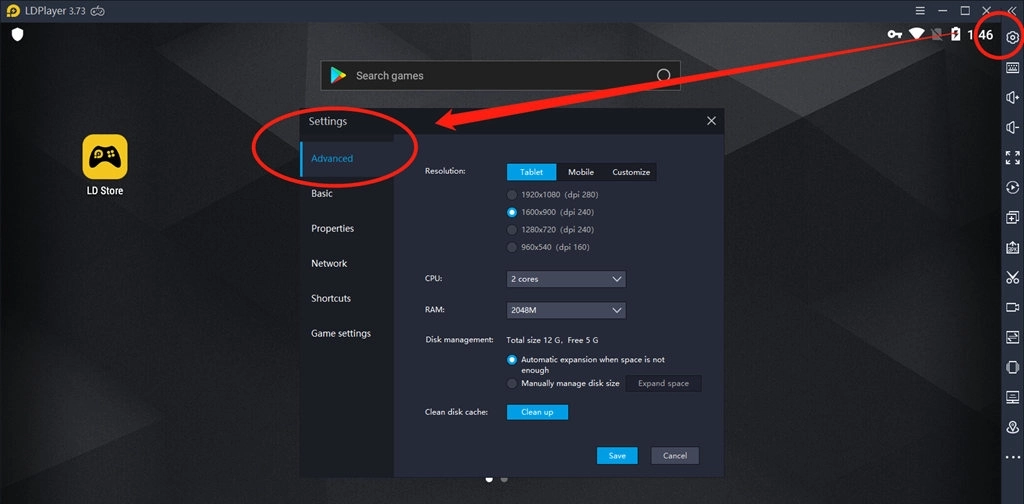
- Adjust the CPU settings to use up to 6 cores and assign around 6GB of RAM for smoother, lag-free gameplay. If your PC has higher memory capacity, you can increase the RAM allocation further for better performance.
Adjust Screen Resolution
Setting the screen resolution to match your monitor is another way to optimize gameplay for smoother performance.
- Go to LDPlayer Settings > Display.
- Set your resolution to 1280 x 720 for a better gaming experience.
Set Up 120 FPS
The Division Resurgence is a fast-paced game where quick actions can make the difference between victory and defeat. You can enable High FPS mode and set it to 120 FPS for faster response times and smoother gameplay.
- Go to LDPlayer Settings > Display.
- Find the FPS setting and switch to High FPS Mode. Select 120 FPS for improved performance.
- Enable V-Sync to prevent screen tearing and enjoy a smoother experience.
LDPlayer Features for a Perfect Gameplay
For optimal gameplay in The Division Resurgence on PC, you can use LDPlayer’s features to make your gameplay more comfortable and easier to control. Here are the features:
Key Mapping Setup for The Division Resurgence
The Division Resurgence is all about fast movements, accurate shooting, and strategic decision-making. While playing on PC, you can use LDPlayer's Keyboard Mapping feature to turn your keyboard and mouse into a precise control setup. It allows for faster movements, smoother actions, and more accurate aimed shots, which is perfect for hitting enemy headshots.
The best part is that Keyboard Mapping lets you fully customize your controls. Here’s how to set it up:
- Open the Keyboard Mapping panel. Drag and place the on-screen buttons where they are easiest for you to reach.
- Arrange the keys to match the in-game touch controls for natural gameplay.
- Assign keyboard or mouse buttons for faster and smoother actions.
- Save your customized layout so you can start playing with your optimized setup anytime.
Tip: You can customize your keyboard layout to feel easier and more natural for your gameplay. This helps improve your aiming, movement, and combat efficiency, making you stronger in battles.
Execute Combos Easily with One Key
The Division Resurgence gameplay comes with different actions and shooting, so you can also perform combo attacks like jumping and firing to reach headshots, or sprinting and throwing explosives while firing to escape from critical moments. Normally, you need to press multiple keys for combos, but LDPlayer’s Keyboard Macro makes it easier to perform combos by setting all actions to one key.
Here’s how to set up combos with Keyboard Macro:
- Open the Keyboard Mapping layout.
- Drag the Keyboard Macro feature onto the screen.
- Assign a key for the combo.
- Program the macro using Size, Loop, Touch, and Wait commands for your actions.
- Set the screen resolution and finish configuring the button.
- Save your layout.
Once you set up combos for one key, you can execute the entire combo automatically with a single key tap. This makes your battles much easier.
Auto Fire with One Tap
Rapid firing is essential during intense battles in The Division Resurgence. Repeatedly pressing the fire button can slow you down. LDPlayer’s Generating Repeat Touch Actions feature allows continuous firing with just a single key.
Here’s how to set it up:
- Open the Keyboard Mapping panel.
- Drag Generating Repeat Touch Actions onto the fire button.
- Assign a keyboard or mouse key to activate it.
- Adjust the repeat rate for the firing speed you want.
- Save your settings.
Once the setup is complete, you can fire continuously with just one tap.
Hot Recommend
Download LDPLAYER, play The Division Resurgence on PC, enhance your gaming experience!


Conclusion
Now you are ready for the ultimate battle experience by playing The Division Resurgence on PC with LDPlayer. You can use LDPlayer’s optimizations and best features to make your gameplay smoother and easier, with faster action controls for more epic battles. Try playing on PC today with LDPlayer and stand out as a pro player in every match, securing victory with precision and speed.
More from The Division Resurgence: