News
LDPlayer 14 vs BlueStacks 5: Performance, Features, and Best Use Cases (2026)

Cecily Wilborn
|2026-07-21When choosing an Android emulator for PC, players usually care about three things: game compatibility, smooth performance, and resource usage. LDPlayer 14 introduces a newer Android 14 environment together with major upgrades in frame rate, multi-instance efficiency, and Windows compatibility.
LDPlayer 14 vs BlueStacks Real-Game Performance Test
The comparison was conducted on the following PC:
- Windows 11 64-bit
- Intel Core i5-13400
- 31.7 GB RAM
- NVIDIA GeForce RTX 3050
- 1600 × 900 emulator resolution
- Highest in-game graphics settings
For the FPS tests, each emulator received six CPU cores and 6 GB of RAM. The same stages, characters, battle settings, and capture ranges were used to reduce testing differences.
Cookie Run: Kingdom
|
Metric |
LDPlayer 14 |
BlueStacks (Android 13) |
|
Average FPS |
124.38 |
102.69 |
|
Average minimum FPS |
78.03 |
61.04 |
|
Maximum FPS |
174.19 |
142.74 |
|
FPS standard deviation |
21.22 |
20.83 |
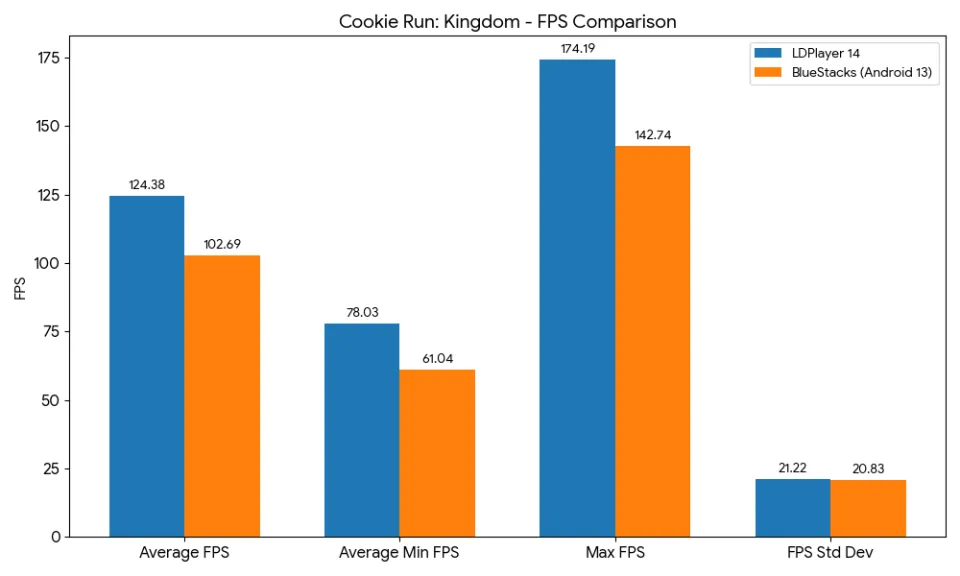 In this test, LDPlayer 14 achieved approximately 21% higher average FPS and 28% higher minimum FPS.
Higher minimum FPS is particularly important during battles with multiple effects and characters on screen. It means the game is less likely to experience noticeable drops during heavier scenes.
BlueStacks recorded a slightly lower FPS standard deviation in this test, but LDPlayer 14 maintained a clear advantage in average, minimum, and maximum frame rates.
Arknights
|
Metric |
LDPlayer 14 |
BlueStacks (Android 13) |
|
Average FPS |
203.72 |
157.05 |
|
Average minimum FPS |
87.76 |
36.14 |
|
Maximum FPS |
261.25 |
240.00 |
|
FPS standard deviation |
31.80 |
40.19 |
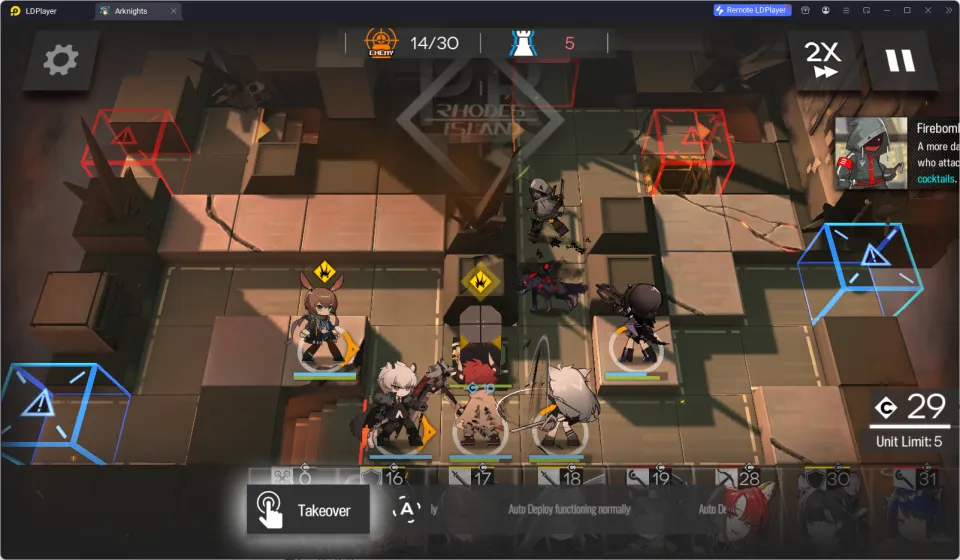
The difference was more noticeable in Arknights. LDPlayer 14 achieved approximately 30% higher average FPS while also recording a substantially higher minimum frame rate.
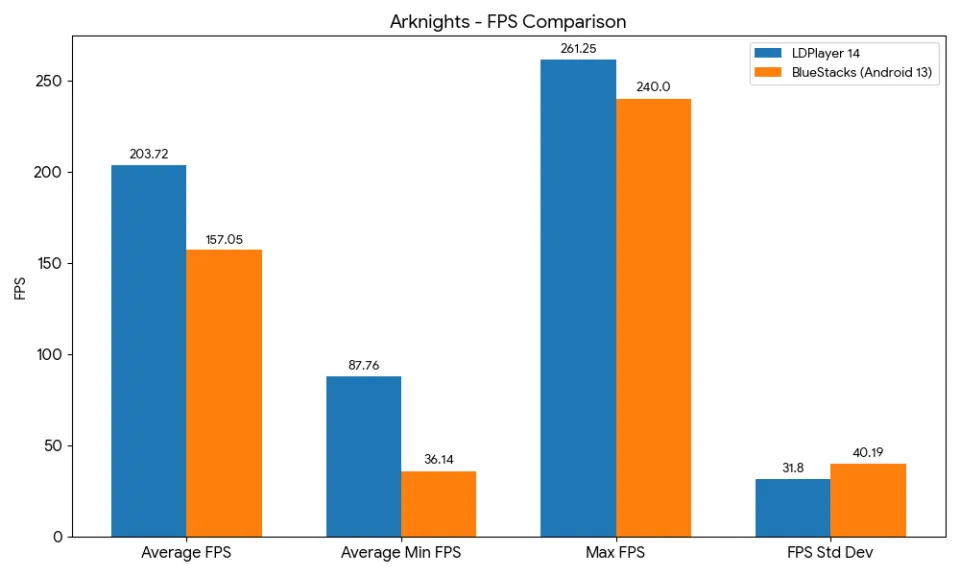 LDPlayer 14 also produced a lower FPS standard deviation, indicating more consistent performance during the tested battle sequence.
These results show how the Android 14 engine and updated performance scheduling in LDPlayer 14 can benefit supported games, especially when running high-frame-rate or visually demanding battle scenes.
Actual performance may vary depending on hardware, graphics drivers, emulator settings, and game updates.
Better Multi-Instance Efficiency
Multi-instance performance matters to players who manage several accounts, reroll characters, farm resources, or keep games running in the background.
The test launched ten Clash of Clans instances at the same time. Each instance was configured with two CPU cores and 2 GB of memory.
|
Resource Metric |
LDPlayer 14 |
BlueStacks (Android 13) |
|
Process CPU usage |
42.39% |
61.08% |
|
Dedicated memory |
3233.24 MB |
2915.30 MB |
|
Committed memory |
22207.01 MB |
25463.79 MB |
|
Physical memory |
22717.33 MB |
26491.74 MB |
|
Video memory |
5074.93 MB |
5576.51 MB |
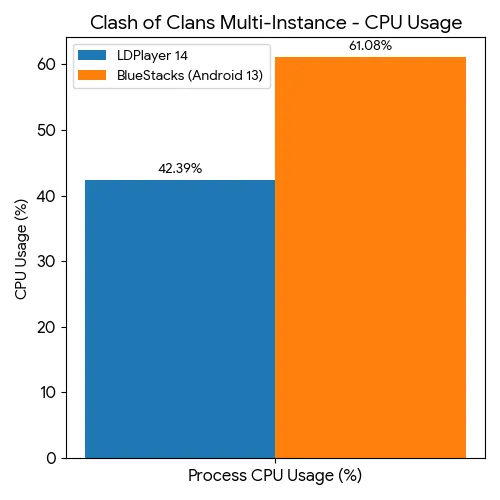
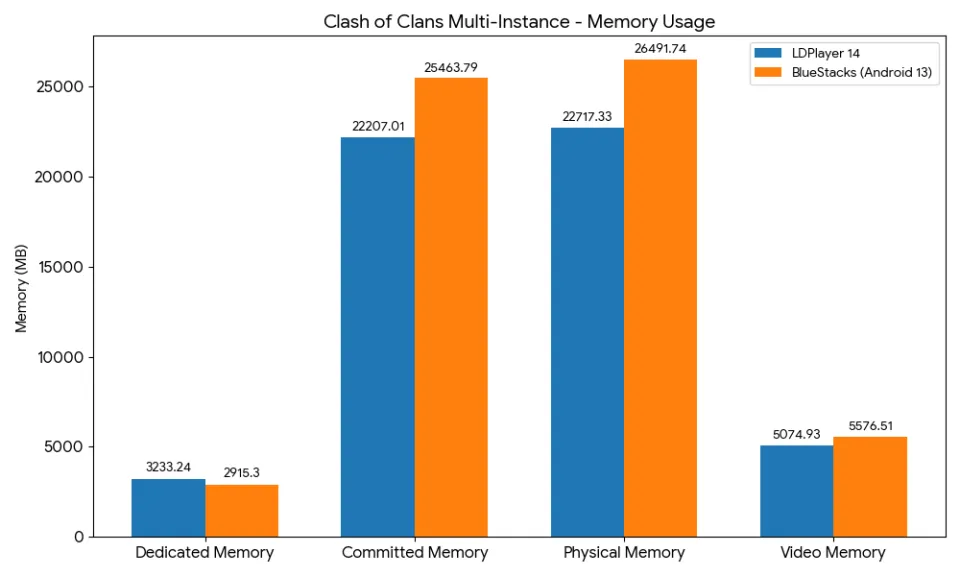
Compared with the tested BlueStacks configuration, LDPlayer 14 used approximately:
- 31% less process CPU
- 13% less committed memory
- 14% less physical memory
- 9% less video memory
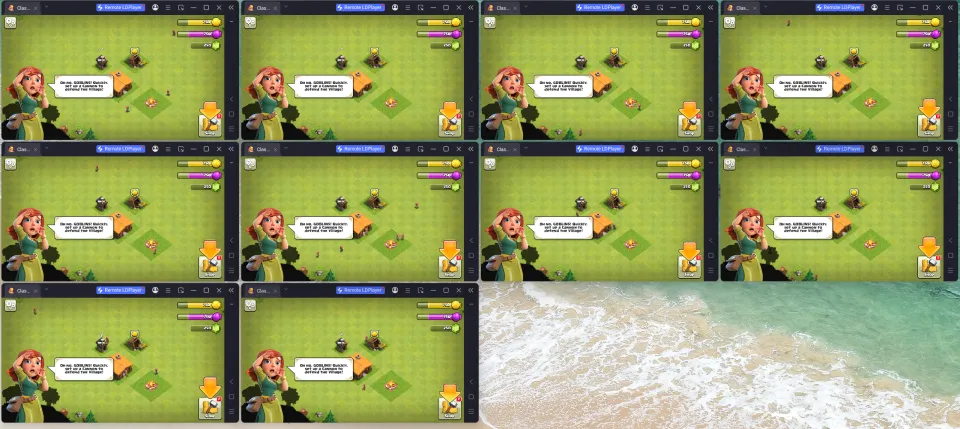
BlueStacks used less dedicated memory, but LDPlayer 14 performed better across several of the system metrics that directly affect multi-instance capacity and overall PC responsiveness.
LDPlayer 14 also includes a multi-instance energy-saving mode. Active windows receive more resources, while inactive or background instances automatically reduce their resource use. This is especially useful for long-term farming, idle games, and multi-account management.
Android 14 for Newer Mobile Games
One of the biggest differences between LDPlayer 14 and many existing Android emulators is its Android 14 engine.
As mobile games adopt newer Android APIs and system requirements, older emulator environments may encounter installation errors, black screens, crashes, or additional configuration steps.
LDPlayer 14 updates the underlying Android environment and application compatibility layer, making it more suitable for newer mobile games and applications developed for recent Android versions.
Hyper-V and Windows Compatibility
LDPlayer 14 can run while Hyper-V is enabled. Users do not need to disable Windows virtualization features simply to launch the emulator.
This is useful for players who also use Windows security features, virtual machines, Docker, development tools, or other software that depends on Hyper-V.
BlueStacks also supports Hyper-V in current versions. The advantage of LDPlayer 14 is that Hyper-V support is integrated into its updated Android 14 environment, helping reduce configuration conflicts for modern Windows users.
Final Verdict
LDPlayer 14 is more than a routine version update. Its Android 14 engine, higher tested frame rates, improved minimum FPS, multi-instance resource optimization, and Hyper-V support make it a compelling Android emulator for modern PC gaming.
Players who want smoother gameplay, better support for newer mobile games, and more efficient multi-account operation can download LDPlayer 14 from the official LDPlayer website and test it with their own games and PC configuration.