Games
Support
Blogs
Updates
LDGame
Affiliate
LDGame Community

Follow Us

LDPlayer Support

EmailEmailFacebookFacebookDiscordDiscordLDGame Customer ServiceLDGame Customer Service(For LDPlayer account & recharge problem)

Products

LDCloudLDCloudOSLinkOSLinkEasyFunEasyFun

About

About UsAbout UsBusiness InquiryBusiness Inquiry

2026 LDPlayer.net. All rights reserved.

JUST OKAY LIMITED

Office F, 12/F, YHC Tower, 1 Sheung Yuet Rd, Kowloon Bay, KLN, Hong Kong

XUANZHI INTERNATIONAL CO., LIMITED

Room 1911, Lee Garden One, 33 Hysan Avenue, Causeway Bay, Hong Kong

Games and applications on this site are collected from the internet. If there is any infringement, please contact the email: support@ldplayer.net
Software Licensing ProtocolSoftware Licensing ProtocolTerms of UseTerms of UsePrivacy PolicyPrivacy PolicyGDPR Privacy NoticeGDPR Privacy NoticeHelp TranslateHelp Translate

Support/

Network Bridging

The solution to network error on LDPlayer

2019-05-28

1. Exit all your anti-virus software. 

2. Download the file below.

    Download


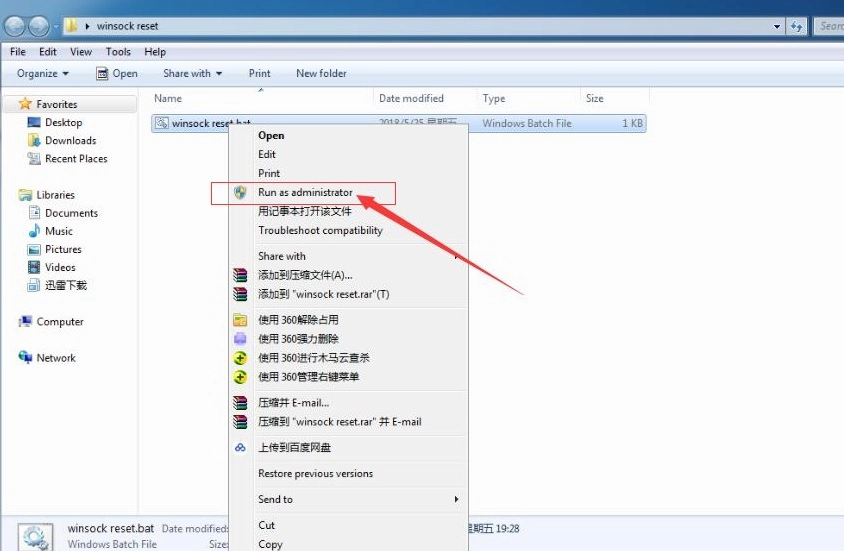
3. Run as administrator.

The solution to network error on LDPlayer


4. Restart your computer. Please note that this operation will reset the network of your PC. 


Was this article helpful?
196 users found this helpful.
Video Tutorials
LDPlayer Introduction
Affiliate Program
Launch Error
Enable Virtual Technology
Function Instruction
Game Installation
Device Optimization
Multi-instance
Network Bridging
Solution to Network Error Set up Network BridgingSolutions to Bridged Networking Driver Failure
Data Recovery/Backup
Game Troubleshooting