home page
Games
Pre-RegisterRPGStrategyAdventureCasualArcadeRacingActionSimulation
Support
LDPlayer 9 IntroductionEnable VTStartup Stuck at 50%/94%Fix Invalid Virtual DiskUpdate Graphics DriverKeyboard MappingEnable LDMultiplayerFPS Setting
Blogs
Updates
LDGame
Affiliate
LDGame Community
download ldplayer
Download LDPlayer
English
繁體中文한국어Tiếng ViệtภาษาไทยPусскийPortuguêsEspañolFrançaisDeutsch日本語Indonesiaالعربية

LDPlayer Support

EmailFacebookDiscordLDGame Customer Service(For LDPlayer account & recharge problem)

Products

LDCloudOSLinkEasyFunLDShop

About

About UsBusiness InquiryDMCA Takedown

Follow Us

©2025 LDPLAYER.NET , ALL RIGHTS RESERVED.JUST OKAY LIMITED , OFFICE F, 12/F, YHC TOWER , 1 SHEUNG YUET RD, KOWLOON BAY KLN, HONG KONG
Games and applications on this site are collected from the internet. If there is any infringement, please contact the email: support@ldplayer.net
Privacy Policy|GDPR Privacy Notice|Help Translate
English
繁體中文한국어Tiếng ViệtภาษาไทยPусскийPortuguêsEspañolFrançaisDeutsch日本語Indonesiaالعربية

Blogs/

Game Guides/

News and Guides for Chiikawa Pocket

Upgrade Your Chiikawa Pocket Gameplay Attacks and Combos with LDPlayer

2025-03-28

Chiikawa Pocket is finally here and it is time to defeat the Abunaiyatsu and then collect rewards. If you want to enjoy the best attacks and combos within here to advance your gameplay, then LDPlayer is now ready for it. It is time to upgrade your attacks and achieve combos while playing Chiikawa Pocket on PC. Are you curious about how to do this? Let’s find out.

Table of Contents
  • Looping and Automatic Combos with Macros
  • Using Operation Recorder 
  • Conclusion

Upgrade Your Chiikawa Pocket Gameplay Attacks and Combos

Looping and Automatic Combos with Macros

The gameplay in Chiikawa Pocket is made with a lot of resource collection tasks and these are repetitive. So, if you do not want to waste your time more, you can use LDPlayer and its Keyboard Macro Commands to achieve this continuous looping as well as to set some automatic combos within your gameplay. So you can perform your resource collection automatically without making direct involvements for it.

So, here is how you can do it.

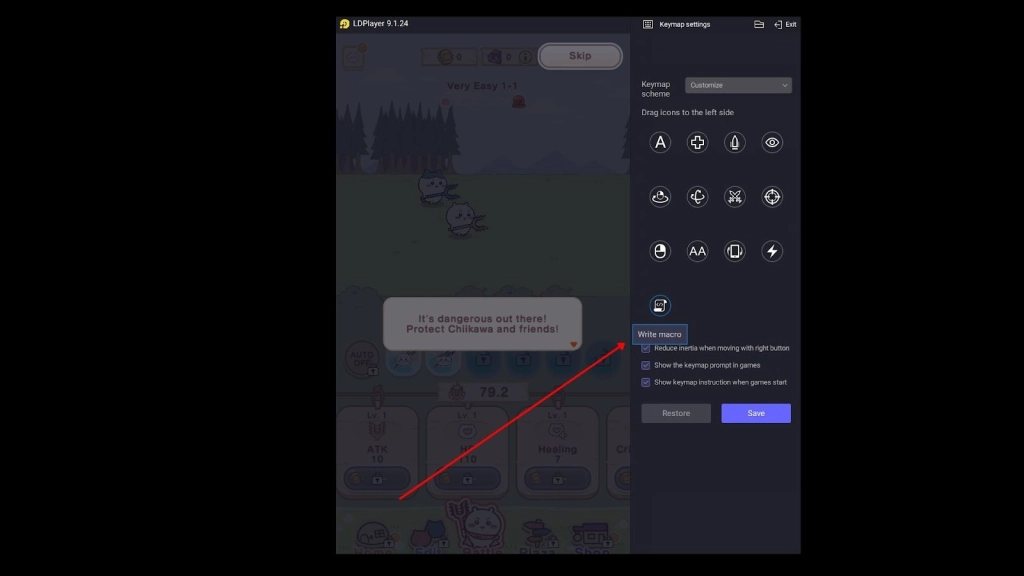
  • Open the game and then select Macros from the toolbar of the emulator.

  • Drag this macro command to the interface of this game.

  • Then, edit the button and enter these settings into your edit box. And remember to set the resolution to size 1600 * 900 for one macro. If you need more than one, go with a customized resolution as you want.
Looping and Automatic Combos with Macros

1.  Size 1600 * 900

2.  Loop

3.  Touch 240 750

4.  Wait 100

5.  Touch 1200 750

6.  Wait 100


Using Operation Recorder 

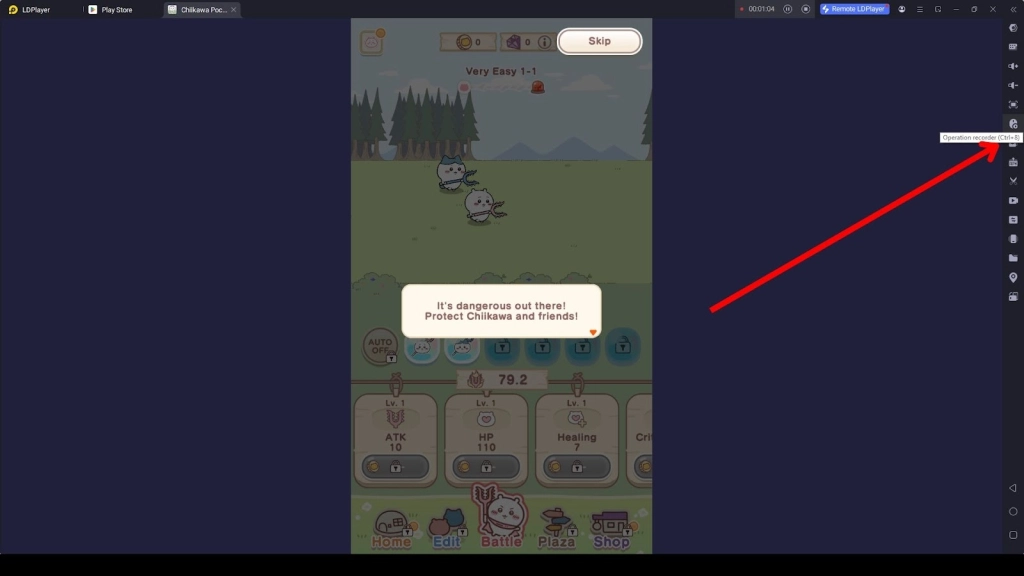
Now, you can use the Operation Recorder feature to achieve the combos you get and set it to play as a loop. Here is how you can do it.

  • Open the game and then click the Operation Recorder function from the menu of the simulator.
Using Operation Recorder 

  • Now click Start Recording. Set the macros you set to play according to the order, record an instance as you want, and then stop.

  • Now, find the recorded script from the Operation Recording tab and then click settings to allow it to perform more operations according to the script.

  • Set your loop mode, speed and loop intervals as your preference and continue gathering more resources


Conclusion

So, as a Chiikawa Pocket beginner, it might be challenging and take more time to collect your resources, but not anymore with LDPlayer. You can set a record, make it play as you want and then make your resource collection more streamlined than ever.

Plants vs. Zombies 2 Expert Guide: Tips, Tricks, and Strategies
|
Chiikawa Pocket Beginner Guide with Tips and Tricks

Chiikawa Pocket

You May Also Like
Top Game Guides
How to Collect Items in Chiikawa Pocket: Recipes, Accessories and Clothing and More
Chiikawa Pocket Characters Guide in Detailed for Newbies
Chiikawa Pocket Battle Guide and Tips –Best Strategies
Chiikawa Pocket Beginner Guide with Tips and Tricks
How to Download and Play Chiikawa Pocket on PC - Beginners Guide
Viking Rise celebrates its anniversary—win a trip, lodging, and 2026 World Championship tickets!