Home/

Games/

Role Playing/

ANGELICA ASTER

ANGELICA ASTER
3.0100+

ANGELICA ASTER

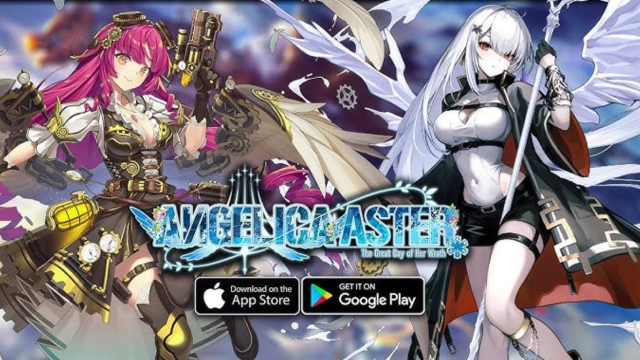
“ANGELICA ASTER” Google Play version finally released! Now you can get up to 6,000 jewels! Angels, it's time to kill the gods - jump!

Play on PC with LDPlayer
recommend
DMMGAMES
How to Download&Play ANGELICA ASTER on PC?
Last Updated: 2026-01-10
com.dmm.games.angelica
Share:
  • Overview

  • FAQ

  • Game Guides

Use LDPlayer to Play ANGELICA ASTER on PC

ANGELICA ASTER is a Role Playing game developed by DMMGAMES, and LDPlayer is the best platform for playing ANGELICA ASTER on Windows PC, offering powerful features for an immersive experience.

When playing ANGELICA ASTER on PC, as a new player looking to start with a fresh account, the multi-instance and sync features are extremely useful for rerolls. You can use them to run multiple instances and begin the synchronization process. Bind your account until you draw the desired heroes.

In addition, operation recorder is great for games that require you to level up and complete tasks! Run the sync and record your actions, then repeat the main instance's actions in real-time. By doing so, you can run 2 or more accounts simultaneously. You can always get the heroes you want before others by faster rerolls and more efficient summoning! Start downloading and playing ANGELICA ASTER on your computer now!

◆◇◆ ANGELICA ASTER リリース!◆◇◆

DMM最高峰の本格3Dグラフィックス美少女バトル
キャラクターは美しい翼を持った天使たち

◆天使諸君、神殺しの時間だ――跳べ!
これは天使と神獣の物語。

命を賭して翼を手に入れ、天使となった少女たちと、高空より飛来し、人を滅ぼそうとする古代遺産戦艦――神獣。

空をめぐる天使と神獣の戦いは、破滅へと突き進む世界に
失われた物語の再演をもたらす。

それは希望の再生か、終極か。


◆ド迫力の空中3Dターン制バトル
縦横無尽に天使たちが大空を翔けめぐり、巨大な神獣に立ち向かう。ジョブごとにバトル中のコマンドが大きく変化、個性豊かなジョブを駆使して天使たちを勝利へと導こう。

◆やり込み要素満載の育成システムや、様々なミニゲームも!
いくら時間があっても足りない!レベル強化、スキル強化、覚醒、好感度アップといった天使の強化だけでなく、不思議な装備品『オーパーツ』の強化、喫茶『鳩』の施設強化などの育成要素が盛りだくさん。
本編に疲れたときは、釣り、メダル落とし、音ゲー、ブロック崩し、落ちパズル、ミニガチャなどの気軽に遊べるミニゲームもテンコ盛り!ぜひANGELICA ASTERをお楽しみください。

◆公式X
https://x.com/Angelica_Aster

◆推奨端末
▽OSバージョン:Android OS 9.0以上
▽プロセッサ:Snapdragon 778G相当
▽メモリ:4GB以上

◆ご利用前に「利用規約」の記載内容をご確認ください。
Open up

Screenshots and Videos of ANGELICA ASTER PC

Experience a wider field of view, exquisite game graphics, and cooler combat skills and effects by downloading and playing ANGELICA ASTER on PC with LDPlayer. Enjoy the ultimate gaming experience with LDPlayer.

Why Play ANGELICA ASTER on PC with LDPlayer?

LDPlayer offers unique emulator features including multi-instance support, macros, operation recorder, and other functions not available on mobile devices.

Multi-Instance & Sync

Remote Control

Operation Recorder

Multi-Instance & SyncRemote ControlOperation Recorder

Effortlessly clone multiple instances and initiate synchronization until you draw the desired hero before binding your account, enhancing efficiency in rerolls in ANGELICA ASTER.

  • High FPS

    With support for high FPS, ANGELICA ASTER's game graphics are smoother, and actions are more seamless, enhancing the visual experience and immersion of playing ANGELICA ASTER.
  • Keyboard & Mouse

    In ANGELICA ASTER, players frequently perform actions such as character movement, skill selection, and combat, where keyboard and mouse offer more convenient and responsive operation.

How to Download&Play ANGELICA ASTER on PC?

  • 1

    Download and install LDPlayer on your computer

  • 2

    Locate the Play Store in LDPlayer's system apps, launch it, and sign in to your Google account

  • 3

    Enter "ANGELICA ASTER" into the search bar and search for it

  • 4

    Choose and install ANGELICA ASTER from the search results

  • 5

    Once the download and installation are complete, return to the LDPlayer home screen

  • 6

    Click on the game icon on the LDPlayer home screen to start enjoying the exciting game