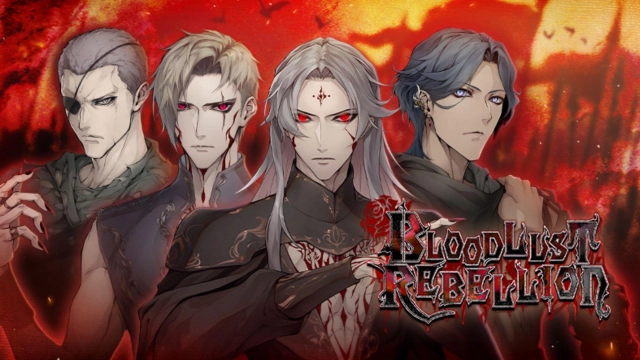
Bloodlust Rebellion: Otome is a Simulation application developed by Genius Inc, but with the best Android emulator-LDPlayer, you can download and play Bloodlust Rebellion: Otome on your computer.
Running Bloodlust Rebellion: Otome on your computer allows you to browse clearly on a large screen, and controlling the application with a mouse and keyboard is much faster than using touchscreen, all while never having to worry about device battery issues.
With multi-instance and synchronization features, you can even run multiple applications and accounts on your PC.
And file sharing makes sharing images, videos, and files incredibly easy.
Download Bloodlust Rebellion: Otome and run it on your PC. Enjoy the large screen and high-definition quality on your PC!
■Synopsis■Introducing Bloodlust Rebellion—a heart-pounding post-apocalyptic vampire adventure!
In a vampire-ruled post-apocalyptic world, join the rebellion to overthrow the iron-fisted Vampire King Xavier and his corrupt reign. Guided by the charismatic Gideon, navigate a perilous landscape filled with supernatural creatures and ancient artifacts, including the mind-controlling device, The Nexus. With your loyal childhood friend and battle-hardened partner, Thorne, face the challenges of the rebellion and ignite a forbidden connection with the enigmatic vampire, Elric, that tests your beliefs and fuels your desire for revolution.
■Characters■
King Xavier — Red Elite General
Mesmerizing and torn, Vampire King Xavier grapples with conflicting loyalties and an undeniable fascination for you, a mere human. As he embarks on a perilous journey to defeat The Nexus and carve a path to a brighter future, Xavier must confront internal opposition that threatens to undermine his leadership and desire for change. With your influence, will Xavier uphold the status quo or dare to embrace a new era of harmony and coexistence?
Elric — Red Elite Sentinel
Elric, the enigmatic and formidable Vampire Sentinel of the Red Elite, stands as the loyal right-hand of King Xavier. His exceptional combat skills and unwavering devotion make him a formidable ally in the rebellion against the Red Elite. However, as your bond deepens, Elric begins to question King Xavier's vision and seeks a more compassionate approach to bring about change. Will Elric's doubts and desire for a better future lead him to betray his king, or will his loyalty prevail?
Thorne — Resistance Warrior
Thorne, your devoted childhood friend and fearless warrior of the rebellion, remains a steadfast presence by your side. Hidden beneath his tough exterior is a vulnerability and a secret dhampir identity that fuels his unwavering determination to prove himself and shield you from danger. Together, you face the challenges of the rebellion with unwavering resolve, knowing that Thorne will do whatever it takes to protect you, even if it means sacrificing himself. Can your bond withstand the trials of the rebellion and lead you to victory?
Gideon — Resistance Leader
Gideon, the charismatic and strategic leader of the Resistance, is driven by an unwavering dedication to overthrowing the oppressive Red Elite and restoring freedom to humanity. Despite his calculated leadership, he finds himself entangled in conflicting emotions for you, admiring your strength and determination. While you see him as a mentor, his feelings for you intensify, yet he remains steadfast in his mission to defeat the Red Elite, even if he believes your heart is off-limits... Will love or duty prevail in this high-stakes battle for freedom?