
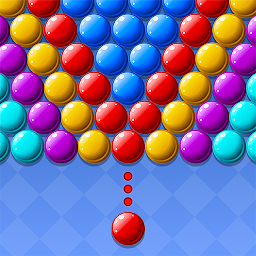


Bubble Pop Frenzy is a Casual game developed by ZenPuz. LDPlayer is the best platform for playing Bubble Pop Frenzy on Windows PC, offering powerful features to enhance your immersive experience in Bubble Pop Frenzy.
When playing Bubble Pop Frenzy on your computer, if you find repetitive actions or tasks tedious and time-consuming, fret not! Macro can alleviate your concerns. Simply record your actions with a click of the screen recording feature and let macros take care of the rest. Macros automate your operations, allowing you to effortlessly conquer the game with minimal effort! Start downloading and playing Bubble Pop Frenzy on your computer now!
Dive into Bubble Pop Frenzy – the FREE bubble shooter that blends fast-paced puzzles, explosive combos, and endless challenges! Whether you're a fan of classic bubble games, color-matching puzzles, or relaxing brain teasers, this is your ultimate obsession! 💥✨ WHY PLAYERS LOVE IT:
✅ Bursting with Levels!– Conquer 1,000+ brain-teasing stages (with NEW Frequent updates puzzles!)
✅ Power-Up Mania!– Unleash Rainbow Blasts, Laser Cannons, and Time Freezers to crush more bubbles!
✅ Play Anywhere!– No Wi-Fi? No problem! Perfect for commutes, waiting rooms, or lazy Sundays.
🔥 HOW TO BECOME A BUBBLE MASTER:
1️⃣ AIM & FIRE! Drag to aim, release to shoot – match 3+ same-color bubbles to make them POP!
2️⃣ THINK AHEAD! Use walls to ricochet shots and create MEGA CHAIN REACTIONS!
3️⃣ SMASH GOALS! Clear, before bubbles hit the bottom – earn 3 STARS for epic rewards!
🚀 FEATURES THAT MAKE IT IRRESISTIBLE:
🌟 Level Challenges: The increasing difficulty and surprise obstacles keep you hooked!
🌟 Stunning Visuals: Watch bubbles burst in satisfying slow-mo with glittering particle effects! ✨
🌟 Family-Friendly: Simple controls for kids, deep strategy for adults – fun for ALL ages!
📧 Need help? Reach us at FrenzyFeedback@outlook.com – we reply in <24hrs!
Aim, shoot, POP! Beat the puzzles, climb the leaderboards, and become the ultimate Bubble Master. Simple to learn, hard to put down – your bubble-popping obsession starts here!







