CCX Drift Drive Simulator is a Simulation application developed by Thunderclap Studios, but with the best Android emulator-LDPlayer, you can download and play CCX Drift Drive Simulator on your computer.
Running CCX Drift Drive Simulator on your computer allows you to browse clearly on a large screen, and controlling the application with a mouse and keyboard is much faster than using touchscreen, all while never having to worry about device battery issues.
With multi-instance and synchronization features, you can even run multiple applications and accounts on your PC.
And file sharing makes sharing images, videos, and files incredibly easy.
Download CCX Drift Drive Simulator and run it on your PC. Enjoy the large screen and high-definition quality on your PC!
Update v2.2New update is now ready for you to enjoy.
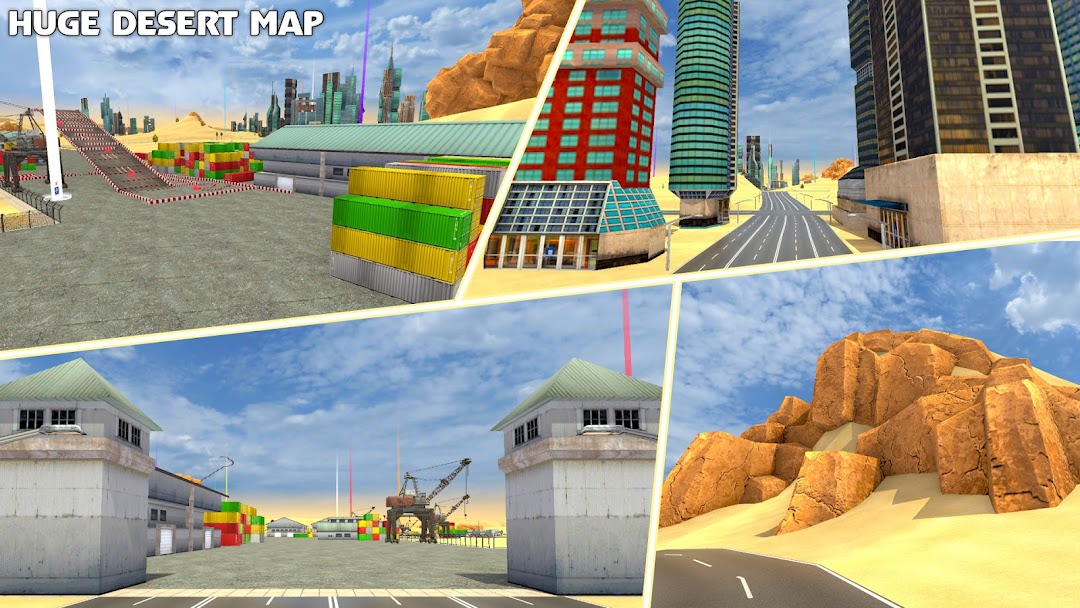
- New Huge Desert Map
- All mission types for the new map with great new missions
- Dry Docks, Desert Dunes, Rocky Mountains and Cities. All in one
- App name now changed from "CCX Drift Drive and Modification Simulator" to "CCX Drift Drive Simulator" in order to stay inline with playstore policy. But the game still has Modification in it ;D
Update v2.1
You will see the following differences in the new update.
- New Agera is now available to drive as you guys were asking for.
- Speedometer is now on top left corner. (Soon will be customizable)
- Optimized game for better performance.
- New money and reward system added.
- Color correction for better graphics.
Update v1.2.1
We added new missions for you guys to enjoy along with other minor fixes and optimizations.
2 New Mission types added
- Parking missions
- Impossible Track missions
Update v1.1
We just updated the game with cool new stuff.
Now you can capture the perfect screenshot of the game using a little in game editor and share it with almost all the social media platform you have on your mobile phone.
5 new mission types for players to enjoy in the free roam map. Those missions include
- Checkpoint Race
- Vase Break Missions
- Speed Cam Missions
- Bench Break Missions
- Easter Egg Find and Collect Missions (Easter Holiday Special)
Along with that we have enhanced the graphics of the game and have added the option to use nitrous purge while in the free roam map as one of our reviewers asked us to do.
Also, now you can change the density and the colour of the tyre smoke as well.
We have also reduced the ad frequency in the game.
We have almost 12 more updated in the pipeline which include new maps, traffic mode and new missions which we would try to roll out every month for you guys.
If you have any suggestions or would like to see any vehicles or maps, please let us know through our Facebook page or email.
For the fans of CCX we present an amazing game featuring their favourite vehicle.
The game features complete customisation of the vehicle so that you can pimp your ride and enjoy it. The game features over 50 different rims and 30 different spoilers and neons and many more options for you to explore. After modification of your ride you can take it to the streets and drift it or drive it.
These are some of the customization options :
- Spoiler change
- Rims change
Paint Options:
- Body paint
- Rims
- Spoiler
- Windshield
- Neons
- Headlights
- Nitrous Purge
With much more to come, this simulator features the best options for you to enjoy the vehicle you love. The game also features 3 different controls schemes for you to enjoy along with 5 different camera options so that you can have the top best possible view driving your CCX.
So engineer your ride, get in the workshop and customise it. Drift it, Drive it, Enjoy it.