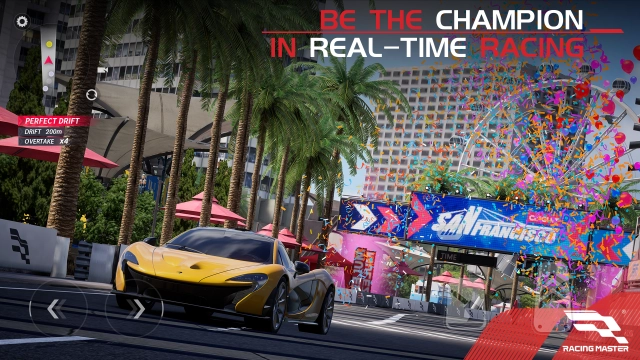
Ignite your passion for speed in Racing Master, a triple-A, high-quality racing game. Experience a breathtaking automotive masterpiece featuring over 120 intricately modeled, officially licensed iconic supercars from more than 30 prestigious global brands. Driven by an advanced physics engine and real-time lighting technology, Racing Master delivers real-world scanned tracks, authentic engine roars, and deep performance customization. Strap in, step on the gas, and engage in fierce real-time competitive PvP matches against racers from around the globe!
Core Gameplay & Features
-
120+ Officially Licensed Supercars: Get behind the wheel of fully licensed legendary machines from world-class manufacturers, including masterpieces like the Lamborghini Aventador SVJ. Each vehicle is meticulously rendered to capture its real-world counterpart down to every gleam of paint.
-
Deep Automotive Customization: Make your dream machine truly unique. Modify your ride with a myriad of aesthetic and performance options, including custom colors, liveries, rims, tires, decals, suspension settings, brakes, and authentic aftermarket parts.
-
Laser-Scanned Global Circuits: Race across stunning real-world locations such as Chicago, San Francisco, Barcelona, Amsterdam, and the Alps. Push your limits on famous real-world F1 circuits, including the Shanghai International Circuit, Indianapolis, and the Red Bull Ring.
-
Advanced Next-Gen Physics Engine: Experience realistic handling that simulates various drive systems, tire slip, and aerodynamics. Compete in exhilarating real-time PvP matches, club-based GvG battles, and high-stakes racing tournaments where skill is the ultimate decider.
-
Immersive Audio Engineering: Feel the rush with meticulously recorded, authentic vehicle sounds that capture the distinct nuances of engine notes, exhaust systems, transmissions, and screeching tires.
Players and racing enthusiasts universally praise Racing Master for bridging the gap between mobile accessibility and authentic, hardcore console-style racing simulation, rewarding precise cornering, drafting, and tactical overtaking.
Play Racing Master on PC with LDPlayer for Best Experience
-
Console-Grade Gamepad & Wheel Support: In a high-speed sim-cade racing game, sliding your fingers across a touchscreen cannot match the precision of physical controls. LDPlayer offers seamless, plug-and-play gamepad and steering wheel support, letting you hit every apex and counter-steer with millimeter precision.
-
Buttery-Smooth High FPS for Faster Reactions: At 200 mph, a single frame drop means missing your braking zone. LDPlayer unlocks uncapped, ultra-stable high frame rates, giving you the fluid visual clarity needed to react to tight corners and rival maneuvers instantly.
-
Stunning Showroom Visuals on a Big Screen: Do not let a tiny mobile screen limit the gorgeous real-time lighting tech and advanced graphics of Racing Master. Watch your customized hypercars shine in full HD or 4K resolution on a large PC monitor.
-
Custom Keymapping for Flawless Drifts: Don't have a controller? LDPlayer’s keyboard mapping allows you to set up customized keys for steering, braking, handbrakes, and nitro deployment, giving you a massive competitive advantage over mobile touch players.
-
Zero Performance & Battery Stress: Realistic physics and lighting can cause mobile devices to overheat and throttle performance. Playing on LDPlayer ensures a cool, lag-free, and stable racing environment for long endurance sessions without any battery anxiety.
Claim your spot on the grid, perfect your lines, and dominate the global leaderboards—download Racing Master on PC and experience the ultimate high-fidelity racing simulation with LDPlayer!