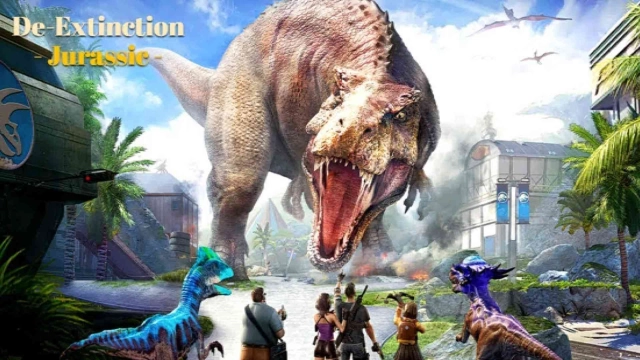
De-Extinct: Jurassic Dinosaurs is a Strategy game developed by SeaMo Entertainment, and LDPlayer is the best platform for playing De-Extinct: Jurassic Dinosaurs on Windows PC, offering powerful features for an immersive experience.
When playing De-Extinct: Jurassic Dinosaurs on your computer, you can enjoy long game sessions using the operation recording feature to record repetitive operations to complete the same tasks automatically. It allows you to level up faster and makes resource grinding much more efficient.
In addition, if you want to execute combo moves or the game requires repeated skill actions, the macro feature is your best helper. It enables you to complete kills with just one click!
If you want to manage multiple accounts, LDMultiplayer and Synchronizer will assist you. You can run multiple alternative accounts at the same time to assist the leveling of your main account. Download and play De-Extinct: Jurassic Dinosaurs on PC with LDPlayer now!
Get ready for this ultimate prehistorical adventure like no other!The Ark Gene Group resurrected dinosaurs on a mysterious island in the distant sea and became the focus of the world.
But one day, we suddenly lost contact with the island. And now it's your quest, as a Veteran, to lead an Elite Team of dinosaur experts and to begin an exhilarating journey.
Do you hear the distant roars of these dinosaurs, their thundering footsteps shaking the ground beneath you?
Are you ready to dig deeper, like an archaeologist unearthing dinosaur fossils, to reveal the truth of this lost island?
----------FEATURES----------
◆ REBUILD DINOSAUR PARK
Face the threats and challenges brought by the Ark Gene Group! Erect shelters for survivors, construct a variety of buildings for research and defense, and customize your Park with unique decorations. Lead the rebirth of a once-forgotten place into a vibrant Dinosaur Park.
◆ RECRUIT DINOSAUR SQUAD
Search those survived on this island, scientists, mercenaries, tourists, and even dinosaur trainers. Recruit them and exploit their specialties to strengthen your squad, many of which can turn into splendid Dinoriders!
◆ ROAM THE ISLAND
Venture across the island's diverse biomes, where danger and discovery walk hand-in-hand. Gather crucial resources and encoutner unexpected events to fuel your survival. And lead the efforts to control, conserve, and contain wild dinosaurs now rampaging across this island.
◆ RESEARCH DINOSAUR ECOLOGY
Encounter over 100 species of awe-inspiring dinosaurs. Whether befriend a docile Triceratops, or capture and train a ferocious T-Rex, or study the genetic secrets and hatch a Psittacosaurus baby.
◆ ALLIES or ENEMIES
You are not the only one who set foot on this island, choose your allies wisely to fight alongside you. Watch out for the hidden threats, be they prehistoric beasts or rival adventurers.
----------FOLLOW US----------
jurassicgamehelp@gmail.com