

Impossible Bottles is a Music application developed by , but with the best Android emulator-LDPlayer, you can download and play Impossible Bottles on your computer.
Running Impossible Bottles on your computer allows you to browse clearly on a large screen, and controlling the application with a mouse and keyboard is much faster than using touchscreen, all while never having to worry about device battery issues.
With multi-instance and synchronization features, you can even run multiple applications and accounts on your PC.
And file sharing makes sharing images, videos, and files incredibly easy.
Download Impossible Bottles and run it on your PC. Enjoy the large screen and high-definition quality on your PC!
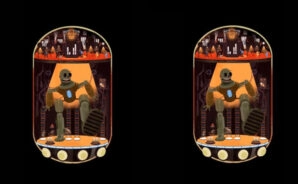
Impossible Bottles is a rhythm game about the global energy crisis and a scientist’s effort to provide an environmentally friendly solution through music.
Each robot represents a decade of electronic music starting from the 1960s.
The music follows those eras and develops up to the year 2050, where the ninth robot powers up rockets to Mars only to reveal the final robot in an abandoned earth “healing” our planet and returning to nature.
During story mode, the scientist sources new materials based on how well the player played the level. These materials will be added to any robot as power-ups.
The player in Impossible Bottles must power the robots by firing electricity streams in time with the music as they travel through power cables.
Succeed, and the robots power up, eventually moving in perpetuity to the beat of their own music.
Fail, and the robots are in danger of being destroyed.
Impossible Bottles can be played in two modes: story mode and arcade mode.
In arcade mode, the player can select any robot and power-up she has already unlocked in story mode to create the ultimate machine.
The music gradually increases in difficulty and complexity and the purpose of the user is to have the highest output of energy from the robot.
- featuring ten hand drawn robots
- Easy single-tap gameplay
- Original electronic music composed for each robot
- export each robot as a gif
"Impossible Bottles only needs one beautiful gif to win you over."
KILLSCREEN
"...magical stories into tiny gifs"
VERGE