
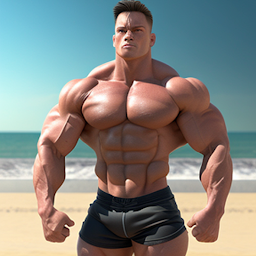


Iron Muscle IV - GYM simulator is a Sports game developed by MateAndor - Sport & Bodybuilding Games. LDPlayer is the best platform for playing Iron Muscle IV - GYM simulator on Windows PC, offering powerful features to enhance your immersive experience in Iron Muscle IV - GYM simulator.
When playing Iron Muscle IV - GYM simulator on your computer, the larger screen and more powerful graphics performance enable you to enjoy clearer and smoother game visuals, enhancing the visual experience of the game.
The operation of peripherals such as gamepads is emulated to better mimic the feel of real sports, providing more precise control and richer operation options.
Furthermore, if you wish to execute a series of continuous key combinations, the one-click macro feature will be the functionality you've been dreaming of, allowing you to effortlessly stay one step ahead with one-touch operation. Start downloading and playing Iron Muscle IV - GYM simulator on your computer now!
Iron Muscle is a bodybuilding game that allows players to design and train a virtual bodybuilder in a simulated gym setting. The game allows players to customize their character's appearance and physique, and then train them using a variety of weightlifting and cardio exercises. The game simulates the effects of training on the body and allows players to see the changes in their character's muscle size and definition as they progress through the game.Some features of Iron Muscle may include :
A wide variety of exercises and equipment to train with, including weightlifting machines, free weights, and cardio equipment.
A detailed simulation of muscle growth and recovery, allowing players to see the effects of their training on their character's physique.
A career mode where players can compete in bodybuilding competitions and earn virtual currency to upgrade their equipment and supplements.
A multiplayer mode where players can compete against other players' virtual bodybuilders online.
It's important to note that while Iron Muscle is a fun and engaging way to learn about bodybuilding and fitness, it is not a substitute for professional guidance and real-life training. Building muscle and staying healthy is best done under the guidance of a certified personal trainer or other qualified professional, and with proper diet, rest and recovery.







