

Japanese Alphabet Letter: Kids is a Educational application developed by Kids Study Games : EMK Fun Lab, but with the best Android emulator-LDPlayer, you can download and play Japanese Alphabet Letter: Kids on your computer.
Running Japanese Alphabet Letter: Kids on your computer allows you to browse clearly on a large screen, and controlling the application with a mouse and keyboard is much faster than using touchscreen, all while never having to worry about device battery issues.
With multi-instance and synchronization features, you can even run multiple applications and accounts on your PC.
And file sharing makes sharing images, videos, and files incredibly easy.
Download Japanese Alphabet Letter: Kids and run it on your PC. Enjoy the large screen and high-definition quality on your PC!
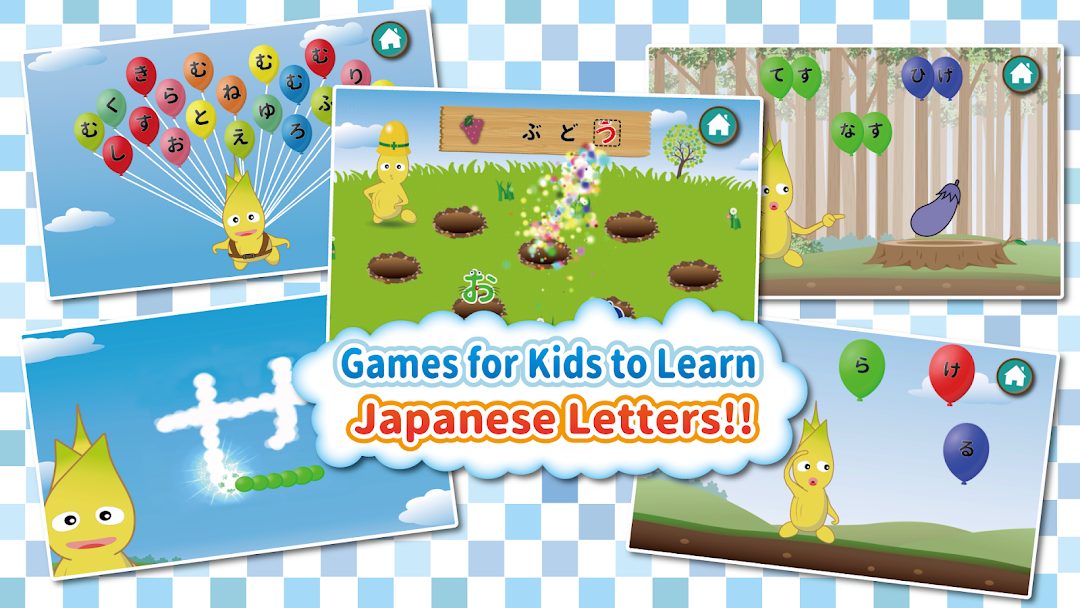
A free educational app for kids to learn how to read and write Japanese alphabet letters / characters with fun. Made for 3 year old to 5 year old kids who starts to have interests in Japanese Hiragana and Katakana letters(Japanese alphabet) like AIUEO. Interactions with and animated character(Goobee) will amuse your kids and enables to let them enjoy the learning process.Target Age: 3 year old to 5 year old
[AIUEO(あいうえお) Game]
A simple free game that lets your kids learn the connection between the sound and the appearance of Japanese alphabet letters. You can turn on/off each Hiragana/Katakana letters if you want them to learn specific letters.
[Balloon Fly(そらとび) Game]
As a next step to AIUEO game, this free game let your kids to search Japanese alphabet letters from a larger number of letters. Children can enjoy popping lots of balloons. Be careful not to fall down by selecting wrong balloons!
[Word Chain(しりとり) Game]
Pick a word that starts with a letter in the tail of previous word. Make word chain longer and run through the roller coaster. Be careful not to select a word that ends with letter [ん], since no Japanese words starts with the letter!
[Whac-a-letter(もじたたき) Game]
Find and hit letters that fit in the blank on the board. Letters will try to hide in holes, so try to hit it before they do so.
[Word(ことば) Game]
Kids can learn words from a connection of Japanese Hiragana/Katakana letters in this game. Familiar words will show up and your kids can enjoy the interaction of the word images and Goobee.
[Write(なぞりがき) Game]
A free game that let your kids learn how to write Japanese Hiragana/Katakana letters by tracing and popping little balloons. As you trace the balloons and make words, cloud-like images will be shown in the sky.
[Dakuon(だくおん) Game] - requires additional pack
Learn how the sound changes when letter parts like DAKUON["], HAN-DAKUON[the circle on upper right] are added to each letters.
[Calligraphy(しゅうじ) Game] - requires additional pack
Leveraging the skills learnt in the writing game, kids can learn the detail shape of each letters such as TOME(stop) and HARAI(sweeping).
[Karuta(かるた) Game] - requires additional pack
Kids can utilize the letters learnt in the other basic games to play Karuta(Card game of Japanese words). It helps to learn more words.
- EMK Fun Lab is a developer of educational apps for kids -