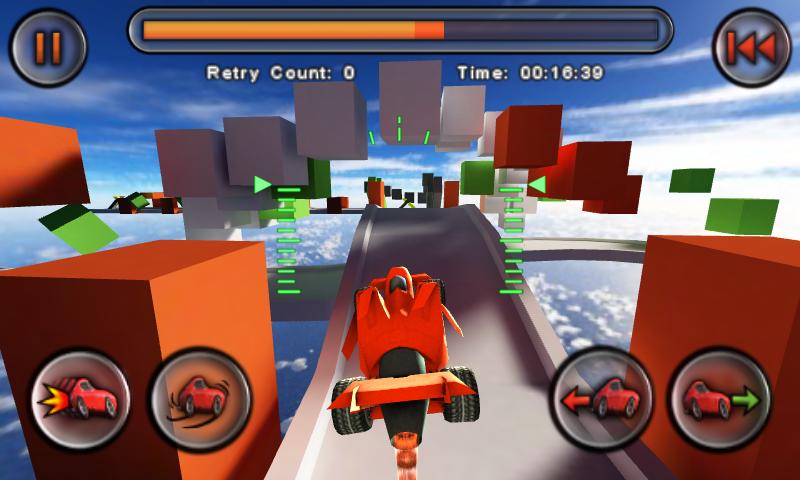


Jet Car Stunts is a Racing game developed by True Axis. LDPlayer is the best platform for playing Jet Car Stunts on Windows PC, providing robust features to help you achieve an immersive experience in Jet Car Stunts.
When playing Jet Car Stunts on your computer, if you prefer using your own gamepad to control the game, LDPlayer's automatic gamepad detection can assist you in customizing controls with just a few simple clicks, allowing you to enjoy more realistic racing scenes and challenges.
With support for high frame rates, the game's diverse track designs and rich terrain and environmental changes become even more lifelike and detailed.
Additionally, the video recording feature makes it easy for you to capture all the exciting and amusing races and game content, making it convenient to share with friends or create videos. Start downloading and playing Jet Car Stunts on your computer now!
Jet Car Stunts is an award winning, over the top, adrenaline rush, 3D driving game, with massive jumps, mid-air hoops, floating platforms, spiral roadways and outlandish manoeuvres in impossible environments. The original levels, tight controls and fast, smooth, addictive game play has landed Jet Car Stunts on many "Best of 2009" lists for iOS and now it is available on Android.Jet Car Stunts is less like a driving game and more like a platformer. Rather than racing opponents around a track, your opponent is the track its self. Get ready for a challenge, because getting to the end
of these insane tracks will test your skills.
**** Features ****
- Smoothest, fast game play
- Tightest, most responsive accelerometer driving controls.
- Smash Physics.
- 36 insane tracks. Each track offers something new.
- Multiple play modes.
- Jet assisted drift handling.
- Half car, half jet with in-air control surfaces.
**** 3 PLAY MODES ****
- Platforming - The challenge is simple, just get to the end. Each track is more challenging then the last.
- Time Trial - Race to reach the next check point before the time runs out. Beat your best time.
- Tutorials - Learn all the tricks you will need to meet the challenges to come.
25 challenging Platforming levels and 11 Time Trial levels.
**** SUPPORT ****
For installation problems, and any other problem, please visit our support site first which has some solutions to common problems.
http://www.trueaxis.com/jetcarstuntsandroidsupport.html