

Pokémon Rumble Rush is a Action game developed by , and LDPlayer is the best platform for playing Pokémon Rumble Rush on PC, offering powerful features to immerse you in the game.
When playing Pokémon Rumble Rush on computer, you can adjust frame rate settings for smooth gameplay and stunning visuals.
LDPlayer also provides pre-configured keyboard mapping for convenient control of the entire game. Continuous optimization of keyboard mapping enhances key sensitivity and skill accuracy. Additionally, LDPlayer offers special buttons like shoot, hide mouse, and continuous key press for an enhanced gaming experience.
If you prefer using a gamepad, the automatic gamepad detection allows you to customize controls with just a few clicks, enabling you to freely maneuver your hero. Start downloading and playing Pokémon Rumble Rush on your computer now!
A world full of uncharted islands! Aided by strong Pokémon and a spirit of discovery, journey through uncharted islands that have many Pokémon!
• Enjoy fast-paced gameplay on the go
It's easy to control your Pokémon with one hand. Clear stages by controlling your Pokémon as it moves forward. If you see enemy Pokémon, you can attack by just tapping the screen. Tap to engage in exciting gameplay action!
• The islands and seas explored during your adventures change every two weeks
You may find unfamiliar and stronger Pokémon on new islands. So, journey through various islands and seas and collect more and more Pokémon!
• Upgrade Pokémon of your choice
You'll sometimes receive ore when you clear a stage. Refine ore to get power gears that you can use to make your Pokémon stronger. You may even be able to refine ore into a summon gear that calls forth a Pokémon to use a powerful move. Use power gears and summon gears to help your favorite Pokémon do well!
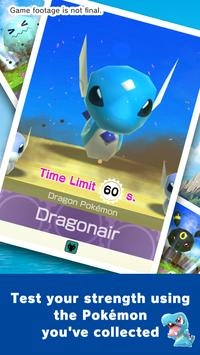
• Test your strength using the Pokémon you've collected
Occasionally, you can earn rewards by working your way through the Super Boss Rush. You'll need many different types of strong Pokémon to win each Super Boss Rush. Harness the power of the Pokémon you've collected from various islands and seas to defeat the powerful Super Bosses.
• Devices compatible with Pokémon Rumble Rush
Pokémon Rumble Rush is compatible with the following environments:
Android 4.4 or higher, Snapdragon 410 or higher
Please be aware though that Pokémon Rumble Rush may not function on some devices.