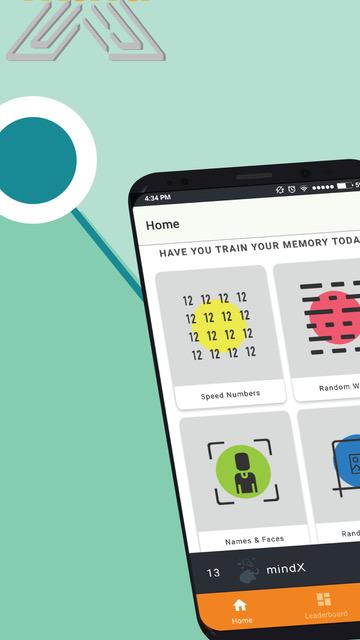
MindX - Memory Games is a Educational application developed by PT. Indonesia Intelektual Akademi, but with the best Android emulator-LDPlayer, you can download and play MindX - Memory Games on your computer.
Running MindX - Memory Games on your computer allows you to browse clearly on a large screen, and controlling the application with a mouse and keyboard is much faster than using touchscreen, all while never having to worry about device battery issues.
With multi-instance and synchronization features, you can even run multiple applications and accounts on your PC.
And file sharing makes sharing images, videos, and files incredibly easy.
Download MindX - Memory Games and run it on your PC. Enjoy the large screen and high-definition quality on your PC!
Learning has never been so much fun!Ever wonder how the World Memory Athletes are able to memorize hundreds of random numbers, pictures, even names and faces in just a matter of minutes? MindX offers a chance for you to play all the competition events of the World Memory Championship and train to become a world-class memory athlete yourselves. Start your brain training today!
MindX is a training program to improve your brain capacity, anywhere, anytime, at your fingertips. Our games are based on the real events of the World Memory Championship where athletes from all over the world competes in who can memorize information as much as they can in a short amount of time. MindX offers fun and engaging games to challenge and train your memory to give your mind a much needed workout. The games included in MindX are quick and simple, but still require your immense focus to help keep your mind active.
FEATURES:
BRAIN EXERCISES
Train your memory from the events competed in the World Memory Championship, including:
- Random Numbers
- Names and faces
- Random Words
- Random Images
MindX is made for all ages who wants to improve their brain capacity. No matter what your current level of memory, you can improve it drastically with the right training.
TRACK YOUR SCORES
- Track your scores and achieve that highscores!
- Analysis of your gameplay that helps you understand your training
- Compete with your friends and see who is the better memory athlete!
MADE FOR YOU
Are you new to the events competed in the championship? Fear not, our game are designed so that you can customize the settings of each event to suit your training. Start small, and when you’re already get the hang of it, do not hesitate to crank those numbers up and you are one step closer to becoming the next World Memory Champion.
This memory boosting app is for all ages. You can even compete with your friends and hit the highest score.
Are you ready for the challenge? Get your neurons ready and play!