

Nonogram 2024 is a Board application developed by Small Games Ltd, but with the best Android emulator-LDPlayer, you can download and play Nonogram 2024 on your computer.
Running Nonogram 2024 on your computer allows you to browse clearly on a large screen, and controlling the application with a mouse and keyboard is much faster than using touchscreen, all while never having to worry about device battery issues.
With multi-instance and synchronization features, you can even run multiple applications and accounts on your PC.
And file sharing makes sharing images, videos, and files incredibly easy.
Download Nonogram 2024 and run it on your PC. Enjoy the large screen and high-definition quality on your PC!
Nonogram is a popular and addictive Jigsaw Number Puzzle Game on Google Play. You can paint to challenge logic cross number puzzles on both Android phone and tablet! Nonogram is a classic number crossword puzzle game for beginners and advanced jigsaw players. It’s a good time killer and it helps you think, makes you more logical and have better memory. Play and enjoy Nonogram now!Nonogram, also known as Jigsaw Puzzle, Number Crossword Puzzle, Picture Cross Puzzle, Paint by Number, Griddlers, Pixel Puzzle, Picross Logic Puzzle and so on. Solving logic puzzles can uncover mysterious pixel pictures. Paint to collect pictures on various themes to enrich the gallery. No matter where you are, Nonogram is always available for entertainment and time passing!
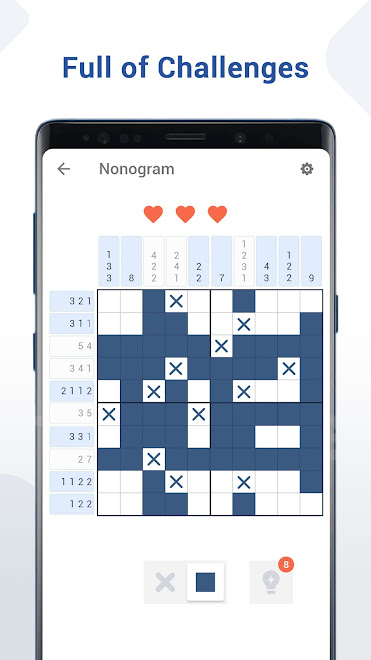
Challenge and enjoy the classic jigsaw game with hidden pictures! Nonogram is suitable for almost everyone. You just need to follow the basic rules and number logic to uncover the coloring pictures. The numbers above or to the left of the grid are clues to the nonogram puzzles which means how many squares to color in each row or each column. Mark the uncolored square with X is also feasible.
To solve nonogram puzzle, you need to follow these rules:
✓ Numbers above the board are clues to the column
✓ Numbers to the left of the board are clues to the row
✓ Tap the bottom button can switch between fill and X
✓ Each number represents the number of consecutive squares
✓ If there is more than one number, there must be at least one blank square between each adjoining consecutive squares
Why choose us:
✓ Various massive themed picross puzzle packages to complete.
✓ Classic picture cross number puzzles and excellent pixel color picture.
✓ Different grid size and nonogram number puzzle levels from small to giant. Choose the Griddlers level that is suitable for you.
✓ Complete logic number puzzles to unlock more pixel pictures.
✓ Download this nonogram picture game and start your picture cross adventure!
✓ 1000+ new nonogram color pictures every month.
✓ The simple and clear novice guidance process teaches you the rules of nonogram.
Nonogram (also known as Griddlers, Picture Cross Puzzle, Paint by Number, Jigsaw Puzzle, Pixel Puzzle, Picross Logic Puzzle, Picross, Nonogram Color, Picture game) which comes from Japanese puzzle is a picture cross number puzzle. Nonogram’s Japanese name includes ‘お絵かきロジック’, ‘イラストロジック’, ‘ノノグラム’ and ‘ピクチャークロス’. Our nonogram picture cross number puzzle has intuitive interface, easy control and well balanced difficulty levels. If you like to solve classic logic number puzzle and picture games such as sudoku, killer sudoku, katana, pixel puzzle, minesweeper, kakuro, pixel art, blockudoku, picture cross, griddlers, nonogram color and other logic number puzzles, you will love our Nonogram puzzles!
This is the Nonogram app for Nonogram lovers. If you like to play Nomogram games, you can download this Nonogram color app. We offer 4 difficulty levels.Enjoy nonogram number puzzles and train your brain now!
Play the BEST Nonogram Game of 2024! Download FOR FREE!!