
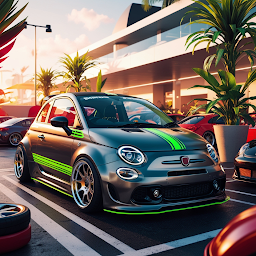


ParkMaster: Ultimate Challenge is a Simulation application developed by Defne Games, but with the best Android emulator-LDPlayer, you can download and play ParkMaster: Ultimate Challenge on your computer.
Running ParkMaster: Ultimate Challenge on your computer allows you to browse clearly on a large screen, and controlling the application with a mouse and keyboard is much faster than using touchscreen, all while never having to worry about device battery issues.
With multi-instance and synchronization features, you can even run multiple applications and accounts on your PC.
And file sharing makes sharing images, videos, and files incredibly easy.
Download ParkMaster: Ultimate Challenge and run it on your PC. Enjoy the large screen and high-definition quality on your PC!
Embark on an exhilarating journey to test your parking skills like never before! With 490 meticulously designed levels and 5 unique vehicles to choose from, our game offers an unparalleled parking experience. Each level brings a fresh challenge, featuring increasingly complex scenarios that will push your precision and control to the limit.Unleash Your Inner Parking Pro
Whether you’re navigating tight corners, avoiding unexpected obstacles, or maneuvering through intricate layouts, this game ensures every level is a test of skill and patience. Each stage is crafted to provide a perfect blend of excitement and strategy, making every parking attempt feel rewarding.
Experience Realism at Its Best
Get ready to immerse yourself in the most realistic parking simulation yet! With stunning graphics and true-to-life vehicle physics, you’ll feel like you’re handling an actual car. From the subtle nuances of steering to the realistic weight and speed dynamics, every detail is designed to enhance your gameplay experience.
Choose Your Ride
Pick from 5 distinct vehicle types, each with unique handling and performance characteristics. Whether you prefer the agility of a compact car or the power of a larger vehicle, you’ll find the perfect match for your parking style. Mastering each vehicle adds a new layer of depth and replayability to the game.
Conquer 490 Levels of Parking Perfection
With a staggering 490 levels of increasingly challenging scenarios, this game guarantees hours of engaging gameplay. From beginner-friendly stages to expert-level obstacles, every level is a step towards becoming a true parking master. Can you conquer them all?
Features You’ll Love:
Ultra-realistic graphics that bring every detail to life.
True-to-life vehicle physics for an authentic driving experience.
Challenging and diverse parking scenarios to keep you hooked.
Five unique vehicles to master, each with its own driving dynamics.
Smooth and intuitive controls, making it easy to pick up but hard to master.
Why You’ll Keep Coming Back
This game isn’t just about parking; it’s about the thrill of overcoming challenges, the joy of mastering complex maneuvers, and the satisfaction of achieving perfection. With levels designed to test every aspect of your skills, you’ll find yourself coming back for more as you strive to complete each level with precision.
So, are you ready to take on the ultimate parking challenge? Download now and prove your skills!







