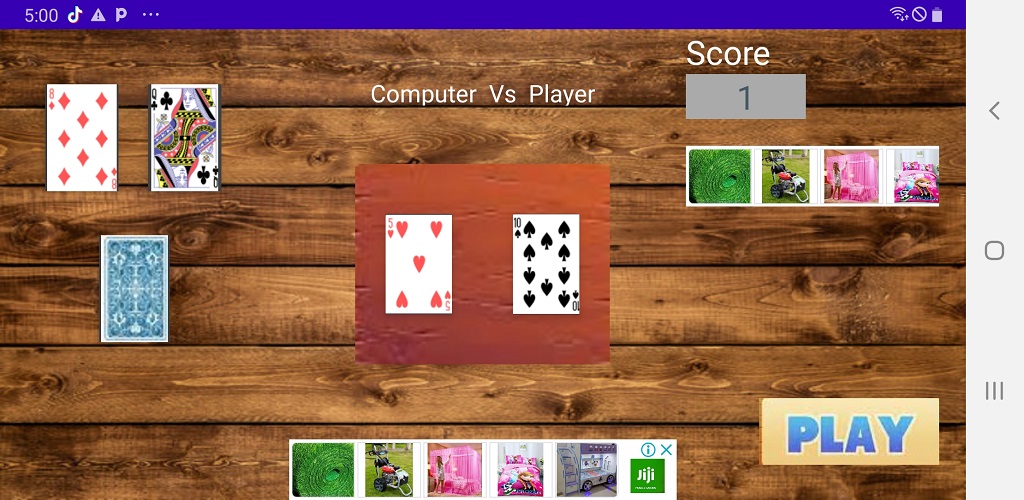
Payee is a Card application developed by Ssenyonga Emma, but with the best Android emulator-LDPlayer, you can download and play Payee on your computer.
Running Payee on your computer allows you to browse clearly on a large screen, and controlling the application with a mouse and keyboard is much faster than using touchscreen, all while never having to worry about device battery issues.
With multi-instance and synchronization features, you can even run multiple applications and accounts on your PC.
And file sharing makes sharing images, videos, and files incredibly easy.
Download Payee and run it on your PC. Enjoy the large screen and high-definition quality on your PC!
Welcome to Payee Master Card Game! Dive into an innovative gameplay experience that tests your memory and strategy skills like never before. Match cards from the top left with the changing center cards to earn points and outwit your computer opponent. Will you rise to the challenge and claim victory?Title: Payee Card Game - Test Your Memory and Strategy!
Features:
🃏 Innovative Gameplay: Engage in a unique card game experience that combines memory and strategy. Match the top left cards with the changing center cards to score points and outsmart your opponent.
🎮 Player vs. Computer: Face off against a cunning computer opponent in a battle of wits. Will you be the one to claim victory and prove your mastery?
🔀 Dynamic Card Changes: Watch as the center cards change randomly, testing your reflexes and ability to spot matches quickly. Stay focused and seize the moment to earn points!
🏆 Score Battle: Compete to win points based on whether the matches occur on your side or the computer's side. Will you come out on top and show your skills to the world?
⚙️ Deck Customization: Unlock new card decks and backgrounds to tailor the game to your personal style. Show off your unique look as you conquer the game!
🎉 Challenging Levels: Progress through increasingly challenging levels that will push your memory and strategic thinking to the limit. Can you reach the pinnacle of Payee greatness?
How to Play:
1: Tap the deck to reveal top left cards.
2: Observe changing center cards for matches.
3: Tap matching cards to score points.
4: Earn points when matches align with your side.
5: Outsmart the computer opponent and conquer the leaderboard!
Download Payee Card Game now and prove your memory and strategy skills. Are you ready to take the challenge and become the ultimate Payee Match Master?