Point Salad Scorekeeper is a Strategy game developed by Nathan Sokalski, and LDPlayer is the best platform for playing Point Salad Scorekeeper on Windows PC, offering powerful features for an immersive experience.
When playing Point Salad Scorekeeper on your computer, you can enjoy long game sessions using the operation recording feature to record repetitive operations to complete the same tasks automatically. It allows you to level up faster and makes resource grinding much more efficient.
In addition, if you want to execute combo moves or the game requires repeated skill actions, the macro feature is your best helper. It enables you to complete kills with just one click!
If you want to manage multiple accounts, LDMultiplayer and Synchronizer will assist you. You can run multiple alternative accounts at the same time to assist the leveling of your main account. Download and play Point Salad Scorekeeper on PC with LDPlayer now!
Point Salad Scorekeeper allows you to calculate your score at the end of a game of the card game Point Salad. Goal cards are entered by taking a picture with your phone's camera & entering the number of Vegetable cards using a slider. The Goal cards can be manually edited after taking a picture, and the number of Vegetable cards is specified manually using a slider for each Vegetable type.How do I get the best pictures?
The picture taken with your camera is only for the Goal cards, so it is not necessary to include the Vegetable cards when taking the picture. When taking the picture, it is best to (when possible) avoid glare. I have found that holding your phone parallel to the table can help in doing this.
What if the app does not correctly identify all my Goal cards?
Depending on your cards, lighting conditions, camera, etc., you will often have 1 or 2 cards that are missing or incorrectly identified. Although you can try as many times as you want, attempting to perfectly identifying every single card with the camera every time will be hard and frustrating. Don't worry, you can manually edit the results in several ways.
How do I edit the results from the camera?
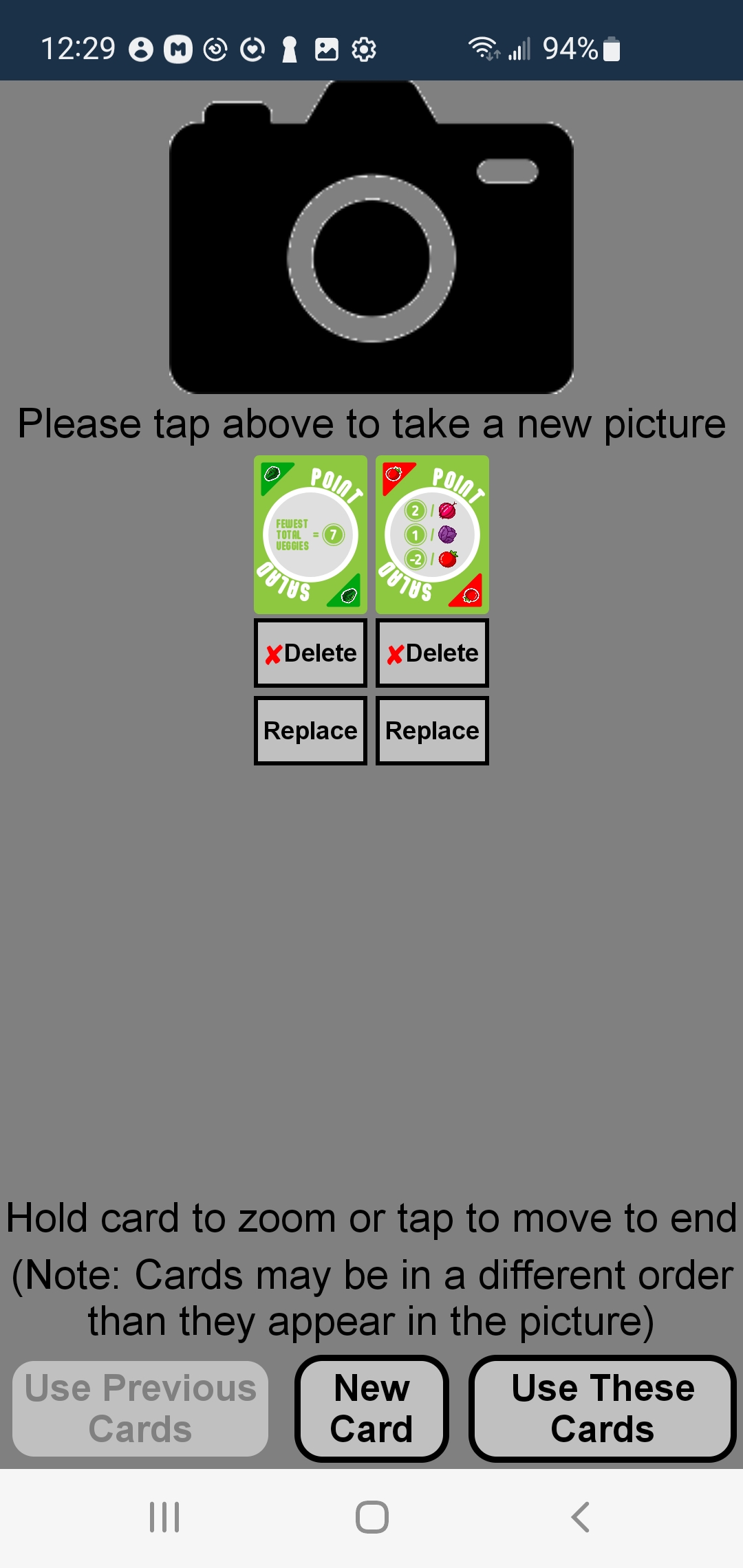
You will notice 2 buttons below each card (Delete & Replace). The Delete button will remove that card from the list (you can always readd it again later). The Replace button will display a list of similar cards (for example, the Most Carrots card to replace the Fewest Carrots card). If you need to add a card that is completely missing from the results or is not listed on the page displayed by the Replace button, you can click the New Card button at the bottom of the screen. This will display a screen with different categories of cards. Click one of these categories to display cards of that type, and click the one you want to add. While editing the results, you can (if desired) move a card to the end of the list by tapping it (this can sometimes make it easier to compare your cards to the ones found by the camera). You can also hold a card to see a zoomed in version (the hold to zoom feature is also available on all other screens that display cards).
How do I calculate my score?
After confirming that you have the correct Goal cards, click the Use These Cards button. You can specify the number of each Vegetable card by using the sliders at the bottom of the screen (if the slider is a 0 and does not seem to work, touch slightly to the right to start sliding). Cards that are based on other player's Vegetable cards (the Most & Fewest cards) can be tapped to mark them as Achieved or Failed. Scores for both individual cards & the total are dynamically updated when you slide the sliders and/or tap the Most & Fewest type cards. To take a new picture or edit your current cards (or calculate the score for another player), you can tap the Edit Cards Or Picture button.
Confirming & editing the cards from the camera may sound tedious, but once you have done it a couple times, you will become much faster at it, and being able to see your score on screen can help avoid the human errors we all make when trying to do math & keep score in our heads. Both me & my friends have found this significantly shortens the amount of time required & simplifies the scorekeeping process, and I hope it can do the same for you. Enjoy!