RDR2: Companion is a Action game developed by Rockstar Games, and LDPlayer is the best platform for playing RDR2: Companion on PC, offering powerful features to immerse you in the game.
When playing RDR2: Companion on computer, you can adjust frame rate settings for smooth gameplay and stunning visuals.
LDPlayer also provides pre-configured keyboard mapping for convenient control of the entire game. Continuous optimization of keyboard mapping enhances key sensitivity and skill accuracy. Additionally, LDPlayer offers special buttons like shoot, hide mouse, and continuous key press for an enhanced gaming experience.
If you prefer using a gamepad, the automatic gamepad detection allows you to customize controls with just a few clicks, enabling you to freely maneuver your hero. Start downloading and playing RDR2: Companion on your computer now!
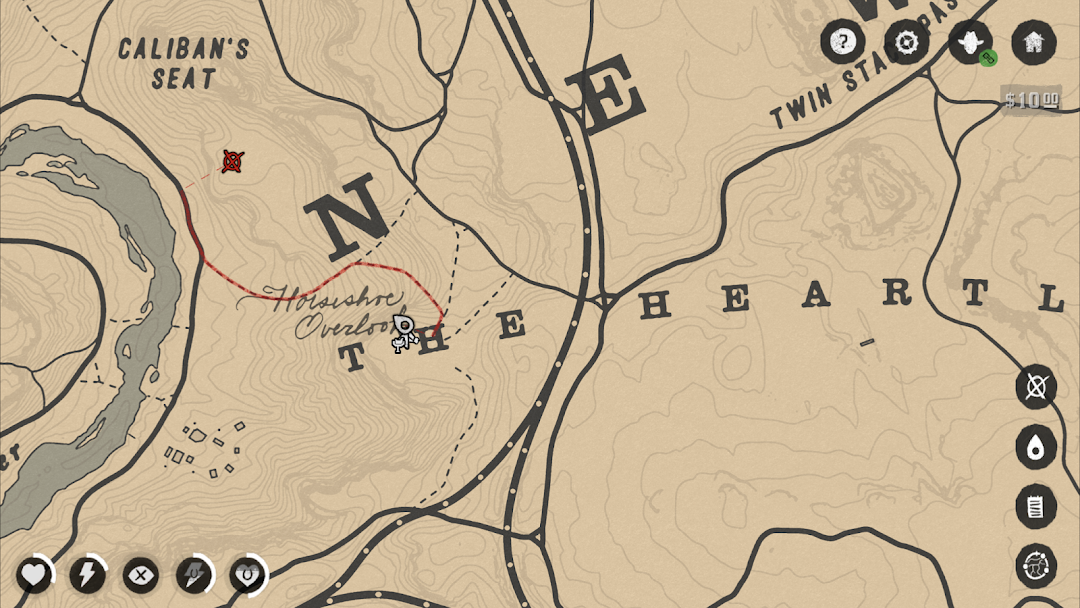
The Red Dead Redemption 2 Companion connects directly with your PlayStation®4 and Xbox One® as you play to deliver a real-time interactive map with pan and zoom functions, helping your exploration and discovery throughout the expansive open-world. The Companion also delivers your in-game Journal, the full game manual, an optional comprehensive strategy guide and more.REAL-TIME MAP TRACKING
Track your position, set waypoints, find the nearest General Store, hide from the law, hunt your enemies and more with a full screen, real-time view of the in-game map connected directly to your game experience. Use pan and zoom functions to explore, easily spot Gang Members, Wanted Areas, and key locations. As you progress you’ll unlock important points of interest to easily locate Gunsmiths, Hotels, Camp, Saloons, Post Offices, Fences, Doctors, Tailors, Stables, and much more.
Get a more immersive gameplay experience by turning off additional elements from your main gameplay screen such as the mini-map, player attributes and cash balance, and having them displayed exclusively in-app.
JOURNAL
Arthur Morgan keeps a detailed journal of his experiences. When connected to the game you’ll be able to examine these entries and illustrations firsthand as new pages appear in the Journal.
THE COMPLETE OFFICIAL DIGITAL GUIDE
Your essential compendium for the deepest and most detailed Rockstar world yet, the Red Dead Redemption 2 Complete Official Guide by Piggyback® is packed with information about every aspect of Rockstar Games’ epic tale of outlaw life in America's unforgiving heartland. This digital version, unlocked via a onetime in-app purchase, contains every page of the physical Standard Edition guide in beautiful high resolution along with interactive menus to make finding information quick and easy.
GAME MANUAL
The official manual for Red Dead Redemption 2 detailing general game controls and everything from player attributes to combat, fishing, hunting, horse bonding, activities and more.
TRACK YOUR STATS & MORE
When connected to your Rockstar Games Social Club account you can also gain quick access to an online interactive visualization of your current progress towards 100% completion of the Story, the web version of the Wheeler and Rawson in-game catalog and important Red Dead Redemption 2 news and announcements.
Rockstar Games, Inc. ©2005-18. Rockstar Games, Red Dead Redemption, and R* are marks/logos/copyrights of Take-Two Interactive. All other marks and trademarks are properties of their respective owners. All rights reserved.
Piggyback® is a registered trademark of Piggyback Interactive Limited. PIGGYBACK.COM and the Piggyback logo are registered trademarks of Piggyback Interactive Limited.
Use of software subject to license at rockstargames.com/eula; online account terms at www.rockstargames.com/socialclub. Violation of EULA, Code of Conduct, or other policies may result in restriction or termination of access to game or online account. For customer& technical support visit www.rockstargames.com/support.
Non-transferable access to special features such as exclusive, unlockable, downloadable or online content, services, or functions may require single-use serial code, additional fee and/or online account registration (13+). Access to special features may require internet connection, may not be available to all users, and may, upon 30 days notice, be terminated, modified, or offered under different terms. For information about online services, fees, restrictions, or additional terms that may apply to this game, please visit www.rockstargames.com.
Unauthorized copying, reverse engineering, transmission, public performance, rental, pay for play, or circumvention of copy protection is strictly prohibited.