
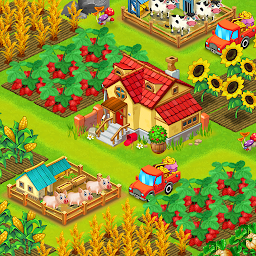


Royal Farm is a Role Playing game developed by vipvipvip, and LDPlayer is the best platform for playing Royal Farm on Windows PC, offering powerful features for an immersive experience.
When playing Royal Farm on PC, as a new player looking to start with a fresh account, the multi-instance and sync features are extremely useful for rerolls. You can use them to run multiple instances and begin the synchronization process. Bind your account until you draw the desired heroes.
In addition, operation recorder is great for games that require you to level up and complete tasks! Run the sync and record your actions, then repeat the main instance's actions in real-time. By doing so, you can run 2 or more accounts simultaneously. You can always get the heroes you want before others by faster rerolls and more efficient summoning! Start downloading and playing Royal Farm on your computer now!
Harvest Farm is farming game where you can build a farm that everyone will envy. Plant, harvest, and trade goods to help your dream farm thrive!A happy yet smooth farm life is watiting you in a classic farming simulation game.
Enjoy a peaceful and happy farm life in the beginning of new season. Let’s starting breading and cropping, make money , more and more money from your land. The atmosphere of the harvest day always bring back childhood memories which sleep deep inside every one’ heart
There are many plants and live stocks for you to increase your production. Let’s expand cropping and breeding area, buy more factories inorder to increase producing. Open business to the world outside for more money and get rich. You can decoreate your farm as your will, to stage your style.
*******Key feature :
+ 12 plants and crops and more:rice, corn, pumkin, carrot, tomato, berry, wheat, chilli , brocoly
+ 7 long term plants and more: peace, srtawberry, apple, mango, cherry,….
+ Factories includes: regular house, composting house, humus compostion house, bread oven, regular oven….
+ 6 type of live stocks and more: chiken, pig, cow, duck, sheep, buffalo,
+ 14 decorating items and more
+ Level up will expand the farm
+ Upgrade your factories
+ The Orders and tasks system
+ Daily quests
+ producable products include: dry leafs, fertilizer, thin cut bread, sweet bread, eggwhas bread, butter, pizza, sausage, grill buffalo steak, birthday cakes, strawberry cake, cream cake, seed package, egg, duck egg, pork, beef, sheep fur, buffalo steak,…
+ Daily gift box.










